Rollo

Tag: UPS

  • Tap Into UPS Discounts with Rollo Ship (A Guide)

    Tap Into UPS Discounts with Rollo Ship (A Guide)

    Looking to save big on your shipping costs? With Rollo Ship, accessing incredible UPS® discounts is easier than ever. Whether you’re sending packages across town or internationally, Rollo Ship offers up to 85% off on UPS services. That means reliable deliveries, fast shipping options, and significant savings—all in one streamlined platform.

    Ready to unlock savings? Let’s dive in and explore how you can tap into these UPS discounts with Rollo Ship.

    What is Rollo Ship?

    Rollo Ship is a cutting-edge shipping platform designed to help individuals and businesses save time and money on their shipping needs. By providing access to premium discounts and deals on UPS services, Rollo Ship makes it easier than ever to reduce your shipping costs. Whether you’re a small business owner or an individual looking to send packages more affordably, Rollo Ship offers a valuable resource to help you save. With Rollo Ship, you can enjoy big savings on a wide range of UPS services, ensuring that your shipping operations are both cost-effective and efficient.

    Why Choose UPS Discounts with Rollo Ship?

    When it comes to shipping, saving money and delivering on time is key to business success. With Rollo Ship, accessing incredible UPS discounts and competitive shipping rates is simple and hassle-free. Here’s why choosing Rollo Ship for your UPS shipping needs is a smart move:
    UPS Discounts available in Rollo Ship, no minimum shipping volume required

    1. No Minimum Shipping Volume Required

    Unlike other platforms, Rollo Ship offers UPS discounts without requiring a minimum shipping volume. Whether you’re sending a single package or managing high-volume orders, you get the same great rates.

    💡 Why This Matters:

    Better Cash Flow – Lower your costs on each shipment, freeing up resources for other aspects of your business.

    Flexibility for Any Business Size – Enjoy discounted rates for both large and small shipments, including UPS Ground packages and expedited services.

    Save Consistently – No need to worry about shipping quotas or losing discounts during slower periods.


    Example: If you’re shipping non-urgent ground packages, choose UPS® Ground and get up to 81% off—perfect for reducing your expenses without sacrificing reliability.


    2. Seamless Integration with Top E-Commerce Marketplaces

    Managing shipments from multiple sales channels can be time-consuming. Rollo Ship solves this problem by integrating seamlessly with major e-commerce platforms like Amazon, eBay, Shopify, and now TikTok Shop. Now, you can handle all your shipping services in one place, saving time and avoiding errors.

    💡 Why This Matters:

    Wide Range of Shipping Options – Choose from standard UPS Ground packages, faster options like UPS Next Day Air® Early, or budget-friendly choices like UPS Next Day Air Saver®.

    Centralized Order Management – Sync orders from all your online stores and manage everything from a single dashboard.

    No Manual Data Entry – Automatically import order details, including recipient information and package weights.

    Example: Selling products across Shopify and Amazon? With Rollo Ship, you can import your orders, compare rates for various UPS services, and choose the best fit based on speed and cost. Whether it’s day air early for urgent deliveries or day air saver for end-of-day drop-offs, Rollo Ship has you covered.


    3. Guaranteed Delivery with Trusted UPS Services

    Trust is crucial when shipping products to your customers. With Rollo Ship, you have access to a variety of UPS shipping services, including UPS® Ground, Next Day Air® Early, and international options like UPS Worldwide Express Plus®. These services offer guaranteed delivery times, ensuring your packages arrive as expected.

    💡 Why This Matters:

    On-Time Guarantee – With services like Next Day Air® Early, you can ensure delivery as early as 8 AM the next business day, boosting customer satisfaction.

    Reliable Shipping for Any Need – Choose from UPS Ground for cost-effective domestic deliveries or expedited services for time-sensitive packages.

    Additional Transit Time Information – Easily access additional transit time estimates for each shipping service, allowing you to set realistic delivery expectations.

    Example: For urgent shipments, select UPS Next Day Air® Early to guarantee morning delivery. If you need a more economical solution, UPS Ground Saver is perfect for non-urgent ground packages, offering substantial savings while maintaining reliable service.
    UPS discount and UPS guaranteed delivery

    Rollo Ship simplifies your entire shipping process, providing access to significant UPS discounts, easy integration with your favorite platforms, and reliable delivery services for all your needs. Start saving on UPS Ground packages, expedited services like day air saver, and everything in between.

    Access UPS Discounts Instantly


    How Rollo Ship Works

    Rollo Ship simplifies the process of finding the best UPS shipping deals, making it easy for users to save on every shipment. To get started, simply log in to the Rollo Ship platform for free and enter your package details. The registration and use of Rollo Ship is entirely free of charge. You’ll receive instant quotes and can compare prices across various UPS services to find the best deal. You’ll only pay for the UPS discount shipping service you choose. Rollo Ship also offers a suite of tools and resources designed to help you optimize your shipping operations. From rate comparisons to smart label printing, Rollo Ship provides everything you need to streamline your shipping process and maximize your savings.

    How to Access UPS Discounts on Rollo Ship
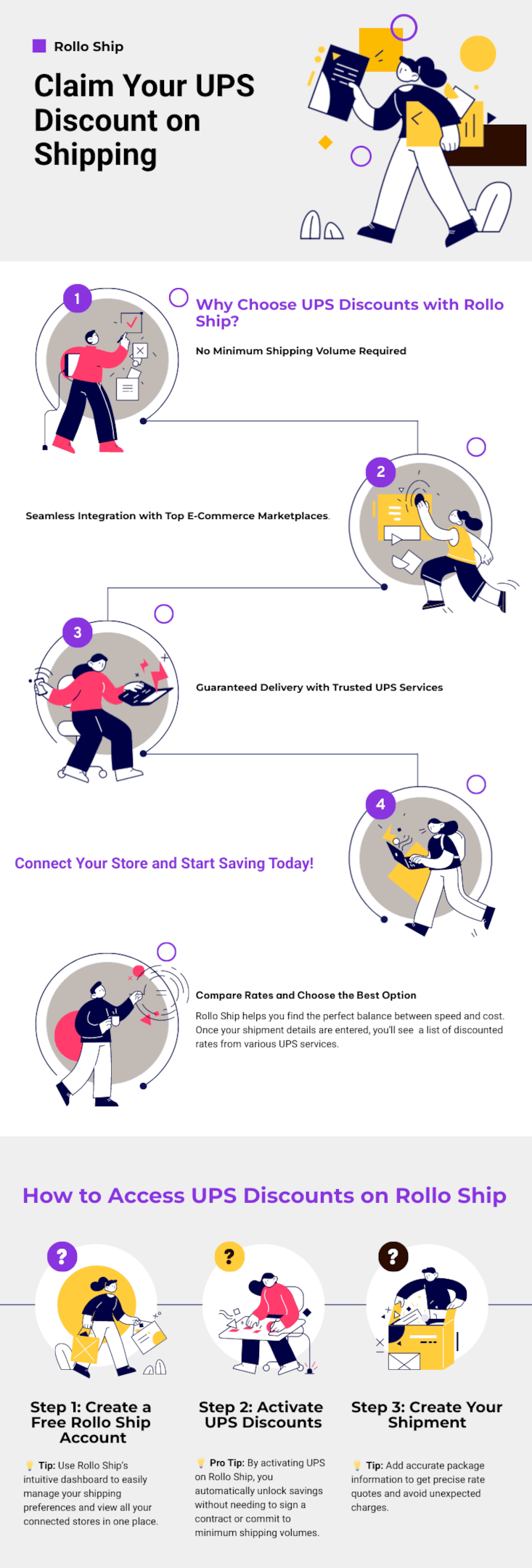
    Why choose Rollo Ship for UPS discounts

    Rollo Ship is designed to make accessing UPS discounts quick, easy, and efficient. In just a few simple steps, you can start saving on all your shipments, whether you’re sending out a single package or handling high-volume business orders through various shipping carriers. Here’s a step-by-step guide to get you started:

    Step 1: Create a Free Rollo Ship Account

    Head over to the Rollo Ship website and sign up with just your email address. The process is fast, and it’s completely free. Once your account is set up, you gain instant access to powerful shipping tools and discounted rates on UPS services.

    💡 Tip: Use Rollo Ship’s intuitive dashboard to easily manage your shipping preferences and view all your connected stores in one place.

    Step 2: Activate UPS Discounts

    After creating your account, it’s time to activate the UPS discounts. Navigate to Connections > Shipping Carriers > United Parcel Service, and click the “ACTIVATE UPS” button. This step enables you to access discounted rates on a wide variety of UPS services, from UPS® Ground to Next Day Air® Early.

    💡 Pro Tip: By activating UPS on Rollo Ship, you automatically unlock savings without needing to sign a contract or commit to minimum shipping volumes.

    Step 3: Create Your Shipment

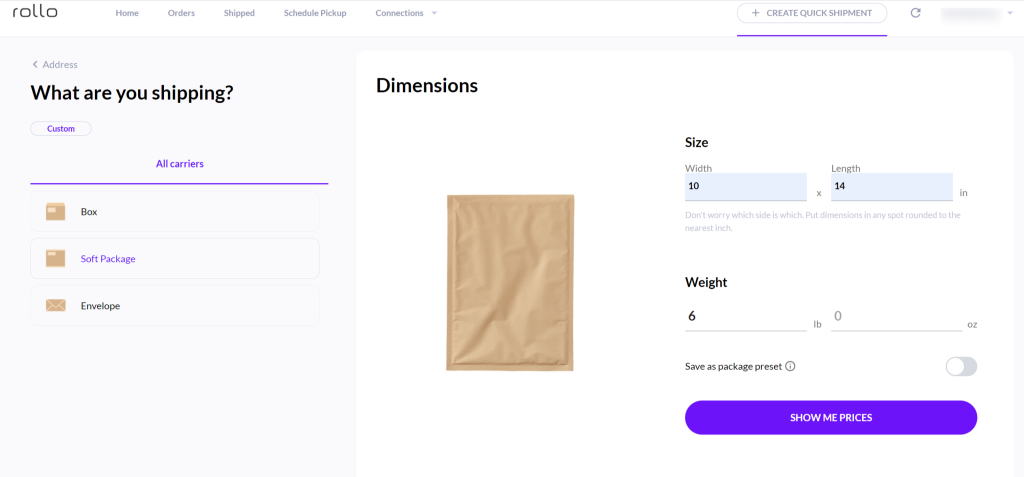
    Ready to send a package? Enter the shipment details, including the origin, destination, and package weight. Rollo Ship makes it simple to handle both domestic and international shipments, providing clear options for selecting the best UPS service based on your needs.

    💡 Tip: Add accurate package information to get precise rate quotes and avoid unexpected charges.

    Step 4: Compare Rates and Choose the Best Option

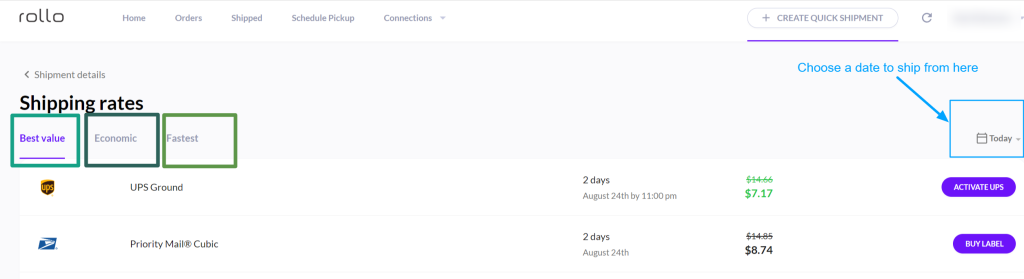
    Rollo Ship helps you find the perfect balance between speed and cost. Once your shipment details are entered, you’ll see a list of rate quotes and discounted rates from various UPS services. Choose from options like:

    UPS® Ground Saver for the most economical choice when additional transit time is acceptable.

    UPS® Ground for affordable, reliable delivery within 1-5 business days.

    UPS Next Day Air® Early for guaranteed morning delivery, ideal for urgent packages.

    Create UPS shipments in Rollo Ship

    Step 5: Print Labels Directly from the App

    With your service selected, it’s time to print your UPS shipping labels. Rollo Ship is compatible with any device, including smartphones and tablets, making it easy to print labels directly from the app using your Rollo printer.

    💡 Pro Tip: Use the Smart Label Printing feature for automatic label size detection, eliminating the need for manual adjustments.

    Print Your UPS Labels Instantly

    From Any Device: Desktop, iOS, or Android

    Overview of UPS Services with Discounted Rates on Rollo Ship

    Rollo Ship gives you access to a comprehensive list of UPS shipping services with various delivery options, each designed to cater to specific delivery needs, whether domestic or international. From urgent overnight deliveries to cost-effective ground options, there’s a service for every type of shipment. Below is a detailed overview of the available UPS services on Rollo Ship, including delivery times, discount rates, and ideal use cases.
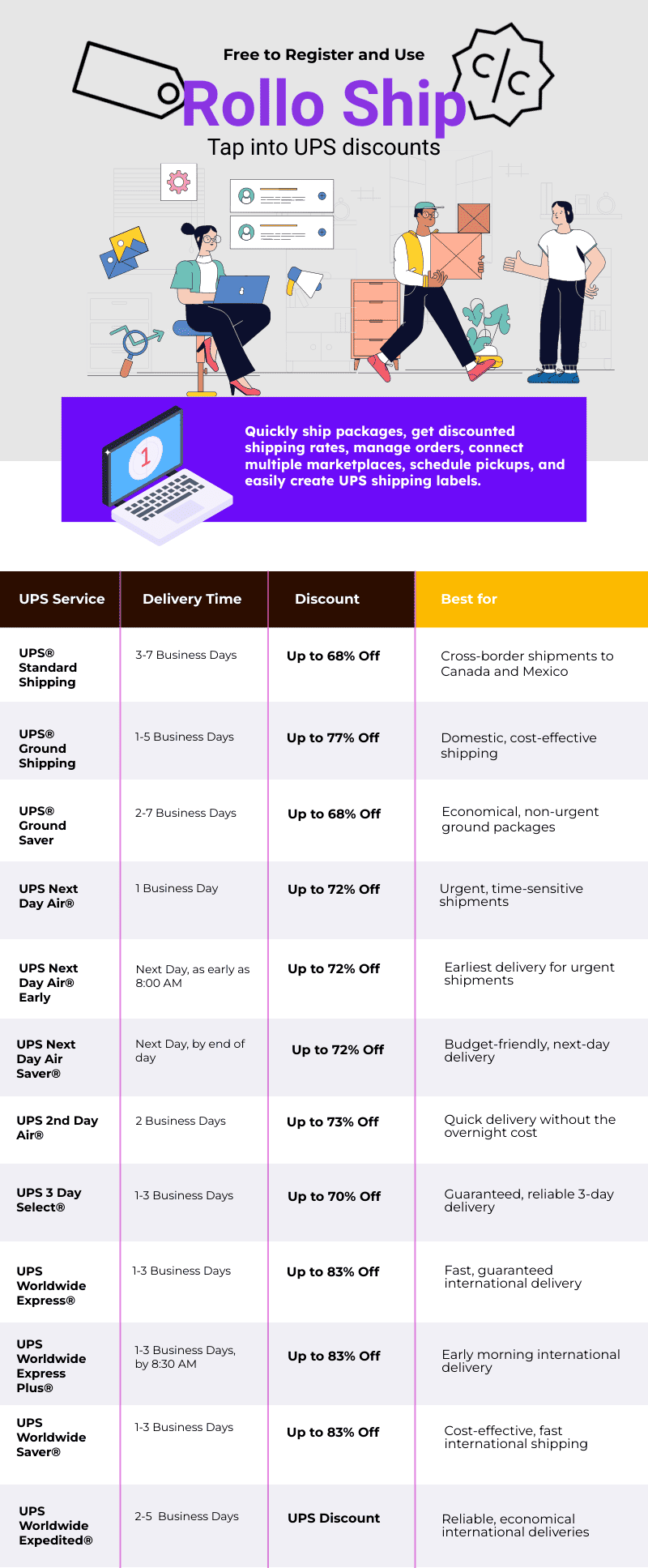
    UPS discounts available in Rollo Ship

    Note: Discounts are based on UPS daily rates and are available for shipments originating from the U.S. only. Rates and applicable discounts are subject to change without notice.

    For the most accurate and up-to-date information on delivery times and services, please refer to the official UPS website.

    More on the UPS Shipping Services

    UPS® Standard Shipping

    • Delivery Time: 3-7 Business Days
    • Overview: Ideal for cross-border shipments to Canada and Mexico, offering reliable delivery without the high cost of express services.
    • Best For: Businesses shipping non-urgent items internationally within North America.

    UPS® Ground Shipping

    • Delivery Time: 1-5 Business Days
    • Overview: A cost-effective, reliable option for domestic shipping services. With up to 81% off, it’s perfect for businesses looking to save on ground deliveries without compromising on service.
    • Best For: Domestic shipments where speed is not the top priority.

    Example: Use UPS® Ground for shipping bulk orders or heavy items across the country at a lower cost.

    UPS® Ground Saver

    • Delivery Time: 2-7 Business Days
    • Overview: This is an economical ground shipping service designed for non-urgent deliveries. While it may take slightly longer, the savings can be substantial.
    • Best For: Small businesses looking to cut shipping costs on less time-sensitive packages.

    Tip: Choose UPS® Ground Saver for promotional items or non-urgent product shipments.

    UPS Next Day Air®

    • Delivery Time: 1 Business Day
    • Overview: Guarantees next-day delivery, making it perfect for time-sensitive shipments. Get up to 75% off on Rollo Ship.
    • Best For: Urgent packages that need to reach the recipient the very next day.

    UPS Next Day Air® Early

    • Delivery Time: Next Business Day, as early as 8 AM
    • Overview: The fastest domestic service, providing morning delivery for critical packages.
    • Best For: Time-critical documents and high-priority items that must arrive first thing in the morning.

    Example: Use Next Day Air® Early for legal documents, medical supplies, or time-sensitive contracts.

    UPS Next Day Air Saver®

    • Delivery Time: Next Business Day, by the end of the day
    • Overview: Offers next-day delivery at a lower cost than standard Next Day Air®. Ideal for packages that don’t need to arrive first thing in the morning.
    • Best For: Businesses seeking a balance between speed and cost.

    Tip: Choose Next Day Air Saver® for non-urgent, high-value packages.

    UPS 2nd Day Air®

    • Delivery Time: 2 Business Days
    • Overview: Delivers within two business days, offering significant savings over overnight options. Get up to 75% off with Rollo Ship.
    • Best For: When you need a faster alternative to ground shipping but don’t require overnight service.

    UPS 3 Day Select®

    • Delivery Time: 1-3 Business Days
    • Overview: Provides reliable delivery within three business days, perfect for mid-range delivery times.
    • Best For: Businesses that want guaranteed delivery without the high costs of expedited services.

    Example: Use 3 Day Select® for retail shipments or inventory replenishment.

    UPS Worldwide Express®

    • Delivery Time: 1-3 Business Days
    • Overview: Guarantees international delivery within 1-3 business days, with options for early delivery.
    • Best For: Urgent international packages that require fast transit times.

    Tip: Opt for Worldwide Express® when shipping to key global markets.

    UPS Worldwide Express Plus®

    • Delivery Time: 1-3 Business Days, by 8:30 AM
    • Overview: Offers early morning delivery for international shipments, ensuring your package arrives before business hours.
    • Best For: High-value, time-critical international shipments.

    UPS Worldwide Saver®

    • Delivery Time: 1-3 Business Days
    • Overview: A cost-effective option for fast international delivery. Perfect for businesses needing a balance between speed and cost.
    • Best For: E-commerce sellers shipping products internationally.

    UPS Worldwide Expedited®

    • Delivery Time: 2-5 Business Days
    • Overview: Offers reliable international shipping at a lower cost, with delivery typically within 2-5 business days.
    • Best For: Non-urgent international shipments where cost savings are important.

    Benefits of Using UPS Paperless™ Invoice with Rollo Ship

    When shipping internationally, paperwork can slow you down. The UPS Paperless™ Invoice feature on Rollo Ship streamlines the process, helping you save time and reduce errors.

    • No More Printed Invoices – Go digital and avoid the hassle of printing multiple copies.
    • Faster Customs Clearance – Electronic submissions speed up the customs process, ensuring your packages reach their destination quickly.
    • Minimize Mistakes – Eliminate manual data entry and reduce the risk of documentation errors.

    Go Paperless with Rollo Ship – Save Time and Money!

    How Rollo Ship Helps You Save with UPS Shipping Discounts

    Rollo Ship not only gives you access to discounted rates but also maximizes your savings with smart, efficient features:

    1. Instant Rate Comparison – Instantly compare available rates for every shipment, highlighting the best deal based on your preferences.
    2. Smart Label Printing – Compatible with any device, including AirPrint, making it easy to print labels from your phone, tablet, or computer.
    3. Order Management – Sync all your orders from platforms like Amazon, Shopify, and eBay into one centralized location for efficient processing.

    Tips for Maximizing Your UPS Discounts with Rollo Ship

    • Bundle Shipments – Group multiple packages together when possible to save even more.
    • Select the Right Service – For fast delivery, choose UPS Next Day Air® Early. For more cost-effective options, try UPS® Ground Saver.
    • Leverage Analytics – Use Rollo Ship’s insights to track your shipping patterns and adjust your strategy based on data trends.

    Optimize Your Shipping Strategy with Rollo Ship!

    Sign Up and Use for Free, Claim Your UPS Discount


    Common UPS Shipping Mistakes to Avoid

    When shipping with UPS, avoiding common mistakes can save you both time and money. Here are a few pitfalls to watch out for:

    • Not Comparing Rates: Failing to compare UPS rates can lead to overpaying for shipping services. Use Rollo Ship to find the best deals and save up to 81% on UPS Ground shipments.
    • Using Incorrect Packaging: Using the wrong packaging can result in damaged goods and additional costs. Ensure you use sturdy packaging materials and follow UPS guidelines to protect your shipments.
    • Not Tracking Packages: Failing to track packages can result in lost or delayed shipments. Use Rollo Ship to track your packages and stay up-to-date on delivery status, ensuring your shipments arrive on time.

    By avoiding these common mistakes, you can enhance your shipping efficiency and save significantly on your UPS services.

    Troubleshooting and Support

    If you encounter any issues with your UPS shipping, Rollo Ship is here to help. Our dedicated support team is available to assist with any questions or concerns you may have. Simply log in to your Rollo Ship account and contact us through our support portal. We are committed to resolving any issues quickly and efficiently, so you can continue shipping with confidence. Whether you need help with rate comparisons, label printing, or tracking your packages, Rollo Ship’s support team is ready to provide the assistance you need.

    *Discounts off UPS daily rates. Rates are limited to shipping from the U.S. only. Rates and any applicable discounts are subject to change at any time without notice.**UPS®, the UPS® brandmark, and the color brown are trademarks of United Parcel Service of America, Inc. Used with permission. © 2020-2025 United Parcel Service of America, Inc. All rights reserved.


    Follow Rollo on:

    Frequently Asked Questions About UPS Discounts

    📌 Q: Which UPS services does Rollo Ship offer discounts on?

    💭 A: Rollo Ship has negotiated big UPS discounted rates on the below UPS services:
    On Domestic UPS Shipping: UPS® Ground, UPS® Ground Saver, UPS Next Day Air® Early, UPS Next Day Air®, UPS Next Day Air Saver®, UPS 2nd Day Air®, and UPS 3 Day Select®.

    On International UPS Shipping: UPS® Standard, UPS Worldwide Express®, UPS Worldwide Expedited®, UPS Worldwide Express Plus®, and UPS Worldwide Saver®.


    📌 Q: Can I Use UPS discounts if I don’t have a UPS account?

    💭 A: Absolutely. All it takes is to join Rollo Ship for free and activate UPS as a carrier. Once you create a shipment, you will be able to see all UPS discounts relevant to your type of package and shipment.


    📌 Q: How much does it cost to use Rollo Ship?

    💭 A: Rollo Ship is free to register and use. The platform is available for Desktop, iOS, and Android. The app is also free to download.
    Discounts off UPS daily rates. Rates are limited to shipping from the U.S. only. Rates and any applicable discounts are subject to change at any time without notice. UPS®, the UPS® brandmark, and the color brown are trademarks of United Parcel Service of America, Inc. Used with permission.
  • The Power of UPS® Label Printers and UPS Shipping Tools

    The Power of UPS® Label Printers and UPS Shipping Tools

    In the bustling realm of e-commerce, the speed and reliability of your shipping operations directly influence customer satisfaction and business growth. Central to optimizing these operations is the choice of a UPS Label Printer. Here’s where Rollo emerges as the unparalleled solution that adheres to UPS’ stringent standards for shipping labels.

    The Essentials of UPS® Label Printers

    Why Do You Need a UPS Label Printer?

    There are several reasons why a person or business might need a label printer for creating UPS shipping labels:

    Why Do You Need a UPS Label Printer?
    1. High Volume Shipping: For businesses that ship a large volume of packages, having a dedicated label printer can save a lot of time and streamline the shipping process.
    2. Efficiency: A dedicated label printer is faster and more efficient than using a standard printer, as it doesn’t require loading label sheets into a printer tray, reducing the risk of jams or misprints.
    3. Cost-Effectiveness: Over time, using a dedicated label printer can be more cost-effective than using a standard inkjet or laser printer, especially in terms of ink or toner costs and the cost of label sheets.
    4. Quality and Durability: Labels printed from a dedicated label printer are often more durable and of higher quality, which is important for ensuring that shipping information remains legible during transit.
    5. Convenience: Printing directly onto adhesive labels is more convenient and time-saving, eliminating the need for taping or gluing labels onto packages.
    6. Professional Appearance: Packages with printed labels look more professional, which can be important for businesses wanting to make a good impression on customers.
    7. Integration with Shipping Software: Many label printers can integrate directly with UPS’s shipping software or other shipping platforms, allowing for seamless printing of labels without having to manually enter data or adjust settings.
    8. Space-saving: Dedicated label printers are often more compact and can save valuable workspace compared to using a standard printer for the same task.
    9. Mobility: Some label printers are portable, allowing for label printing at various locations within a facility or even in field operations, which can be crucial for logistics and shipping operations that are not confined to a single space.
    10. Customization: Label printers often offer more options for customizing label size, format, and content, allowing businesses to add branding or specific instructions to their shipping labels.

    Having a UPS label printer is particularly beneficial for e-commerce businesses, logistics companies, and any organization that regularly ships goods, as it enhances efficiency, professionalism, and the overall shipping process.


    ⚠️ UPS Shipment Requirements

    UPS requires that UPS shipping labels are printed for all Domestic Air Shipments. Thus, if you are a business or a person shipping regularly within the USA, you will find yourself printing UPS shipping labels a lot.

    For domestic shipments via air services, it’s essential to utilize a UPS label generated from an automated shipping system (such as UPS.com or Rollo Ship App) or a UPS Air Shipping Document (ASD). The ASD consolidates your address label, tracking label, and shipping record into a single document. According to UPS, you can obtain specific ASDs for the following services:

    • UPS Next Day Air® Early
    • UPS Next Day Air® (also applicable for UPS Worldwide Express®)
    • UPS Next Day Air Saver®
    • UPS 2nd Day Air A.M.®
    • UPS 2nd Day Air®

    What Makes a UPS Label Printer Indispensable?

    In times when online shopping is the norm, the efficiency of getting orders out the door can set your store apart. Not only for online business owners but for the average shipper. This is where the Rollo Label Printer shines as an indispensable asset.

    Rollo Label Printer Features and Advantages

    Opting for a Rollo Label Printer, especially the Rollo Wireless UPS Label Printer, brings a suite of benefits to your shipping process:

    • This device champions direct thermal printing technology. This means eliminating the need for ink or tone. The pro for you as a business – reducing operational costs and increasing reliability.
    • Rollo’s UPS label printer’s compatibility with both Mac and Windows, without the hassle of installing drivers, streamlines the setup process, making it a straightforward choice for businesses of all sizes.
    Choose The Right UPS Label Printer for Your Needs

    Choosing the Right UPS Label Printer

    Navigating Through UPS Label Printer Options

    With a myriad of UPS label printers available, Rollo distinguishes itself by not just being a printer but a comprehensive shipping solution. Its wireless model, in particular, stands out as the best UPS thermal printer for Mac and Windows users alike. To make sure you choose the right one, avoid these common UPS printer buying mistakes. The lack of a driver requirement means you can get your shipping station operational in no time, focusing on what matters most—growing your business.

    Rollo Label Printer Setup and Integration

    The beauty of the Rollo Label Printer lies in its seamless integration into your shipping workflow. Whether you’re a small online boutique or a burgeoning e-commerce platform, the Rollo Wireless Label Printer’s setup is a breeze. Its intelligent label detection and high-resolution printing capabilities ensure that every label meets UPS’s precise specifications, guaranteeing smooth deliveries and satisfied customers.

    Valuable Options for Different Needs

    Rollo’s adaptability extends beyond operating systems. Whether you need the mobility provided by a wireless connection or the specific compatibility with Mac or Windows systems, the Rollo Label Printer is designed to cater to your unique business needs. Its efficiency and flexibility make it an unparalleled choice for modern online stores.


    Enhancing Your Shipping with Rollo Label Printers

    Rollo’s innovative approach to label printing extends beyond mere hardware. The company’s solutions are a testament to its understanding of the e-commerce landscape, offering tools that simplify and optimize the shipping process from start to finish.

    Features That Set Rollo Apart

    Rollo Label Printers, particularly the wireless model, are designed with the user in mind. They offer:

    • Direct thermal printing technology: This means you’ll never need to buy ink or toner again. It’s not just cost-effective; it’s also hassle-free.
    • High-speed printing: Capable of printing one label per second, Rollo printers ensure that even the largest order batches are processed quickly.
    • Wide compatibility: Whether you’re using a Mac, Windows, or even mobile devices like iPhones and Androids, Rollo printers seamlessly integrate with your preferred platform without the need for additional drivers.
    • Intelligent label detection: Rollo printers automatically detect and analyze the size and type of label being used, adjusting settings to ensure each label is printed perfectly.
    • Versatility: Capable of handling a wide range of label sizes, Rollo printers are suited for everything from shipping labels to ID badges, making them a versatile addition to any business.

    Get a Piece of Mind with Cutting-Edge Performance

    Order a UPS Label Printer from Rollo

    Seamless E-commerce Integration

    UPS Label Printing Software

    UPS Label Printing Software

    Integrating UPS WorldShip® with Rollo Printers

    In the expansive world of e-commerce, aligning your shipping process with both UPS WorldShip® and UPS label printers no matter their brand can significantly streamline operations. It also ensures your packages are dispatched swiftly and accurately. Here’s a distilled guide to seamlessly integrating UPS WorldShip® software with Rollo’s cutting-edge UPS label printers.

    Whether you’re setting up WorldShip for a Rollo USB UPS label printer or capitalizing on the driver-free convenience of a Rollo Wireless UPS label printer, this guide ensures a smooth installation process.

    UPS WorldShip® For Rollo USB Label Printer:

    🎬 🐾 Step 1 ➡️ UPS Label Printer Preparation

    • Ensure the Rollo USB UPS label printer is connected to power and your PC. (For Rollo Wireless, ensure you are connected to power and Wi-Fi. And you have done the printers’ initial installations.)
    • For Rollo USB, visit this installation guide.
    • For Rollo Wireless, refer to this video:


    • Load the labels into the printer.

    🐾 Step 2 ➡️ Access WorldShip’s Printing Setup: Open UPS WorldShip®, navigate to the Tools tab, select System Preferences, and then click Printing Setup.

    🐾 Step 3 ➡️ Adding the Rollo Printer: In the System Preferences Editor, under Printing Setup, enter a printer ID and select Label as the printer type. Then, click Add.

    🐾 Step 4 ➡️ Selecting Printer Type: In the Printer Selection window, click Add Printer. For Rollo, choose the “Other” option as the printer type.

    🐾 Step 5 ➡️ Installing the Printer: Follow the on-screen prompts to install your Rollo printer. If using a Rollo USB printer, select the appropriate communication port, usually USB001.

    🐾 Step 6 ➡️ Finalize Setup: After installation, verify the printer settings, ensuring the correct label stock dimensions and printer name are selected. Apply the changes.

    🏁 🐾 Step 7 ➡️ Print a Test Label: To ensure everything is set up correctly, print a test label from the Printing Setup tab in WorldShip.

    UPS WorldShip® For Rollo Wireless UPS Label Printer:

    The beauty of the Rollo Wireless UPS Label Printer lies in its driver-free operation for both Mac and Windows users. Since UPS WorldShip® requires direct communication with printers, those opting for a wireless setup should ensure their network settings allow for seamless interaction with WorldShip software. Although specific driver installation isn’t necessary for the wireless model, ensuring your computer and printer are on the same network is crucial for smooth operation.

    ✅ 💭 Integration Tips:

    • Customizing Label Settings: After setting up your printer, take a moment to customize your label settings in WorldShip to match the specific requirements of your Rollo printer. This ensures optimal clarity and formatting for your shipping labels.
    • Troubleshooting: If you encounter issues during the setup, UPS provides a Support Utility to help identify and resolve printer communication problems, ensuring a smooth integration process.

    By following these steps, Rollo users can efficiently integrate their UPS label printers with UPS WorldShip®. Alternatively, you can enjoy the hassle-free, no installation required shipping integration from Rollo – available for Desktop, and as a mobile app totally for free.

    UPS Shipping Discounts via Rollo Ship App

    Rollo Ship App – A Comprehensive Shipping Solution

    The Rollo Ship App is the companion piece to the Rollo UPS label printers, offering a suite of features that make shipping simpler and more cost-effective. With the app, users can:

    • Automatically import orders from various e-commerce platforms.
    • Access discounted shipping rates, thanks to Rollo’s negotiations with major carriers like UPS.
    • Print UPS shipping labels directly from their mobile device or desktop, without the need for a traditional printer setup.
    • Schedule pickups and track shipments with ease, providing a complete shipping solution that saves time and money.


    Looking for UPS Shipping Discounts?
    Enjoy Big Savings on the Go!

    Use the Rollo Ship App on your Desktop or your mobile,

    print UPS shipping labels easily

    Shipping Via UPS Website

    Another Alternative to UPS WorldShip® and Rollo Ship:

    Create a Shipping Label via UPS.com either with a profile or as a guest:

    • 🎬 🐾 Step 1 ➡️ Visit UPS.com > Top Left Menu > Shipping > Create Shipment.
    • 🐾 Step 2 ➡️ Input all the required information in the Shipping Form, such as the sender’s name, address, phone, and email along with the recipient’s name and address. Choose if you wish to receive status updates for this shipment.
    • 🐾 Step 3 ➡️ Fill in the details about the package you’re sending and pick the service options that align with your shipping requirements.
    • 🏁 🐾 Step 4 ➡️ Select how you’d like to pay and proceed to print the UPS shipping label.

    Maximizing Efficiency and Savings

    Cost-Effective Shipping with UPS Label Printers

    The question of cost is always at the forefront for online businesses, and Rollo’s solutions are designed with this in mind. By utilizing a UPS label printer like Rollo, businesses can enjoy:

    • 💰 Significant savings on shipping costs, thanks to Rollo’s efficient thermal printing technology and access to discounted rates.
    • 💰 Reduced overhead by eliminating the need for ink, toner, and maintenance associated with traditional printers.
    • 💰 Increased productivity, as Rollo printers and the Rollo Ship App streamline the entire shipping process, allowing businesses to focus on growth and customer satisfaction.

    Continuing from the discussion on the efficiency and cost savings offered by Rollo’s innovative shipping solutions, we’ll now explore real-world applications and the significant advantages that Rollo label printers bring to online stores, followed by addressing some of the most common queries through an FAQ section.

    *Discounts off UPS daily rates. Rates are limited to shipping from the U.S. only. Rates and any applicable discounts are subject to change at any time without notice. UPS®, the UPS® brandmark, and the color brown are trademarks of United Parcel Service of America, Inc. Used with permission. © 2020-2025 United Parcel Service of America, Inc. All rights reserved.
    Follow Rollo on:

    Frequently Asked Questions about UPS and Rollo’s UPS Label Printers:

    📌 Q: Does UPS provide label printers?

    💭 A: While UPS does not directly provide label printers, they recommend using high-quality thermal printers for printing their shipping labels. Rollo’s label printers exceed UPS’s requirements, ensuring compatibility and efficiency.


    📌 Q: How do I get a free UPS label printer?


    💭 A: Though obtaining a “free” UPS label printer might not be straightforward, investing in a Rollo printer is a cost-effective decision. The savings on ink, toner, and time, coupled with discounted shipping rates through the Rollo Ship App, ensure that the printer pays for itself over time.


    📌 Q: How do I print labels from UPS?

    💭 A: Printing UPS labels with a Rollo printer is a breeze. Once your shipment details are entered into UPS’s online platform or an integrated e-commerce site, simply select your Rollo printer and print. The label will come out crisp, clear, and ready to adhere to your package.


    📌 Q: Can I create my own UPS shipping label?

    💭 A: Yes, you can create your own UPS shipping label using UPS’s online services or through e-commerce platforms that integrate with UPS. Rollo printers can then print these labels, ensuring they meet UPS’s specifications.


    📌 Q: Is it more affordable to use a shipping label printer?


    💭 A: Absolutely. Using a shipping label printer like Rollo saves money in the long run. The initial investment is quickly offset by the savings on ink, toner, and maintenance costs associated with traditional printers. Additionally, the Rollo Ship App offers access to discounted shipping rates, further enhancing savings.
  • UPS® Shipping Labels: How to Print at Home

    UPS® Shipping Labels: How to Print at Home

    In today’s fast-paced world, where timely deliveries are more crucial than ever, UPS shipping labels have become indispensable tools in the shipping and delivery process. For small business owners who are constantly managing a flurry of orders, and for individuals eager to send packages to their loved ones, the ability to create and print UPS shipping labels from home is a game-changer.

    It simplifies what used to be a complex process, making it manageable right from your living room. This guide will walk you through the steps to handle UPS shipping labels efficiently, ensuring your packages are ready for their journey quickly and correctly.

    Understanding UPS® Shipping Labels

    What are UPS Shipping Labels?

    Think of UPS shipping labels as the lifeline for your packages. They’re not just ordinary pieces of paper; they carry the essential DNA of your shipment.

    Each label holds crucial information:

    • where your package is from (origin) = sender’s information: name, address, phone;
    • where it’s headed (destination) = recipient’s information: name, address, phone;
    • the specifics of the shipment = weight, type of UPS service chosen, and more;
    • a unique tracking code
    What are UPS Shipping Labels?

    This code is particularly important as it allows you to follow the package’s journey, ensuring it reaches its destination safely. These UPS labels serve as a critical bridge between you, the shipping service (UPS), and the recipient, making sure everyone is on the same page about where your package is and when it’s expected to arrive.

    By incorporating these steps and understanding the importance of a well-prepared UPS shipping label, you’re not just sending a package; you’re ensuring its safe and timely arrival. Whether you’re shipping a product to a customer or a gift to a family member, the accuracy and clarity of your UPS shipping labels can make all the difference.

    So, let’s delve into the process of creating and printing these labels at home, ensuring your shipments are handled with the utmost care and professionalism.

    The Significance of Shipping Labels in Logistics

    Shipping labels are the backbone of logistics, serving roles far beyond simple identifiers:

    • pivotal in tracking, allowing both senders and recipients to monitor shipments in real time;
    • streamline inventory management and inspection processes;
    • provide essential information on package contents, origins, and destinations.

    Major carriers like UPS understand the importance of efficient shipping labels and invest significantly in their development. This investment enhances the accuracy and organization of shipping processes, ensuring each package is tracked and managed meticulously.

    Creating Your UPS Shipping Labels on UPS.com

    How to create UPS shipping labels on UPS.com
    ⚠️ For those committed to using UPS.com directly: Keep the default settings on UPS.com and crop the label as outlined in this article.


    Ready to print your UPS shipping label at home? Make sure you have a standard printer and either regular printing paper or specialized label sheets. It’s vital to check that your printer has sufficient ink and is functioning properly to avoid any printing issues.

    While you’re exploring ways to print UPS shipping labels at home, don’t miss our comprehensive Money Saving eBay Shipping Label Guide. It’s packed with tips and tricks to help eBay sellers reduce their shipping costs effectively.

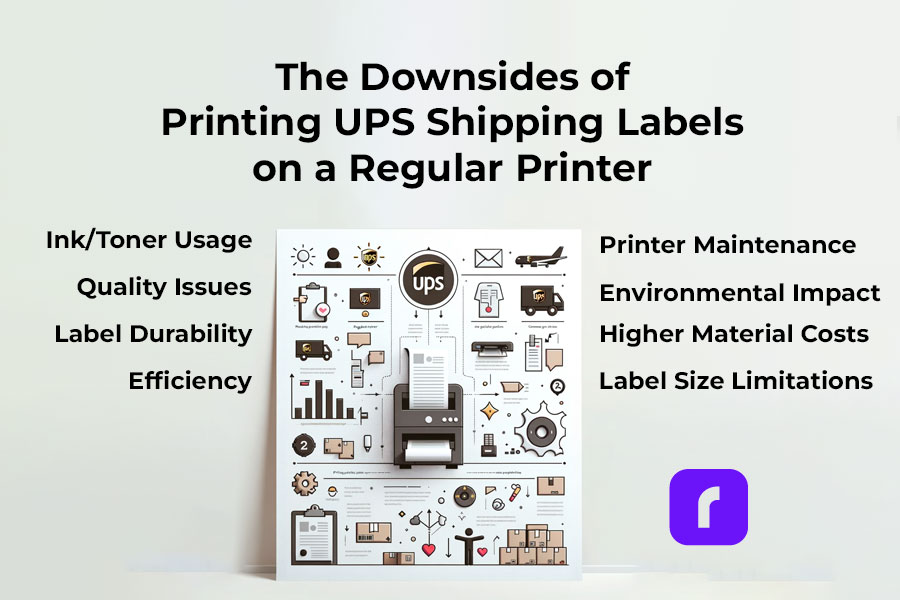
    Downsides of Printing UPS Shipping Labels on a Regular Printer

    ⚠️ Warning! Downsides of Printing UPS Shipping Labels from a Regular Printer

    • ✒️🖨️ Ink/Toner Usage: Regular printers use ink or toner, which can be costly over time, especially for high-volume shipping.
    • 🔎📝 Quality Issues: Inkjet and laser printers may not offer the same clarity and durability in labels as thermal printers, leading to smudging or fading.
    • 🏷️💧 Label Durability: Labels printed from regular printers are often less resistant to water and handling, which can result in damage during transit.
    • 🦥⏳ Efficiency: Printing labels on standard printers is generally slower, making it less efficient for those with frequent or bulk shipping needs.
    • 🏷️📐 Label Size Limitations: Regular printers may have restrictions on the size of labels they can print, potentially complicating the process for specific UPS label sizes.
    • ⬆️💰 Increased Material Costs: Using regular printers requires additional label sheets or sticker paper, which adds to the overall cost.
    • 🔧🖨️ Printer Maintenance: Regular printers used frequently for label printing may require more maintenance and are more prone to jams and other mechanical issues.
    • 🚫 🟢 Environmental Impact: Regular ink printers contribute more to waste and environmental impact compared to thermal printers, which don’t use ink cartridges.
    ⚠️ Keep in mind that you may need to visit a UPS store to print your UPS shipping labels if you don't have a printer or face technical difficulties.

    PRO TIP: 
    For a smoother printing experience, consider using a dedicated shipping label printer compatible with UPS labels. Shipping label printers like the Rollo Wireless Label Printer offer quick, easy, and high-quality printing, ensuring your labels are clear and professional. With the right printer, you can streamline your shipping process, making it more efficient and reliable.

    Ready to elevate your shipping game?
    Opt for a specialized shipping label printer today and experience hassle-free label printing for your UPS shipments!

    Claim UPS shipping discounts

    and

    Print 200 Shipping Labels for Free

    Printing UPS Shipping Labels at Home with a Shipping Label Printer

    ⬇️ Sign Up for Rollo Ship for Free – App or Desktop

    No monthly subscriptions, no download fee, no registration fee.
    You can choose either the mobile app for iOS and Android or the desktop version.


    ➡️ Log Into Rollo Ship


    ➡️ Select or Create a Shipment

    If you have connected stores (like Shopify, Amazon, etc.), simply select an order to print a shipping label. The details for your shipments will be automatically imported. 
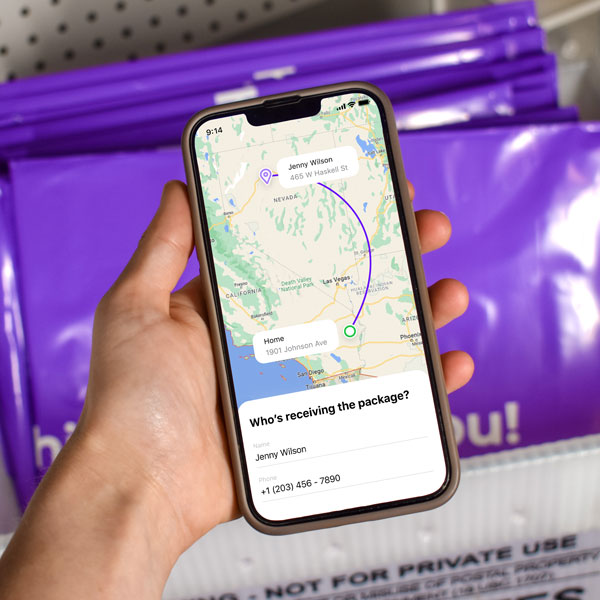
    If you don’t have connected marketplaces, click on ‘Create Shipment’ on your home screen and input the sender and recipient’s shipping details.


    ➡️ Verify Order and Input Package Details

    Double-check the recipient’s address and shipping requirements.
    Enter the package dimensions and type.


    ➡️ Choose the UPS Service you need at a cheaper shipping rate.

    Click “Calculate Shipping Rates” to view different delivery options.
    Select the UPS service that suits your needs.
    With Rollo Ship, you benefit from negotiated UPS shipping discounts.


    ➡️ Buy the Shipping Label or Leverage the 200 Free Labels from Rollo.

    The first 200 shipping labels are free, but shipping fees still apply.


    🔚 Print Label

    Ensure your device is linked to the Rollo shipping label thermal printer.
    The label will be formatted perfectly for printing.

    Print clear and durable UPS shipping labels

    Easy, Fast, Convenient, Clearly

    Incorporating the Rollo Ship App and the Rollo Wireless Printer into your shipping process not only simplifies the creation and printing of UPS shipping labels but also ensures accuracy and efficiency. Whether you’re a small business or an individual shipper, these tools provide a seamless, hassle-free shipping experience, giving you more time to focus on what matters most. Start using these innovative solutions today and transform the way you handle your shipping needs.

    Did you know?
    You can easily integrate your existing UPS account with Rollo Ship at no cost, or even set up a new one directly in the Rollo app?
    
    Rollo offers valuable shipping discounts with UPS®, designed to help both regular shippers and businesses reduce their shipping costs. Additionally, Rollo Ship users can conveniently schedule pickups and receive automated tracking updates for their shipments.

    UPS Shipping Label Costs and Validity

    Are UPS Shipping Labels Free?

    While creating a UPS shipping label is generally free, additional costs may apply for features like tracking and insurance. It’s important to factor in these costs when calculating your overall shipping expenses.

    UPS Shipping Label Validity and Expiration

    UPS shipping labels are typically valid for a specific period, often 90 days from the date of creation. It’s crucial to use the label within this validity period to ensure smooth processing of your shipment.

    Handling and Placing UPS Shipping Labels

    Correct Sizes and Placement of UPS Shipping Labels

    Standard UPS labels are typically 4×6 inches. Placement is key; the label should be affixed to the top surface of the package, avoiding any seams or edges where it might get torn or obscured.

    Attaching UPS Shipping Labels on Different Package Types

    Whether you’re using a box or an envelope, make sure the label is securely attached and fully visible. For special package types, consult UPS guidelines to ensure proper labeling.

    Advanced UPS Shipping Label Options

    How to Order, Edit, and Cancel UPS Shipping Labels

    Managing your labels is easy with UPS. You can order, modify, or even cancel your labels through the UPS website or app. This flexibility is particularly useful for businesses managing multiple shipments.

    Special Considerations for International Shipments

    For international shipments, additional details like customs information may be required. Ensure these are accurately filled out to avoid delays.

    Poly Mailer for Shipping

    Tips for Efficient Use of UPS Shipping Labels

    Best Practices for Preparing a UPS Box for Shipping

    Preparing your package for shipping with UPS is crucial for its safe and timely delivery. Here’s how Rollo’s shipping and packaging supplies can enhance this process:

    Select the Right Label:

    Rollo offers eco-friendly, FSC-certified, BPA-free thermal labels in various sizes and colors. For standard shipments, their 4×6 shipping labels in white, available in fanfold or roll, are perfect. They also provide colorful 2-inch circle labels and 2×1 barcode labels on a roll for specialized needs.

    Ensure Secure Packaging:

    Use Rollo’s no-noise heavy-duty shipping tape for a strong seal.

    For items needing extra protection, their bubble mailers and poly mailers come in various sizes. These mailers are extremely lightweight, durable, and water-resistant, and feature a strong peel-and-seal closure, ensuring your package stays secure and protected.

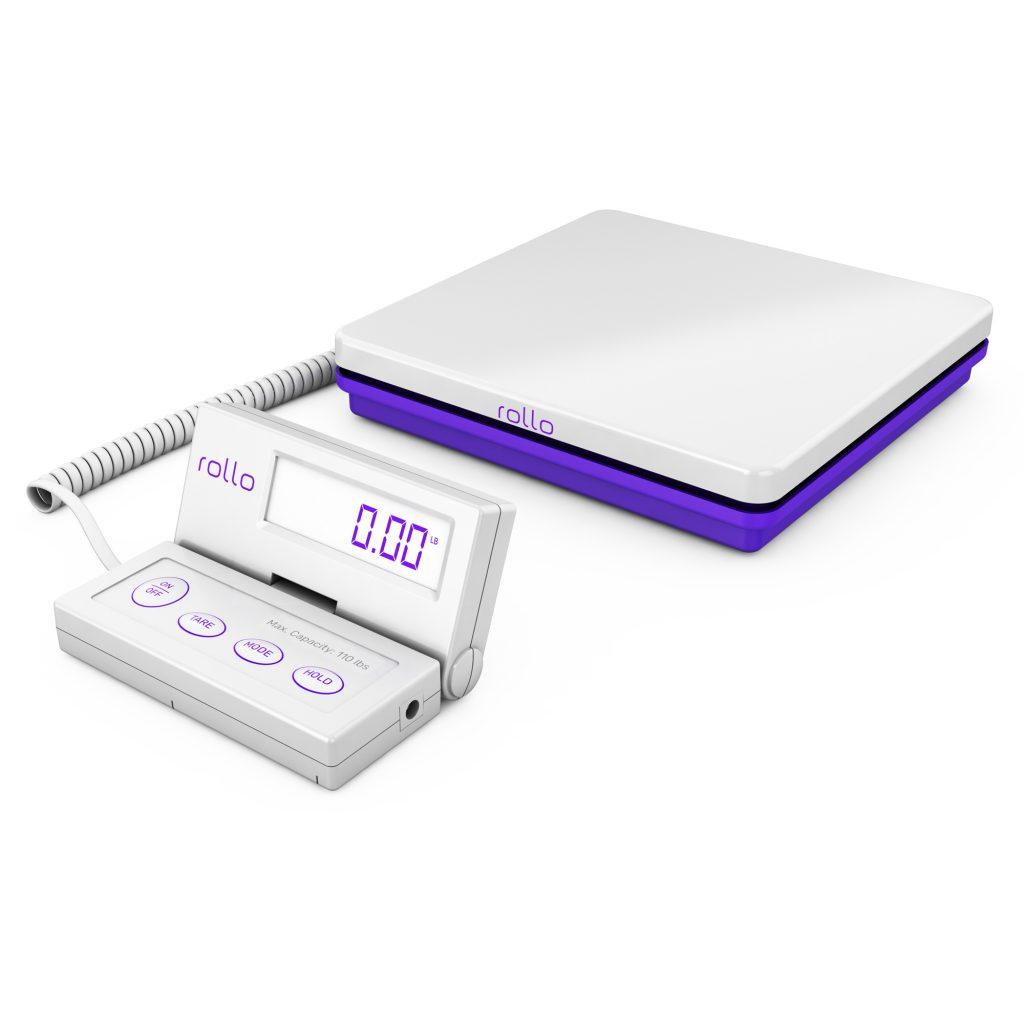
    Weigh Your Package Accurately: Rollo’s heavy-duty shipping scale with a separate reading panel makes it easy to get accurate weight measurements. It features smart functions like Tare (net weight), Hold (weight memory), and Auto Shut Off to save battery life. It’s accurate up to 0.07 ounces and can handle packages up to 110 lbs.

    UPS shipping with cheaper rates when using Rollo Ship app

    Utilizing UPS Shipping Labels for Business Efficiency

    Integrating label creation and printing into your shipping workflow can significantly enhance business efficiency. Rollo products are designed to streamline this process:

    • Use the Rollo Ship App: This app simplifies creating UPS shipping labels, allowing you to consolidate orders from various platforms and generate labels effortlessly. It’s user-friendly and ideal for businesses managing multiple shipments.
    • Print with the Rollo Wireless Label Printer: Combine the Rollo Ship App with the Rollo Wireless Label Printer for a complete labeling solution. This printer is compatible with various label sizes, including 4×6 inches, and uses direct thermal printing technology, which is fast and ink-free. It’s perfect for high-volume shipping needs.
    • Optimize Your Shipping Supplies: With Rollo’s range of packaging supplies, you can ensure that every package you send out is well-prepared. Their hybrid label holder is suitable for both fanfold and roll labels, making it versatile for different packaging needs.

    Final Words

    Printing UPS shipping labels at home makes managing your packages easy and effective. Whether you’re sending something across town or to the other side of the world, the right label is key. It’s a small step, but it makes a big difference in making sure your package gets where it’s going. So, each time you stick that label on, know that you’re on the right track to a successful delivery.

    Discounts off UPS daily rates. Rates are limited to shipping from the U.S. only. Rates and any applicable discounts are subject to change at any time without notice. UPS®, the UPS® brandmark, and the color brown are trademarks of United Parcel Service of America, Inc. Used with permission. © 2020-2025 United Parcel Service of America, Inc. All rights reserved.
    Follow Rollo on:

    FAQs

    📌 Q: What do UPS shipping labels require?

    💭 A: Accurate sender and recipient information, package details, and a tracking number.


    📌 Q: How long are UPS shipping labels good for?

    💭 A: Typically, they are valid for 90 days from the date of creation.


    📌 Q: Can I Handwrite a Shipping Label?


    💭 A: While handwritten labels are possible, printed labels are preferred for accuracy and readability. Handwritten labels must be clear and include all necessary information.


    📌 Q: Do I Need to Print My Own Shipping Label for UPS?


    💭 A: No, you don’t necessarily have to print your own UPS shipping label. If you’re unable to print at home, you can have it printed at a UPS store. For a more convenient solution, consider using the Rollo Ship App and Rollo Wireless Label Printer to create and print your labels easily at home.


    📌 Q: Where to Print a Shipping Label for Free?


    💭 A: While free label printing isn’t typically available, you can get labels printed at UPS stores for a fee. Alternatively, using the Rollo Wireless Label Printer at home can be a more cost-effective solution in the long run, allowing you to print labels anytime you need.
  • UPS® vs USPS for E-commerce: What You Need to Know

    UPS® vs USPS for E-commerce: What You Need to Know

    In e-commerce, choosing the right shipping carrier is crucial, and the UPS vs USPS decision is key. While other carriers like FedEx exist, our focus is on the UPS vs USPS debate, helping you choose the best fit for your business. We’ll compare USPS First-Class Mail’s agility to UPS Worldwide Express®’s global reach, along with its label requirements and tracking capabilities. Dive into the details of UPS vs USPS to unlock shipping success for your e-commerce venture.

    Key Points:

    • Learn about the foundations of both UPS® and USPS, their history, and the services they offer.
    • What are the big differences between UPS vs USPS when it comes to your e-commerce shipping strategy?
    • Discover how Rollo’s cutting-edge wireless thermal printers revolutionize label printing for both UPS and USPS.

    Unpacking USPS: A Comprehensive Overview

    Founded in 1775 with Benjamin Franklin as the first Postmaster General, the United States Postal Service (USPS) is a foundational element of American logistics. It has grown into a vast institution, reaching every part of the U.S. and globally. Serving both bustling cities and remote rural areas, USPS has adapted over time to meet technological and societal changes. Today, it offers various services, including the fast Priority Mail Express and cost-effective Media Mail, maintaining its role as a key player in national commerce and communication. Its extensive network ensures comprehensive coverage, making it a go-to for e-commerce businesses needing reliable, widespread shipping solutions.

    The UPS® Advantage: A Closer Look

    Founded in 1907 in Seattle by 19-year-old James E. Casey, United Parcel Service (UPS) evolved from a small messenger company into a global shipping and logistics leader. Now operating in over 220 countries, UPS caters to businesses of all sizes with its focus on efficiency and reliability. It offers a range of services, including ground, air freight, and international shipping, along with advanced tracking and dependable delivery, making it a pivotal player in the global logistics industry.

    UPS vs USPS at a glance
    FeaturesUPSUSPS
    Service Options🚛 UPS® Ground: Reliable and cost-effective for non-urgent shipments

    ✈️ UPS 2nd Day Air®: Guaranteed Delivery in 2 business days

    🌎 UPS Next Day Air®: Guaranteed next business day delivery.
    ✉️ Priority Mail: Fast delivery with flat-rate options

    📩 First Class Mail: Economical option for lightweight items

    📨 Priority Mail Express: Fastest service with guaranteed delivery dates
    Delivery Speed➕ Offers a range of delivery options from standard ground to expedited services

    🤞 Guaranteed delivery dates for express services
    Priority Mail and Priority Mail Express provide fast and reliable delivery service options

    ▶️ First Class Mail is generally faster than standard mail services
    Pricing💵 UPS® Ground: Starts from $8 (varies by distance and package size)

    💳 UPS 2nd Day Air®: Starts from $16 (based on weight and destination)

    💸 UPS Next Day Air®: Starts from $25 (depending on weight and destination)
    💵 Priority Mail: Starts at $7.95 (for flat-rate envelope, varies by weight and destination)

    💸 Priority Mail Express: Starts at $26.35 (for flat-rate envelope, varies by weight and destination)
    Kindly note these are subject to change by the carriers. For up-to-date starting rates, please, always double-check with the official carriers’ sites.

    What Services Does USPS Offer?

    The USPS logo – was designed by Raymond Loewy in 1970. Image credit to Raymond Loewy

    When it comes to shipping solutions, the USPS offers a diverse range of services to cater to a multitude of needs. From the swift dispatch of time-sensitive parcels to the cost-effective handling of lightweight packages, USPS has a comprehensive suite of options designed to accommodate your business, but is it the right fit for you?

    • First-Class Mail serves as the foundation of USPS services. It’s the go-to choice for sending letters, postcards, and small parcels in an efficient and cost-effective manner. 
    • For those seeking expedited delivery, Priority Mail steps up to the plate. This service is a step up from first-class mail and includes faster delivery times. In cases where overnight delivery is paramount, Priority Mail Express provides a guarantee, ensuring your package arrives at its destination with the utmost urgency.
    • When it comes to shipping media materials such as books and DVDs, Media Mail offers a budget-friendly option. 
    • Finally, for larger, non-urgent shipments, Parcel Select Ground strikes a balance between cost and speed, making it an attractive choice for businesses seeking economical shipping solutions.

    Additionally, USPS offers a fairly robust suite of business shipping solutions to accommodate businesses of all sizes, from online label printing to an online portal for shippers. With this diverse array of services, USPS stands as a versatile and reliable partner for e-commerce businesses looking to streamline their shipping processes.

    DID YOU KNOW?

    You can leverage USPS shipping discounts by signing up and using for free the Rollo Ship App.
    The USPS services covered with Rollo are:
    Ground Advantage
    Parcel Select Ground
    Priority Mail®
    Priority Mail® Cubic
    Priority Mail® Express
    Priority Mail® International
    Priority Mail® Express International
    First Class Mail
    First Class Package International

    UPS® Unveiled: A Palette of Services

    An older version of the UPS logo – designed by Paul Rand in 1961. Image credit to Design Facts

    UPS, a global shipping and logistics leader, offers a broad range of services for swift domestic and international deliveries, ensuring reliable and timely package delivery.

    • UPS® Ground: This service forms the backbone of UPS’s domestic offerings, providing a dependable ground service for shipping within the United States. It’s perfect for businesses looking to cut costs but maintain reliable timelines.
    • UPS 2nd Day Air®: When time is of the essence, UPS 2nd Day Air steps in. This service promises two business day delivery, so your packages arrive quickly and securely.
    • UPS Next Day Air®: For lightning-fast next-business-day delivery, UPS Next Day Air is the go-to choice. It’s a premium option for urgent shipments, providing the assurance of prompt arrival.
    • UPS Worldwide Express® Stepping onto the global stage, UPS Worldwide Express ensures swift international shipping with reliable delivery times. This service is tailored for businesses with a global reach, offering timely and efficient shipping solutions to over 220 countries and territories.
    • UPS Worldwide Expedited®: For businesses seeking cost-effective international shipping without compromising on reliability, UPS Worldwide Expedited is an attractive choice for e-commerce businesses scaling their business globally.

    Whether you run a small business or are aiming for an enterprise-scale logistics partner, UPS stands as a versatile and trusted partner for e-commerce, offering a logistics and shipping experience that will fit your business.

    DID YOU KNOW?

    Take advantage of UPS shipping discounts in Rollo Ship.
    The UPS services supported by Rollo Ship are:
    UPS® Ground
    UPS Standard®
    UPS 3 Day Select®
    UPS Next Day Air®
    UPS Next Day Air Saver®
    UPS 2nd Day Air®
    UPS Worldwide Saver®
    UPS Worldwide Express®
    UPS Worldwide Expedited®

    UPS vs USPS Pros and Cons

    Pros and Cons: UPS vs USPS

    When we look at UPS vs USPS for e-commerce shipping, it is important to look at the pros and cons of both shipping providers. With that said, it is important to note that your mileage may vary depending on the scope and scale of your business, so be sure to keep your needs in mind as you review the following.

    Pros of UPS

    Reliable and Swift Delivery: UPS is renowned for its reliability and fast delivery times, especially for time-sensitive shipments. This is crucial for businesses relying on getting products to customers quickly.

    Robust Tracking System: UPS offers a best-in-class tracking system that keeps both the customer and seller in the loop as the package travels. This level of visibility can be invaluable for businesses and their customers, ensuring everyone stays informed throughout the shipping process.

    Extensive International Shipping Options: For businesses with a global reach, UPS’s comprehensive international shipping services are a major advantage. These services are tailored to cater to the demands of businesses looking to expand their reach beyond domestic borders.

    Pros of USPS

    Cost-Efficiency: USPS shines when it comes to affordability, particularly for lightweight packages. If you are looking to optimize shipping costs at scale, it is a good choice.

    Extensive Network: With a presence in every nook and cranny of the United States, USPS boasts an extensive network. This widespread coverage ensures that even the most remote areas are within reach, making it an invaluable partner for businesses serving a diverse customer base.

    Flat-Rate Options: USPS offers fixed-rate shipping, which can really help with budgeting costs. This is especially beneficial for businesses looking to budget effectively and avoid unexpected surcharges.

    Cons of UPS

    Potentially Higher Costs: In certain cases, UPS services may come with a higher price tag compared to other carriers like USPS. This could be a consideration for businesses operating on tight budgets or those seeking the most cost-effective options.

    Limited Saturday Delivery Options: While UPS offers Saturday delivery in many areas, there are still select regions where this option is limited. This could be a factor for businesses that rely on weekend deliveries to meet customer demands.

    Cons of USPS

    Limited Tracking Options: While USPS provides basic tracking services, they may not be as robust or real-time as those offered by competitors like UPS. This can potentially lead to a lack of visibility for both businesses and customers.

    Slower Delivery Times for Certain Services: While USPS offers rapid options like Priority Mail Express, some services may have slower delivery times compared to express services offered by competitors. If you have time-sensitive shipments, you may need to consider this.

    UPS Ground vs. USPS Priority for E-commerce Shipping

    To fairly judge the contest of UPS vs USPS, we need to compare their most popular shipping options used for e-commerce packages.

    UPS® GroundUSPS Priority
    🎀 Reliable and Time-Tested: UPS Ground might be the gold standard for dependable service.
    ⏲️ Swift Delivery: USPS Priority is known for its speed. It’s often the faster option, making it ideal for time-sensitive shipments.
    🏠 Great for Domestic Shipments: If most of your packages are staying within the United States, UPS Ground is an excellent choice. It’s designed for local and national deliveries.💰 Affordable for Many: USPS Priority is often more budget-friendly, especially for smaller and lighter packages. This can be a big plus for businesses keeping an eye on costs.
    💲 Cost Considerations: While generally affordable, UPS Ground may have higher rates compared to USPS Priority.🚀 Excellent for Express Needs: If you have customers who expect packages quickly, USPS Priority Express can get them there fast.

    Every e-commerce business has different shipping needs and each option has its strengths, so choose the one that works for you and your budget. Make sure to take budget, delivery deadlines, and the scale of your business into consideration when choosing between UPS Ground and USPS Priority.

    What to Know When Self-Printing USPS Labels

    What to Know When Self-Printing USPS Labels

    When it comes to self-printing USPS labels, precision is key. Follow these guidelines for seamless label processing:

    • 👍 Print Quality: Use a high-quality printer for clear, readable labels.
    • 👨‍🔬 Standard Format: Ensure labels match USPS size standards for optimal processing.
    • 👓 Barcode Clarity: A sharp barcode aids accurate tracking throughout transit.
    • 🎯 Accurate Addressing: Provide complete, formatted recipient details to prevent delays.
    • 🔒 Secure Attachment: Affix labels securely with clear tape, avoiding critical information.
    • 🆕 Avoid Reuse: Generate a fresh label for each shipment to prevent confusion.
    • 👀 Final Check: Review labels for accuracy, ensuring a smooth shipping process.

    Adhering to these USPS self-printing guidelines guarantees efficient label processing and timely deliveries, enhancing the overall customer experience for your e-commerce business.

    Guidelines for Self-Printing UPS Labels

    Achieving proficiency in self-printing UPS labels is paramount for a seamless shipping operation. Adhere to these UPS-specific guidelines to ensure labels meet the carrier’s standards:

    • 👓 Label Clarity and Definition: Utilize a high-quality printer for sharp and easily legible UPS labels.
    • 🧑‍🔬 Compliance with UPS Label Sizes and Formats: Choose UPS-compatible label sizes to facilitate accurate scanning and processing.
    • 🔬 Barcode Sharpness: Ensure barcodes are clear and well-defined for accurate package tracking.
    • 🎯 Accurate and Complete Addressing: Verify recipient details to guarantee precise and timely delivery.
    • 🔒 Securing Labels Firmly: Affix labels securely with clear packaging tape, ensuring no vital information is obstructed.
    • 🆕 Prohibit Label Reuse: Generate a new label for each shipment to eliminate any potential confusion.
    • 👀 Final Quality Check: Conduct a thorough review to confirm accuracy and assess label condition.

    By following these UPS self-printing guidelines, you’ll streamline your packages’ journey through the shipping process, ultimately leading to timely arrivals. This not only minimizes the risk of delays but also elevates the overall customer experience, presenting your e-commerce venture in a positive light.

    Struggling With Labels? Rollo Ship Can Help

    Discover Rollo Ship, the ultimate shipping solution that simplifies your e-commerce operations. It integrates seamlessly with platforms like Amazon, eBay, Squarespace, and Shopify, automating order entries and label printing. But there’s more – Rollo Ship offers significant discounts on shipping costs. It’s not just about UPS vs USPS; Rollo Ship connects you with all major shipping carriers for effortless logistics management. Embrace the all-in-one tool to streamline shipping, save time and money, and enjoy stress-free logistics with Rollo Ship.

    Tired of manually printing labels?
    Import all of your orders and receive best-in-class logistics support, too!

    Rollo Reshapes the Game: Elevate Your Label Printing:

    Whoever you end up with between UPS vs USPS, integrating Rollo’s advanced wireless thermal printers into your e-commerce operations revolutionizes label printing and shipping logistics, saving you time and money. 

    The versatility of Rollo printers empowers your e-commerce business with the ability to generate high-quality shipping labels tailored to the specifications of any carrier. Whether you opt for USPS’ First-Class Mail or UPS’s Next Day Air, Rollo’s precision and speed ensure labels are crisp, clear, and scannable. 

    Rollo’s meticulous design ensures a smooth shipping process for your packages, with a user-friendly interface and compatibility with different label sizes for easy carrier switching. Additionally, Rollo printers feature wireless connectivity, offering a clutter-free workspace and the flexibility to place your printer for better workflow efficiency.

    The wireless functionality also means that multiple team members can print labels from different devices, further streamlining your operations. Rollo’s intuitive design and easy integration with popular e-commerce platforms ensure a hassle-free setup, allowing you to hit the ground running and focus on growing your business. With Rollo, you’re not just investing in a printer; you’re investing in a seamless, efficient shipping process that elevates your e-commerce venture to new heights.

    The Final Verdict: UPS vs USPS

    When it comes to choosing between UPS vs USPS for e-commerce shipping depends on your specific needs. UPS is ideal for fast, reliable, and international shipments. USPS is more cost-effective, especially for light packages, with wide U.S. coverage. Consider factors like cost, product size, destination, and delivery speed to make the best decision for your business.

    Follow Rollo on:

    FAQs about UPS vs USPS

    📌 Q: What is the difference between UPS vs USPS?

    💭 Short Answer: It’s Complicated!

    💭 A: UPS offers fast and reliable delivery, ideal for urgent and international shipments, while USPS, a cost-effective government service, excels in lightweight package delivery across the U.S., benefiting businesses with broad customer reach.


    📌 Q: Can I use UPS labels with USPS or vice versa?

    💭
    Short Answer: No.

    💭 A: No, you can’t interchange UPS and USPS labels as each carrier has unique label formats. Using the wrong label can lead to delays, so it’s essential to use the correct label for each carrier.


    📌 Q: What are the average delivery times for UPS and USPS services?

    💭
    Short Answer: Results may vary based on the shipping product.

    💭 A: Delivery times for UPS and USPS vary by service: UPS offers UPS Next Day Air, UPS 2nd Day Air, and UPS Ground services, while USPS provides USPS Priority Mail Express, USPS Priority Mail, and USPS First-Class Mail, each with different delivery schedules. Actual times may differ due to unforeseen factors.
  • Cheapest Overnight Shipping: Saving Big with Rollo Ship

    Cheapest Overnight Shipping: Saving Big with Rollo Ship

    In today’s digital age, where convenience reigns supreme, the concept of “waiting” has become almost obsolete. The eCommerce industry, thriving on instantaneous gratification, has been at the forefront of this evolution. The phrase “cheapest overnight shipping” is not just a catchphrase; it’s a genuine demand echoing through the vast corridors of online shopping platforms, stemming from a clientele that’s more informed, impatient, and demanding than ever before.

    As consumers, we’ve been conditioned to anticipate our online orders almost as swiftly as our digital downloads. Businesses, on the other hand, face the daunting challenge of balancing the scales between providing speedy deliveries and maintaining profitability.

    Amidst this backdrop of heightened expectations and operational challenges, the Rollo Ship App emerges as a beacon of hope for online sellers. More than just a shipping tool, it represents a paradigm shift in how businesses approach to achieve the cheapest overnight shipping.

    By prioritizing both affordability and efficiency, the Rollo Ship App ensures that businesses don’t have to choose between keeping their customers happy and keeping their operations green. In the intricate dance of eCommerce logistics, the app serves as a robust partner, ensuring every step is in tune with the rhythms of today’s market demands.

    Understanding Overnight Shipping

    Overnight shipping, as the name implies, ensures that packages reach their destination the next business day. The increasing demand for this service stems from the eCommerce boom, where customers no longer want to wait days or even weeks for their orders. Fast shipping has become a standard, but what does it mean for businesses?

    As online shopping surges, the clamor for the cheapest overnight shipping is more pronounced than ever. It’s no longer just a luxury but a baseline expectation. This quick turnaround means that a customer can place an order in the evening and, like magic, have it at their doorstep by the next day.

    But, what has driven this insatiable demand for rapid deliveries? The evolution of the eCommerce landscape has played a significant role. With the convenience of browsing, selecting, and purchasing products from the comfort of one’s home, the only missing piece of the puzzle is swift delivery.

    Understanding Overnight Shipping

    The thrill of instant gratification that online shopping offers is somewhat dampened if customers have to wait extensively for their purchases. Hence, overnight shipping bridges this gap, ensuring that the digital shopping experience is seamless from click to delivery.

    However, this demand poses a significant challenge for businesses. How do they ensure that they provide the quickest deliveries without burning a hole in their pockets? The quest for the cheapest overnight shipping has led to many innovations in the logistics and delivery sectors. Companies are constantly on the hunt for optimizing routes, enhancing packaging methods, and employing advanced technologies to bring down costs.

    And amidst these solutions, the Rollo Ship App has emerged as a game-changer, promising businesses one of the cheapest overnight shipping options for their customers. By navigating the complexities of shipping logistics, the app offers a harmonious blend of speed and affordability, ensuring businesses can thrive in the demanding world of eCommerce.

    Major Players in Overnight Shipping

    Major Players in Overnight Shipping

    Introduction to the Rollo Ship App 

    Navigating the intricate waters of shipping can be challenging. That’s where the Rollo Ship App shines. Available across platforms – iOS, Android, and Desktop – this ingenious app consolidates orders from various marketplaces like Amazon, Etsy, Shopify, WooCommerce, and many more. With its state-of-the-art AI technology, Rollo automatically imports new orders, groups them, and sends out notifications, simplifying the entire shipping process.

    But the benefits don’t stop there. The app keeps customers in the loop by automatically sending tracking information. Businesses of all kinds, even service professionals, can leverage Rollo’s impressive shipping discounts without having to integrate their stores.

    Plus, there’s no mandate to buy a Rollo printer; you can print labels using any printer. Best of all, unlike other shipping apps, there’s no business validation required and no monthly subscription. Instead, users are charged a minimal fee per label. Discounts are available.

    Unique Features of the Rollo Ship App 

    Comparing Rollo Ship App with UPS, USPS, and FedEx

    The Rollo Ship App combines the best of USPS, UPS, and FedEx to offer users the cheapest overnight shipping choices. With AI-powered order imports and special features, it’s a top pick for businesses.

    While each carrier offers its own set of advantages, Rollo brings them all together on one platform. Whether you’re seeking USPS’s affordability, UPS’s variety of next-day options, or FedEx’s precision in overnight deliveries, Rollo has got you covered.

    Benefits of Using Rollo Ship for the Cheapest Overnight Shipping

    In a market inundated with shipping apps, Rollo stands out. Not only does it provide the cheapest overnight shipping rates by integrating offerings from UPS, USPS, and FedEx, but it also ensures businesses and individuals achieve efficiency and flexibility in their shipping endeavors. From consolidating shipping from various marketplaces to offering significant discounts, Rollo is a game-changer in the shipping landscape.

    Why Choose Rollo Ship App Over Traditional Shipping Platforms?

    Choosing the right shipping platform can make or break your delivery efficiency. While traditional platforms focus on specific carrier solutions, the Rollo Ship App offers a more holistic approach. With Rollo, you’re not restricted to a single carrier. Instead, you gain access to an array of choices from USPS, UPS, and FedEx.

    Moreover, traditional platforms often come with hidden costs, monthly subscriptions, or cumbersome business validation processes. Rollo Ship App trumps these by offering a transparent pricing model without the need to prove business authenticity. This makes it ideal not just for eCommerce stores, but also for professionals and service businesses seeking efficient shipping solutions.

    How Rollo Optimizes Delivery Times

    A key consideration when selecting a shipping platform is the speed of delivery. How does Rollo guarantee prompt deliveries, given that overnight shipping is the benchmark? The solution is found in its cutting-edge AI technology. The application autonomously imports categorizes, and alerts you of fresh orders, making sure that no shipment deadline is overlooked. Moreover, its collaboration with leading carriers ensures you have access to the quickest shipping paths and durations on offer.

    By leveraging the strengths of USPS’s Priority Mail Express, UPS’s Next Day Air services, and FedEx’s overnight options, Rollo ensures your packages are always in the best hands. The app even offers features like International Shipments, catering to global delivery needs with features like paperless customs invoices and landed cost estimation.

    Rollo’s Competitive Edge in Pricing

    In the race for the cheapest overnight shipping, pricing plays a pivotal role. While individual carriers offer competitive rates, the Rollo Ship App takes it a notch higher. By providing a platform that integrates multiple carriers, Rollo gives users the unique advantage of choosing the most cost-effective overnight shipping option for each package.

    Furthermore, with discounts of up to 90% negotiated with major carriers, Rollo users often find themselves making substantial savings. The app’s transparent pricing model, with no hidden fees or monthly subscriptions, further adds to its cost-effectiveness.

    CHOOSE BETWEEN

    THE FASTEST, THE BEST VALUE AND

    THE CHEAPEST OVERNIGHT SHIPPING

    NO REGISTRATION FEES.

    NO MONTHLY SUBSCRIPTIONS.

    Final Thoughts

    In an era where timely deliveries can significantly influence customer satisfaction, leveraging the right shipping platform is crucial. Rollo Ship App, with its unmatched features and competitive pricing, emerges as the frontrunner for businesses and individuals seeking the cheapest overnight shipping solutions.

    By integrating the best of USPS, UPS, and FedEx, and adding a touch of AI magic, Rollo ensures that every package reaches its destination promptly without burning a hole in your pocket. As shipping demands continue to evolve, platforms like Rollo are paving the way for a more efficient, cost-effective, and user-friendly shipping future.

    Follow Rollo on:

    Frequently Asked Questions about the Cheapest Overnight Shipping:

    📌 Q: Is Overnight Shipping Worth it? 


    💭 A: Absolutely! In a world that values speed and efficiency, overnight shipping ensures your business meets customer expectations, enhancing brand reputation.


    📌 Q: How Does Rollo Offer the Cheapest Overnight Shipping? 


    💭 A: Thanks to its strategic partnerships and negotiations with major carriers, Rollo secures massive discounts, passing the savings on to its users.


    📌 Q: What is the Cost Difference between UPS and FedEx on Rollo?


    💭 A: While costs can vary based on package dimensions and destinations, Rollo’s negotiated discounts ensure that users consistently get competitive rates, whether they opt for UPS or FedEx. It’s always advisable to use the app to compare real-time rates and choose the most economical option.
  • Rollo’s Guide to The Cheapest Way to Ship a Package

    Rollo’s Guide to The Cheapest Way to Ship a Package

    Shipping costs can often make or break a deal, especially when you’re constantly on the lookout for the cheapest way to ship a package. From small business owners to everyday people sending gifts to loved ones, everyone wants to save on shipping. That’s where Rollo comes into the picture, offering a comprehensive suite of tools designed specifically to minimize your shipping expenses. From intelligent thermal label printers to a robust shipping app with carrier discounts, Rollo is a one-stop solution for all your shipping needs.

    In this guide, we will delve into how Rollo’s diverse range of products and services can not only simplify your shipping process but also help you discover the cheapest way to ship a package. Whether you’re shipping domestically or internationally, dealing with heavy or lightweight items, or operating on various online platforms, Rollo has got you covered.

    Understanding Shipping Costs

    Shipping costs are a complex equation influenced by several variables: weight, size, distance, and speed. Each of these factors plays a crucial role in the final shipping rate, and missing the mark on any of them can significantly bump up your costs.

    What Determines Shipping Costs

    Understanding these four key factors can greatly assist you in finding the cheapest way to ship a package. And with Rollo’s suite of tools and services, that task becomes significantly simpler and more efficient.

    Types of Shipping Options with Major Carriers

    Shipping options are as diverse as the carriers that offer them, and choosing the best one can be a maze if you don’t know where to look. Rollo Ship makes this easier by providing you access to a host of discounted shipping options from major carriers such as UPS, USPS, and FedEx. Here’s a look at what each of these carriers offers:

    Thanks to Rollo Ship’s partnerships with these carriers, you can avail of substantial discounts that can be as high as 90% off standard rates. When you use the Rollo Ship app, it intelligently compares real-time quotes from these carriers, ensuring that you always find the cheapest way to ship a package—be it a small envelope or a heavy crate. Moreover, you can print your discounted shipping labels directly through the app, using Rollo’s thermal label printers for maximum convenience and efficiency.

    By leveraging Rollo Ship’s discounted rates and AI-driven platform, you can optimize your shipping costs regardless of the carrier or service you choose, making it the go-to tool for both businesses and individuals who prioritize savings without compromising on service quality.

    General Guide for The Cheapest Way to Ship a Package

    What is the Cheapest Way to Ship a Package?

    Using Rollo Ship, you can compare rates from various carriers and choose the cheapest option. The app is compatible across iOS, Android, and Desktop, allowing you to manage your shipping seamlessly.

    What Determines the Cheapest Way to Ship a Package?

    Package Size

    Cheapest Way to Ship a Small Package


    Small packages can often be deceptively expensive to ship, particularly when shipping costs are determined by both size and weight. Rollo Ship comes to the rescue with significant discounts that make it an ideal choice for cost-effective shipping solutions. By negotiating bulk rates with major carriers like USPS, FedEx, and UPS, Rollo Ship ensures that you’re getting the best bang for your buck.

    Bubble Mailer

    But the savings don’t stop at just carrier discounts. Rollo also offers shipping supplies that are both functional and economical. One of the standout products in their line is the Rollo bubble mailer. These mailers are not just lightweight, which contributes to lower shipping costs, but are also water-resistant. This dual advantage ensures that you’re saving money while also providing a secure shipping environment for your products.

    Rollo’s poly mailers offer a similar set of advantages. Available in various sizes, these mailers are extremely light, cutting down on weight-based shipping costs. They’re also water-resistant and durable, offering added protection for your items during the shipping process.

    Poly mailer

    The Rollo Ship App makes it easy to apply these discounts and select these supplies right from your dashboard. It integrates seamlessly with popular e-commerce platforms, enabling you to process orders and print discounted labels in bulk. The app even allows for advanced customization features, giving you the flexibility to choose between various mailer sizes and types based on the items you’re shipping.

    Therefore, when it comes to shipping small packages, Rollo Ship provides a comprehensive suite of options that focus not just on immediate costs, but also on long-term savings and product safety.

    Cheapest Way to Ship a Large Package Using Rollo’s Scales


    When you’re dealing with large or bulky packages, the stakes are high. A miscalculation in weight or size can lead to significantly higher shipping costs. This is where Rollo’s heavy-duty shipping scale shines. Designed to handle up to 110 lbs and accurate to within 0.07 ounces, this scale ensures you pay for exactly what you ship—no more, no less.

    Rollo digital shipping scale heavy duty

    The scale comes with smart features like Tare and Hold. ‘Tare’ allows you to zero out the weight of any container, ensuring that you’re only measuring the weight of the goods inside. ‘Hold’ is particularly useful for large packages that might obstruct the view of the display; the weight reading will hold even after you remove the package, giving you time to note it down.

    The scale is integrated seamlessly with the Rollo Ship App. When you weigh your package, the information can be directly transferred to the app, where you can complete your shipping process by comparing rates from various carriers and selecting the cheapest one.

    When shipping large packages, many carriers have oversized fees that can substantially increase the shipping cost. By ensuring you have accurate measurements, you can confidently choose a shipping option that accommodates your package size without extra fees. Additionally, Rollo Ship’s negotiated rates with major carriers can make those large package deliveries much less daunting.

    Package Weight

    Cheapest Way to Ship a Heavy Package

    Shipping heavy packages usually takes a toll on your wallet. However, Rollo Ship’s deep discounts with carriers like UPS, FedEx, and USPS can significantly lessen this burden. The app also has a consolidation feature, grouping your heavy shipments together, potentially qualifying you for bulk shipping discounts.

    Cheapest Way to Ship an Envelope

    For lighter items like envelopes, Rollo Ship offers discounted rates that can lead to substantial savings over time. The Label Design Tool can also help you create professional and custom labels for your envelopes, adding a personalized touch without breaking the bank.

    Speed of Delivery

    Rollo Ship Discounts Make USPS the Cheapest Way to Ship a Package Quickly

    If you’re looking for fast yet affordable shipping, USPS often emerges as the winner, particularly for small-to-medium-sized packages. By taking advantage of Rollo Ship’s negotiated rates with USPS, you can often get your packages delivered more quickly without paying premium rates.

    What it takes to ship a packages

    Specialized Shipping Scenarios

    Cheapest Way to Ship a Package Internationally

    Global shipping can often be exorbitant. However, Rollo Ship also negotiates rates with international carriers, making global shipping significantly more affordable. The app’s AI capabilities can even group your orders based on destination countries, ensuring that you get the most bang for your buck.

    Cheapest Way to Ship a Package on Depop

    Depop sellers, rejoice! Rollo’s printers and Ship App integrate seamlessly with Depop, and sites like Depop – Mercari, Poshmark, and more, allowing you to manage your orders and find the most cost-effective shipping options all in one place.


    Cheapest Way to Ship a Box of Clothes

    In the competitive world of online clothing retail, every cent truly does matter, and finding the cheapest way to ship a package can make or break your profit margins. Rollo Ship is a lifesaver in this domain. One of its standout features is its integration with a multitude of e-commerce platforms, from Shopify and Etsy to WooCommerce and Magento. This is particularly advantageous for clothing sellers, who often use these platforms to reach millions of online shoppers.

    When an order comes through any of these platforms, Rollo Ship’s app automatically imports the order details. From there, you can effortlessly print discounted shipping labels using Rollo’s eco-friendly thermal printers or any other printer. Rollo does not oblige you to use Rollo printers in order to take advantage of the cheap shipping rates.

    You also don’t need to be a business owner to enjoy shipping discounts. However, using Rollo label printers with thermal labels that are not only BPA-free but also FSC-certified, makes them an eco-friendly and economical choice for shipping clothing. The thermal labels also help maintain the integrity and presentation of the packaged clothes, adding an extra layer of professionalism to your business.

    The Rollo Ship app’s dashboard also allows you to review and compare shipping rates from various carriers. By presenting real-time shipping costs, it ensures you’re not only choosing the cheapest shipping option but also the one that suits your delivery timeframe. This is vital for customer satisfaction and can lead to more positive reviews, repeat business, and ultimately, higher sales.

    Comparing Rollo Ship Discounts: USPS vs. FedEx vs. UPS.

    Which one is the cheapest way to ship a package?

    One of the major highlights of using Rollo Ship is the real-time rate comparison feature, which is especially useful when you’re looking for the cheapest way to ship a package. With just a few clicks, users can see up-to-date rates from major carriers such as USPS, FedEx, and UPS. The platform has successfully negotiated substantial discounts with these carriers, meaning you’re seeing rates that you might not find elsewhere.

    For users, this feature eliminates the tedious task of jumping from one carrier’s website to another to compare rates. It consolidates all the necessary information in one place, allowing you to make quick, informed decisions on how to ship your packages most economically. This is particularly advantageous for businesses that deal with high shipping volumes and cannot afford to waste time manually comparing rates.

    For the purpose of showcasing, we provided Rollo Ship with a sample address of the shipper in Buffalo, NY, and the recipient’s address in Worcester, MA.

    After inputting both addresses, Rollo Ship asks what type of package you are shipping: a box, a soft package, or an envelope.

    cheapest way to ship

    The Rollo Ship app then requires adding dimensions and weight. The ones seen in the picture below are samples for the purpose of demonstration.

    cheapest way to ship a package using Rollo Ship

    Rollo presents shipping possibilities for the Best Value, the most Economic, and the Fastest delivery:

    This feature doesn’t just showcase the rates; it also indicates the estimated delivery times, which lets you weigh the cost against speed. It’s all too common for businesses to choose the cheapest option without considering delivery speed, only to face customer complaints later. With Rollo Ship, you get a balanced view, making it easier to choose an option that meets all your requirements—speed, cost, and reliability.

    And the beauty of Rollo Ship? You can get the cheapest way to ship a package from any device – your Android, iPhone, tablet, or PC.

    NO MONTHLY SUBSCRIPTIONS.

    Schedule Pickups.

    Group Orders.

    The Cheapest Way to Ship a Package.
    Up to 90% off.

    Top 5 Tips for Finding the Cheapest Way to Ship a Package with Rollo

    Finding the cheapest way to ship a package with Rollo isn’t just about clicking a few buttons; it’s an art and a science. Here are five golden rules to master this:

    1. 🤖 Harness the Power of AI:
      Rollo’s AI features are like your personal shipping assistant, automatically grouping and importing orders, and even suggesting the most cost-effective shipping methods.
    2. 📊 Compare, Compare, Compare:
      Always use Rollo Ship’s real-time comparison feature to scrutinize shipping rates from multiple carriers. It’s like having a bidding war where the lowest price wins, but for shipping!
    3. ⚖️ Weigh it Right:
      An accurate weight is your best defense against overpaying. Rollo’s heavy-duty digital scale should be your go-to tool for this.
    4. 💚 Go Green and Save Green:
      Rollo’s eco-friendly thermal labels are a win-win, benefiting both Mother Earth and your bottom line.
    5. 🎨 Be Your Own Designer:
      Forget about pricey pre-printed labels. Rollo’s free Label Design Tool lets you customize labels to your heart’s content, adding professionalism without adding costs.

    How to Use Rollo’s Label Design Features for More Affordable Shipping

    Have you ever thought about the aesthetics of your labels as a way to save money? It’s a thing! With Rollo’s free Label Design Tool, the luxury of customized labels is no longer reserved for big companies with deep pockets. The tool is loaded with a variety of templates, allowing you to drag and drop logos, add QR codes, and even adjust the layout to fit your branding.

    The tool seamlessly integrates with Rollo printers, meaning you can print directly in various sizes, depending on your needs. It’s like having an in-house design studio but without the hefty price tag. Now, you can ship packages that not only reach their destination cost-effectively but also arrive looking like a million bucks, courtesy of your personalized, professional labels.

    With these tools and tips in hand, Rollo equips you to find the cheapest and most effective shipping solutions, proving that quality doesn’t have to be sacrificed for cost-efficiency.

    Follow Rollo on:

    Frequently Asked Questions about the Cheapest Way to Ship a Package:

    📌 Q: Is it Cheaper to Ship with USPS or UPS for Expedited Deliveries?


    💭 A: When it comes to urgent shipments, both USPS and UPS have their merits. With Rollo Ship, you can easily compare rates and estimated delivery times side by side, making it easy to choose the option that best suits your needs both in terms of speed and cost.
  • “Ready to Ship” – Understanding The Status

    “Ready to Ship” – Understanding The Status

    In today’s bustling eCommerce world, “Ready to Ship” has taken on a new level of importance. Simply put, ‘Ready to Ship’ is a status indicating that a package is packaged, labeled, and prepared for courier pick up. This is the final step before the shipping process commences and is a crucial component of the supply chain.

    What does ready to ship mean?

    For eCommerce businesses, ‘Ready to Ship’ is a key operational status. It indicates that a product order has been fully processed and is prepared to start its journey to the customer. Efficiently handling the ‘Ready to Ship’ phase can enhance customer satisfaction by ensuring timely delivery and establishing clear communication.


    “Ready to Ship” and Major US Carriers

    To give a holistic understanding of ‘Ready to Ship’, let’s look at how major US carriers like UPS, USPS, and FedEx approach this crucial phase.

    What is “Ready to Ship

    ‘Ready to Ship’, as we’ve established, refers to the status of a package once it has been prepared for shipping and is waiting to be picked up by a carrier. It means that the seller has completed their part of the shipping process and the package is now in the hands (or soon to be) of the carrier.

    Ready to Ship Status and Major US Shipping Carriers

    📌 What does ready to ship mean UPS?

    When it comes to UPS, ‘Ready to Ship’ refers to the stage where a parcel has been packed and labeled, ready for UPS collection or drop-off. It’s the signal that your package is queued for transportation. The tracking update ‘Ready to Ship’ is a reassurance that everything on the sender’s end has been efficiently completed.

    📌 What does ready to ship mean USPS?

    USPS, like UPS, uses the ‘Ready to Ship’ status to indicate that a package is ready for pick-up or has been received at a USPS facility. So, when you see ‘Ready to Ship’ on a USPS tracking update, it simply means your package is prepared for the shipping journey.

    📌 What does ready to ship mean FedEx?

    Similarly, FedEx employs the ‘Ready to Ship’ status to signify that a package is prepared and awaiting transportation. However, sometimes, USPS packages can appear as ‘Ready to Ship’ without updates. This may occur due to delays in scanning or updating tracking information, not a cause for alarm as your package is still on its way.


    How to Get a Package Ready for Shipping

    When it comes to prepping a package for shipping, there are several key steps to bear in mind. The first of these involves packing your product with care. This could mean enlisting the help of bubble wrap or similar protective materials, particularly for items that are susceptible to damage. Doing so helps ensure that your product arrives at its destination in the same condition it was sent. If you are shipping from the comfort of your home, you may find this article helpful.

    How to Get a Package Ready to Ship

    The next step is addressing the package properly. Make sure to print the customer’s address and any other shipping details clearly on the parcel. Any inaccuracies here could see your package winding up at the wrong doorstep, or worse, going undelivered entirely.

    The final step is making sure your package is well-sealed. It’s imperative that the seal is strong and secure to prevent any chance of the package opening accidentally during its journey, which could potentially result in the loss or damage of the product within.

    Refer to these tips to make shipping easy.

    The Package is Ready to Ship


    After diligently following through on each of these steps, your package has now achieved the ‘ready to ship’ status. At this point, it’s all set for the carrier, whether that’s UPS, USPS, or FedEx, to sweep in and begin the journey toward its destination. This stage is a pivotal one in the shipping process, marking the shift in responsibility for the product from the seller to the carrier.

    📌 How Long Does it Take to Go from Preparing to Ship to Be Shipped?

    The duration it takes for a package to transition from ‘Preparing to Ship’ to ‘Shipped’ can be influenced by various elements. These can range from how swiftly the seller manages to pack and label the parcel, to the carrier’s pickup timetable, and even the bulk of packages the carrier is dealing with at that moment.

    On the whole, this process can span anywhere from a few hours to a couple of days. It’s essential to remember that the moment a package is tagged as ‘Shipped’, it signifies that the carrier has taken possession of the package, and it’s officially en route to its final destination – the customer.

    📌 Why is My Package Stuck on “Ready to Ship”?

    At times, you might notice that a package seems to linger in the ‘Ready to Ship’ stage longer than anticipated. This can occur due to a myriad of reasons. A typical cause is a delay in the carrier’s pickup schedule. Particularly during peak periods, there could be a gap between the time the package is prepped for shipment and when it’s physically picked up.

    Alternatively, it could be a lag in updating the tracking system. In this case, the package may already be in transit, but the tracking status has yet to reflect this change. This is commonly seen when there’s a lack of updates on a package’s status.

    In the grand scheme of things, a package remaining in the ‘Ready to Ship’ status for a while is typically not a reason for alarm. Of course, if you’re feeling anxious, reaching out to the carrier is a good idea. However, most of the time, a little extra patience is all that’s needed.

    What are Ready to Ship Products?

    “Ready to ship” products refer to items that are fully prepared and packaged, waiting to be shipped out upon receiving an order. These products stand in contrast to made-to-order or custom items that require a certain production or preparation time after an order is placed. Ready to ship products are packaged, labeled, and set on the warehouse or storage shelf, prepared to start their journey to the customer as soon as an order comes in.


    For eCommerce businesses, offering ready to ship products has many advantages. Firstly, it reduces the lead time between an order being placed and the product being shipped, enhancing customer satisfaction. Secondly, it allows businesses to better manage their inventory by keeping a stock of pre-packaged products. This ensures they are not caught off guard by sudden spikes in demand. Finally, ready to ship products facilitate smoother operations by enabling businesses to spread the packaging workload over time, rather than rushing to package items after an order has been placed.

    However, managing ready to ship products requires efficient inventory management and forecasting. Businesses need to accurately predict demand to decide how many ready to ship products they should keep in stock. They also need to ensure that these products are stored properly to maintain their quality until they are shipped. Despite these challenges, with the right strategies and tools, ready to ship products can greatly enhance an eCommerce business’s efficiency and customer satisfaction.

    “Ready to Ship” and Major eCommerce Platforms

    ‘Ready to Ship’ is a vital concept not just for carriers and eCommerce businesses, but also for major online marketplaces like Amazon, Etsy, and eBay. Each of these platforms has its unique approach to handling ‘Ready to Ship’ statuses, and understanding these can be beneficial for both sellers and buyers.

    Ready to Ship and Major eCommerce Platforms


    Understanding Multi-Carrier Integration: Focus on Rollo Ship

    To optimize ‘Ready to Ship’ handling, many eCommerce businesses turn to multi-carrier shipping software like Rollo Ship.

    Benefits of Using Rollo Ship for ‘Ready to Ship’ Status

    Utilizing Rollo Ship can significantly enhance your ‘Ready to Ship’ management. It simplifies the shipping process by automating tasks, such as label printing and tracking updates. This leads to reduced errors and increased efficiency.

    Rollo Ship also ensures that ‘Ready to Ship’ statuses are promptly updated and communicated to both the business and the customer. This transparency can improve customer satisfaction and build trust.

    Moreover, Rollo Ship can help businesses save on shipping costs. By offering carrier rate comparisons, it allows businesses to select the most cost-effective shipping option for each package.


    Comparing ‘Ready to Ship’ Services: UPS, USPS, FedEx, and Rollo Ship

    Each carrier has strengths and weaknesses when it comes to ‘Ready to Ship’ services. However, a common issue with all carriers can be the lack of regular tracking updates, causing packages to appear ‘stuck’ on ‘Ready to Ship’.

    Rollo Ship, as a multi-carrier shipping solution, can alleviate these issues. It integrates with all major carriers, ensuring a smooth shipping process regardless of the chosen carrier. Its automation features minimize errors, while its easy-to-use interface keeps businesses in the loop about each package’s status.

    Future Trends for Ready to Ship Statuses

    Future Trends: ‘Ready to Ship’ in eCommerce

    In the future, we may see more automation and real-time updates in ‘Ready to Ship’ services. This will provide more transparency and efficiency, benefiting both businesses and customers. Rollo Ship is poised to adapt to these trends, offering continued value to eCommerce businesses.

    Conclusion: Maximizing the ‘Ready to Ship’ Advantage with Rollo Ship

    In conclusion, understanding ‘Ready to Ship’ status and leveraging it effectively is crucial for eCommerce businesses. Major US carriers like UPS, USPS, and FedEx offer unique ‘Ready to Ship’ services, but utilizing a multi-carrier shipping solution like Rollo Ship can bring substantial advantages, from improved efficiency to cost savings.

    Follow Rollo on:

    Frequently Asked Questions

    📌 Q: Why does my USPS package say ready to ship?

    💭 A: Your USPS package says ‘Ready to Ship’ when it’s been properly packaged, labeled, and is waiting for pickup or has been received at a USPS facility. It’s the last status update before the actual shipping process begins.


    📌 Q: Can USPS deliver without updating?

    💭 A: Yes, in some instances USPS might deliver your package without updating the tracking information due to oversight or technical issues. However, this is relatively rare as tracking updates are a standard part of their delivery process.


    📌 Q: Why isn’t my package updating?

    💭 A: Your package might not be updated due to several reasons, including delays in scanning, technical issues with the tracking system, or the package has not yet been picked up by the carrier. In most cases, this isn’t a cause for concern, but if the status remains unchanged for an extended period, it might be a good idea to contact the carrier.
  • How to Get a UPS® Thermal Printer for Free?

    How to Get a UPS® Thermal Printer for Free?

    With the rapid expansion of the e-commerce market and escalating shipping costs, small businesses are continuously seeking methods to optimize their operations and reduce expenses. One viable solution is to print shipping labels in-house, which can result in substantial savings. Some items or services, such as printing supplies and equipment, can be obtained cost-free, adding to the convenience and benefits. In this comprehensive guide, we delve into the possibility of renting a thermal printer from UPS and compare it to other options such as purchasing a Rollo thermal printer. We will discuss the advantages and disadvantages of renting a UPS thermal printer, compare it with alternatives from USPS and FedEx, and highlight the benefits of investing in a Rollo printer for your small business.

    Does UPS offer a thermal printer for shipping labels for free?
    UPS offers the Zebra LP 2844 thermal printer for rent to businesses, which allows them to print shipping labels without making a significant upfront investment. 
    But is it entirely free?
    However, it is not entirely free, as there is usually a small weekly fee depending on your shipping volume. In some cases, if you have a high shipping volume, UPS may waive the rental fee.
    Who can qualify for a free UPS thermal printer?
    To qualify for a thermal printer from UPS, you will need to open a UPS business account and discuss the rental option with your account manager. 


    It is important to keep in mind that while renting a UPS thermal printer may seem like an affordable option, there are ongoing fees and limitations to consider, such as limited functionality and courier options.

    UPS® Thermal Printer Rental: Pros and Cons

    Let’s examine the pros and cons of renting a UPS thermal printer in more detail.

    Pros:

    Reduced initial investment:
    By renting a thermal printer from UPS, you can avoid the substantial upfront cost of purchasing a printer, which can be particularly beneficial for small businesses with limited capital.

    Free shipping supplies:
    UPS provides free branded boxes, shipping tags, customs forms, label pouches, and blank thermal printing labels, helping you save on shipping costs and further enhancing the cost-effectiveness of renting a printer.

    Basic printing capabilities:
    The Zebra LP 2844 is a simple, functional printer that accomplishes its primary purpose without any unnecessary features. It’s a practical option for businesses seeking a no-frills solution for printing shipping labels.

    Cons:

    Limited functionality:
    The rented printer lacks advanced features such as wireless printing and compatibility with multiple label sizes and brands. This limitation may hinder your ability to adapt to evolving business needs or take advantage of more efficient printing solutions.

    Ongoing rental fee:
    Although the weekly fee for renting a printer is relatively small, it can accumulate over time, especially if you are not shipping at high volumes. In the long run, purchasing a printer outright may be more cost-effective.

    Limited courier options:
    Renting a UPS thermal printer may tie you to UPS as your primary shipping provider, restricting your ability to select the courier that best aligns with your business needs and potentially limiting your ability to negotiate more favorable shipping rates.

    Do USPS and FedEx Offer Thermal Printers for Free?

    USPS and FedEx also offer thermal printers to their customers, but their programs and availability may differ from UPS. It is crucial to contact your local post office or FedEx account manager to learn about their specific offerings and requirements. By doing so, you can make a well-informed decision about which provider’s thermal printer rental program best suits your business needs.

    Step-by-Step Guide: How to get a free thermal printer from UPS

    To obtain a thermal printer from UPS, follow these steps:

    Step 1: 💻 Create an online business account with UPS.
    Visit the UPS website and sign up for a business account, providing all the necessary information.
    Step 2: 📲 Call UPS customer support.
    Once your account is set up, contact UPS customer support at 1-800-742-5877. Their representatives are available Monday through Friday from 7 am to 9 pm EST.
    Step 3: 🧑 Speak to a customer service representative.
    When prompted by the automated system, enter 0 on your keypad to be directed to a customer service representative. Request that they connect you with an account manager to activate and set up your account.
    Step 4: 💲 Discuss renting a printer from UPS.
    Talk to your account manager about renting a printer from UPS. The company typically charges a weekly fee for printer rental, but the account manager may waive this fee if you are shipping at high volumes. If the UPS thermal printer breaks, UPS will provide a replacement printer free of charge by contacting the account manager.
    Step 5: 🗎 Understand qualification requirements.
    Be aware that qualifying for a free thermal printer from UPS is determined by your monthly shipping volume. You may have to pay a weekly fee if you are not shipping frequently. Ensure you understand these requirements before committing to a rental agreement.

    Maintenance and Support for The Granted UPS Thermal Printer

    If you encounter issues with your rented UPS thermal printer, contact UPS customer support for assistance. They can provide troubleshooting tips or, in some cases, replace the printer if necessary. Regular maintenance, such as cleaning the print head and replacing worn parts, is essential to ensure the printer’s optimal performance and extend its lifespan.

    Freebies and Discounts from Shipping Companies and Rollo

    Shipping companies like UPS, USPS, and FedEx often offer free shipping supplies, such as boxes, labels, and packaging materials, to help businesses save on costs. You can order free shipping supplies from UPS from their website or via phone during their work hours. According to UPS, it usually takes 5 to 7 business days for these to be received. As stated by them, they are free of charge. Often, pre-printed UPS labels are not available online.

    These freebies can significantly reduce your shipping expenses, especially for small businesses with limited budgets.

    Additionally, Rollo provides shipping discounts through the Rollo Ship App up to 90% off, along with freebies like sample labels when you purchase a Rollo printer.

    Rollo Thermal Printers: A Better Solution for Small Businesses

    Rollo shipping label printer: a better solution for small businesses

    Despite the initial investment, purchasing a Rollo thermal printer can be a more cost-effective and versatile solution for your small business. Here’s why:

    🚀 Compatibility with multiple couriers:
    Rollo printers can print shipping labels for UPS, USPS, and FedEx, giving you more freedom in choosing the courier that fits your business needs. This flexibility allows you to take advantage of the most competitive shipping rates and services.
    🎇 Advanced features: 
    Rollo printers offer advanced features such as wireless printing and compatibility with various label sizes and brands, providing more flexibility in your shipping process. These features can improve efficiency and potentially save you time and money in the long run.
    🚀 Integration with platforms and operating systems: 
    Rollo printers seamlessly integrate with popular e-commerce platforms and operating systems, streamlining your shipping workflow. This integration can simplify your shipping process, allowing you to spend more time focusing on growing your business.

    Maintenance and Support of Your Rollo Thermal Printer

    Proper maintenance and support are essential for the longevity and optimal performance of your Rollo thermal printer. Here is a comprehensive guide to help you maintain your Rollo printer and seek support when needed:

    By following these maintenance and support guidelines, you can ensure the longevity and optimal performance of your Rollo thermal printer, ultimately saving your small business time and money while streamlining your shipping process.

    Step-by-Step Guide: Printing UPS Labels with Rollo using blank thermal labels

    To print UPS shipping labels using your Rollo printer, follow these steps:


    Refurbished Rollo Printers: A Budget-Friendly Alternative

    If you are on a tight budget, consider purchasing a refurbished Rollo printer. Refurbished printers offer a cost-effective solution without compromising on quality or performance.
    These printers have been carefully:
    ✅ inspected

    ✅ repaired

    ✅ tested
    to ensure they meet Rollo’s high-quality standards.


    As a result, you can trust that you are investing in a reliable and efficient thermal printer for your small business.

    One of the main advantages of choosing a refurbished Rollo printer is the significant cost savings compared to buying a brand-new device. This makes it an attractive choice for budget-conscious small businesses looking to optimize their shipping processes without breaking the bank.

    Despite being refurbished, these printers are still certified by Rollo and come with a six-month warranty, providing you with peace of mind and protection for your investment. This warranty ensures that if any issues arise within the covered period, Rollo will provide support and, if necessary, repair or replace the printer.

    In summary, refurbished Rollo printers offer a budget-friendly alternative that allows you to take advantage of the benefits of a Rollo thermal printer without incurring the full cost of a brand-new device. With the backing of a six-month warranty from Rollo, you can confidently invest in a refurbished printer, knowing that you have a reliable and cost-effective solution for your small business’s shipping needs.


    Comparing the UPS thermal printer and Rollo Printers

    The Zebra LP 2844 and Rollo X1040 are both thermal printers designed for printing shipping labels. Here’s a comparison of their features and capabilities:

    Zebra LP 2844, offered for rent by UPS:

    • Connectivity: Wired (USB, parallel, and serial interfaces)
    • Intended for: Desktop
    • Label Compatibility: Limited to specific label sizes and brands
    • Print Speed: Up to 4 inches per second
    • Resolution: 203 dpi
    • Courier Compatibility: Primarily designed for UPS, but can be used for other couriers with some adjustments
    • Wireless Printing: Not available
    • Integration: Limited integration with e-commerce platforms and operating systems
    • Cost: Available for rent from UPS, usually with a small weekly fee. It is a RENTAL. To be purchased it can be found for $184.89 as new and $149.95 as used on different marketplaces.
    • Model from: 2009 onwards

    Rollo X1040 Shipping Label Printer:

    • Connectivity: Wired (USB) and Wireless (Wi-Fi)
    • Intended for: Desktop and Mobile
    • Label Compatibility: Works with various label sizes and brands
    • Print Speed: Up to 4.7 inches per second
    • Resolution: 203 dpi
    • Courier Compatibility: Works with multiple couriers, including UPS, USPS, and FedEx
    • Wireless Printing: Available. WiFi and AirPrint Certified.
    • Integration: Seamless integration with popular e-commerce platforms (Etsy, eBay, Shopify, Magento, PayPal, Walmart, Amazon, Wix, WooCommerce, and more) and operating systems (Linux, Mac, Windows, Android, iOS)
    • Cost: One-time purchase, no ongoing rental fees. New from $179.99 and refurbished from $159.99.
    • Model from: 2016 onwards
    Comparing UPS Thermal Printer and Rollo Shipping Label Printers

    Comparison between The USPS Thermal Printer for Rent and Rollo Thermal Printers

    FeatureZebra LP 2844Rollo X1040
    ConnectivityWiredUSB & Wireless
    Label CompatibilityLimitedVarious
    Print SpeedUp to 4 ipsUp to 4.7 ips
    Resolution203 dpi203 dpi
    Courier CompatibilityUPS (primarily)UPS, USPS, FedEx
    Wireless PrintingNot availableAvailable, WiFi & AirPrint
    IntegrationLimitedSeamless
    CostRental feeOne-time purchase


    Note: Based on the comparison, the Rollo X1040 offers more flexibility, advanced features, and compatibility with multiple shipping couriers, making it a more versatile choice for small businesses. No wonder it is considered one of the best thermal printer for UPS labels.

    Conclusion

    Renting a UPS thermal printer may seem like a convenient and affordable option for small businesses, but it is essential to consider the long-term benefits and limitations. Investing in a Rollo thermal printer offers greater flexibility, advanced features, and compatibility with multiple shipping couriers, making it a smart choice for growing businesses. With easy integration, wireless printing capabilities, and ongoing support, a Rollo printer can help streamline your shipping process and ultimately save your business time and money.

    By weighing the pros and cons of renting a UPS thermal printer against purchasing a Rollo printer or even considering a refurbished Rollo printer, you can make the best decision for your small business’s unique needs. Regardless of the option you choose, it’s crucial to remain informed about the latest shipping solutions and strategies to continue optimizing your operations and staying competitive in the ever-evolving e-commerce landscape.

    *Discounts off UPS daily rates. Rates are limited to shipping from the U.S. only. Rates and any applicable discounts are subject to change at any time without notice. UPS®, the UPS® brandmark, and the color brown are trademarks of United Parcel Service of America, Inc. Used with permission. © 2020-2025 United Parcel Service of America, Inc. All rights reserved.
     

    Follow Rollo on:

    Frequently Asked Questions about UPS Thermal Printers

    Q: What thermal printer does UPS use?

    Short Answer: Zebra LP 2844 for weekly rent.
    A: UPS utilizes the Zebra LP 2844 thermal printer for printing shipping labels, offering it as a rental option for businesses to streamline their shipping processes.


    Q: Does UPS give out free thermal printers?

    Short Answer: For rent, not entirely free.
    A: UPS does not provide completely free thermal printers; however, they offer rental options for businesses, sometimes with a small weekly fee, depending on shipping volume.


    Q: How to order supplies from UPS?

    Short Answer: Via phone during business hours or via their website.
    A: To order supplies from UPS, visit their website, log in to your UPS account, and navigate to the “Order Supplies” section. Select the desired items, add them to your cart, and complete the checkout process. Alternatively, contact them during business hours on the phone and speak to a representative.