Rollo

Tag: Thermal Printing

  • Print UPS® Labels for Shipping without a Drop of Ink

    Print UPS® Labels for Shipping without a Drop of Ink

    Running an online business is a challenge. From managing inventory, printing UPS labels for shipping, and delighting customers, every minute counts when you’re wearing multiple hats, especially when you have to ensure packages are delivered within a few business days.

    And let’s be honest, dealing with shipping can feel like a massive time suck – until you discover Rollo. This game-changing solution is on a mission to make label printing so effortless, you’ll actually enjoy prepping those packages for delivery.

    With Rollo’s wireless label printer and Rollo Ship, its all-in-one shipping solutions app, you can create UPS labels for shipping and integrate UPS services seamlessly into your workflow. But that’s just the beginning. Rollo hooks you up with outrageously good UPS®discounts that’ll have you doing a happy dance every time you create a shipment, and slap one of those labels on a box.

    Why UPS® Labels for Shipping are Essential
    Let’s talk about what UPS labels for shipping are and why they’re essential for your logistics process. These labels are basically your package’s passport. Without them, your precious cargo isn’t going anywhere. UPS labels carry all the vital info needed to get your product from point A to point B safely and efficiently. Think of them as the GPS for your packages in the vast world of shipping.

    These labels contain crucial information like:

    • 📮 Sender and recipient addresses
    • 📦 Package weight and dimensions
    • 🚚 Shipping service selected
    • 🔍 Tracking number

    Without accurate UPS labels, your packages could get lost, delayed, or even returned. That’s why having a reliable system for creating and printing these labels is crucial for any online seller or small business.

    Integrating Rollo’s Label Printer with UPS®

    Remember the days of untangling cords, loading rolls of labels, and dealing with printer jams? Rollo makes that nightmare a distant memory. Their innovative wireless label printer is set up in a snap – just unbox, plug in the power cord, and connect to your device via Bluetooth. No complicated software installations.

    From there, it’s smooth sailing with UPS®. Rollo’s printer and app play beautifully with all major UPS® services – UPS® Ground, Air, Freight, you name it. Print shipping labels for any UPS® offering right from your desktop or mobile device. Want to incorporate your workflow with other shipping carriers down the line? No problem, Rollo’s got your back there too.

    Traditional vs. Inkless Printing Methods

    Before we dive deeper into Rollo’s solution, let’s compare traditional and inkless printing methods:

    • 🖨️ Traditional printing: Uses ink cartridges, prone to smudging, and can be costly over time.
    • ♨️ Thermal printing: Uses heat to create images, no ink needed, and produces crisp, long-lasting labels.

    It’s like comparing a gas-guzzling clunker to a sleek electric car. Sure, they both get you from A to B, but one does it with style, efficiency, and a lot less hassle.

    How Inkless Printing Works

    Thermal printing is like drawing on those heat-sensitive mood rings we all had as kids. The printer uses a thermal printhead to heat specific areas of special heat-sensitive paper. When heated, these areas turn black, creating the text and images on your label. No ink, no toner, just pure heat-activated awesomeness.

    Benefits of Printing UPS Labels without Ink

    Switching to thermal printing for your UPS labels isn’t just a cool party trick. It’s a smart business move that can seriously boost your bottom line. Here’s why:

    • 💸 Save that cash: No more shelling out for expensive ink cartridges. Your future self will thank you when you see those savings add up.
    • 🌱 Green is the new black: Less waste means you’re doing your part for the environment. High five, eco-warrior!
    • 🛡️ Built to last: Thermal-printed labels are water-resistant and fade-proof. They’re like the Navy SEALs of the label world – tough and reliable.
    • ⚡ Speed demon: Thermal printers work faster than traditional ones. When you’re in the shipping zone, every second counts.
    • 🔍 Crystal clear: Say goodbye to smudged barcodes and unreadable addresses. Thermal prints are always crisp and clear.

    Step-by-Step Guide to Printing UPS Labels for Shipping

    Let’s dive into how this whole seamless shipping process works:

    1. Download the App: Get the Rollo app from your smartphone’s app store.
    2. Set Up the Printer: Connect your printer to power, turn it on, and load the labels.
    3. Connect to Wi-Fi: In the app, select your printer and connect to your Wi-Fi.
    4. Test Print: Do a test print to ensure everything is set up correctly.
    5. Manage Orders: View and compare shipping options from the app.
    6. Print Labels: Choose your shipping option and print the label.
    7. Schedule Pickup: Arrange for a pickup directly through the app.
    8. Save on Shipping: Enjoy up to 90% off on shipping rates as a Rollo customer.

    Customize Your Shipping Experience: Now that you’ve mastered the setup and basic operations, it’s time to tailor the Rollo experience to fit your brand’s unique needs.

    Customizing Your UPS Shipping Labels

    Of course, Rollo wouldn’t be Rollo without options to make your shipping process yours. Adding your company logo to UPS® labels? Check. Customizing package handling instructions like “Fragile” or “Keep Upright”? You got it. Switching up the label layout to suit your preferences? No problemo.

    Rollo offers a free label design app that makes designing a label as easy as a few clicks. Once you sign up, you have access to an array of templates and tools. Choose a template or start with a blank canvas, select your preferred size, layout, and color, and begin your design.

    Simply put, Rollo treats you like the boss you are, putting full control of your shipping communication right at your fingertips.

    Handling Common Issues with UPS Shipping Labels

    As any seasoned shipper knows, the journey doesn’t end once a label is printed. What if you need to reprint a lost label or make a last-minute change? Rollo keeps you covered without breaking a sweat.

    Additionally, if you used the UPS® account by Rollo, our customer service options can assist you with the UPS claim process. Just create a support ticket and provide the necessary information for a speedy response.

    Reprinting a label is as easy as a couple clicks in the app. Did your shipment details change after purchasing the original label? Just void it and print a new one – no hassles, no extra fees from UPS. You can even schedule pickups or drop-offs at your convenience through the app. Easy peasy.

    Advanced Features and Benefits of Rollo Ship

    Speaking of convenience, let’s talk about those sweet shipping management tools built right into the Rollo Ship app. With advanced tracking, you can monitor every shipment like a hawk, getting up-to-the-minute status updates delivered straight to your device.

    Expecting a package? Just check the app for delivery alerts. You can even send customized notifications to customers, extending that first-class service you’re known for.

    But what really separates Rollo from the competition is no skimpy fine print. No minimum shipping requirements, no hidden fees, just pure reliability and customer-centric focus. Sounds like the dream, doesn’t it?

    Big Shipping Discounts with Rollo
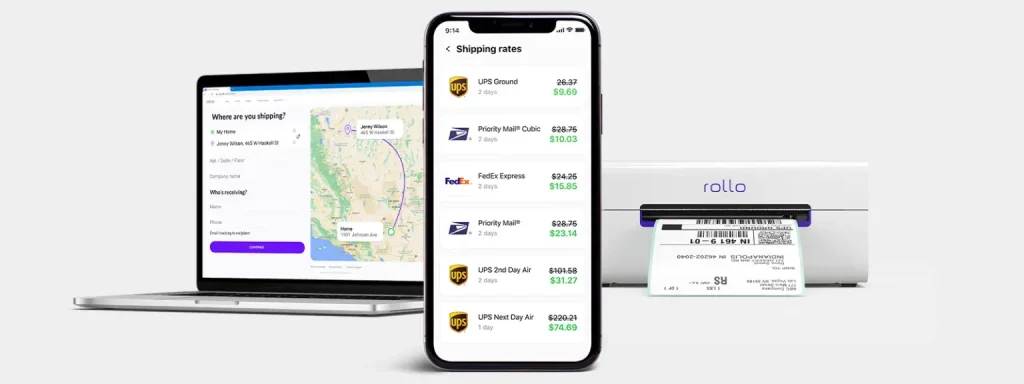
    Okay, let’s talk savings because that’s where Rollo truly shines. Most small businesses assume deep UPS discounts are reserved for corporate giants. Not anymore! Rollo opens the gates, scoring you the kinds of rates that’ll make your accountant weep happy tears.

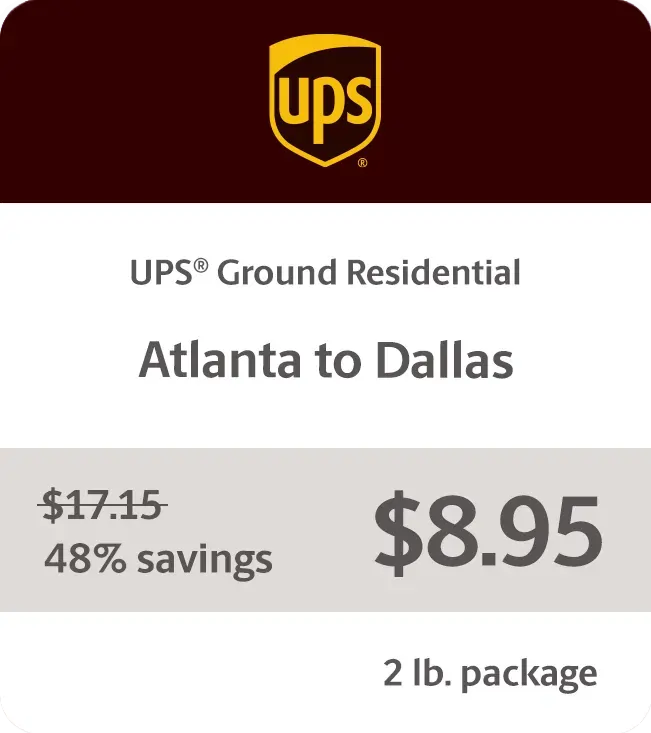
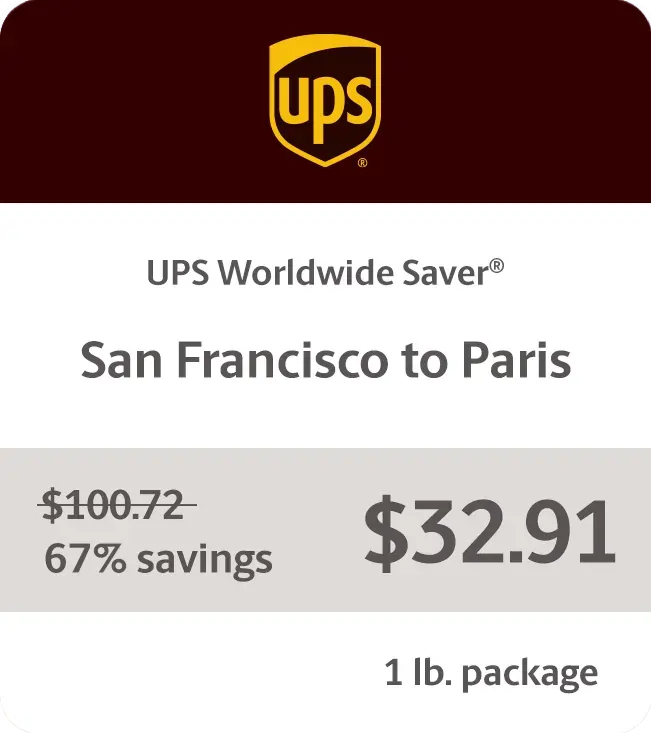
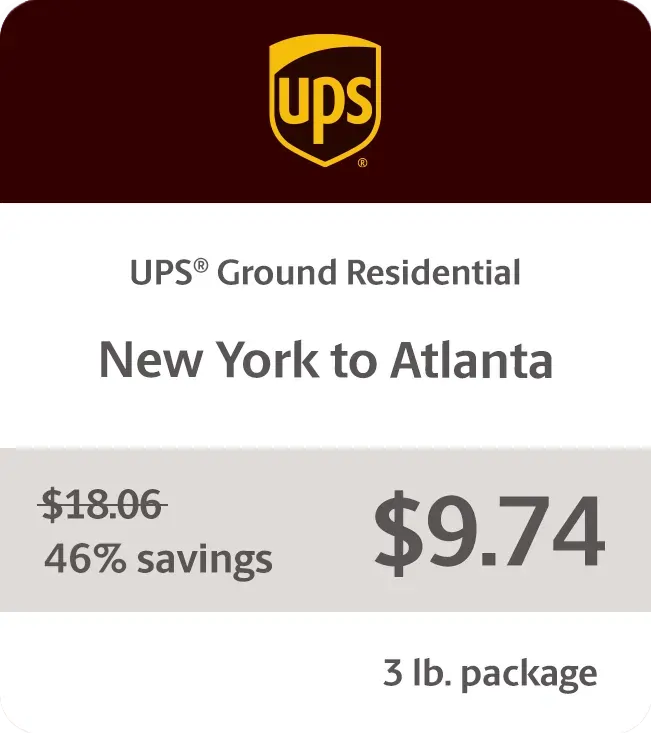
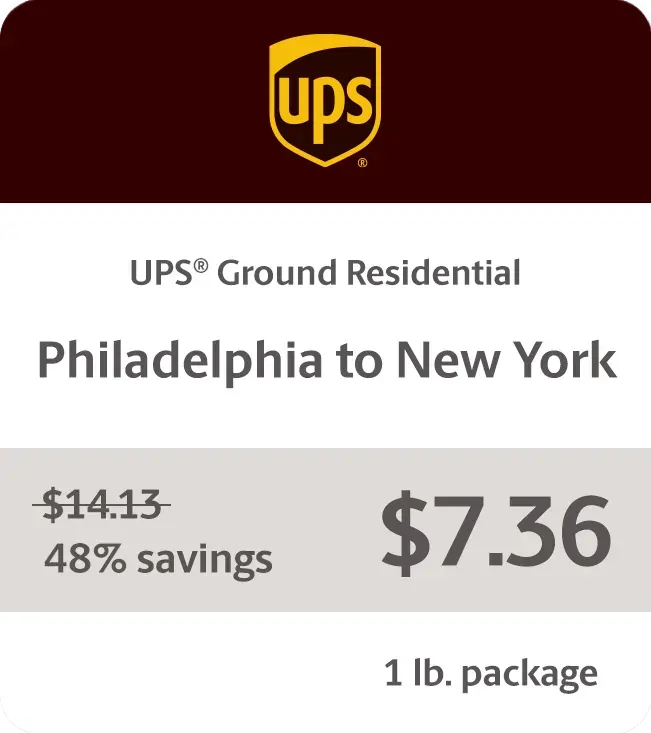
    We’re talking up to 81% off UPS® Ground residential shipments, 75% UPS 2nd Day Air®, and a staggering 85% off UPS® international shipments. Fantastic, right? Whether you’re shipping across town or worldwide, those discounts add up lightning fast. Rollo pays for itself before you can say “happy customer.”

    Sample Rates
    Delivering Results One Shipping Label at a Time

    Don’t just take our word for it, though. Online sellers everywhere are raving about how Rollo has transformed their operations:

    “As a small business owner, managing shipping used to be a hassle,” says Austin, a pottery studio owner. “My favorite thing about using Rollo is probably the ink that it doesn’t use. Previously, I was using a laser printer, and you know, you have to replace the toner every now and then. So the no ink aspect of it is really good.”

    Larger operations are singing Rollo’s praises too. “My favorite thing about my Rollo printer is that it’s completely wireless,” explains Maggie, owner of Colorado Glassworks. “In the past, when I used other printers, I had to attach them to my laptop. Not only is it super easy to print from any location in my shop, but it’s also really reliable.”

    Ensuring High-Quality UPS Labels for Shipping

    Of course, the success of your entire shipping operation hinges on those little sticky labels doing their job perfectly every time. That’s why Rollo is fanatical about ensuring each thermal label meets stringent quality and scannability standards.

    The printer and label materials are optimized to produce razor-sharp barcodes and clearly legible text. This attention to detail prevents headaches and delays that can occur when labels can’t be properly scanned at each checkpoint. Trust us, those preventable hangups are aggravating for all involved.

    Rollo’s UPS Labels for Shipping are Eco-Friendly

    Sure, optimizing operations and cutting costs are stellar benefits. But Rollo also helps make the world a little greener, one thermal shipping label at a time.

    While those old-school label sheets were destined for the landfill, Rollo’s direct thermal labels avoid inks, ribbons, and toners that harm the environment. Even better, the labels themselves are made from recyclable materials like paper, so they can easily avoid a wasteful fate.

    Proper disposal is a snap too. Just follow standard paper recycling guidelines in your area – no need for special handling. It’s a win-win that lets you ship responsibly without sacrificing efficiency.

    Tips for Optimizing Your Shipping Process

    Want to take your shipping game to the next level? Try these tips on for size:

    • 🧼 Keep your thermal printhead clean for the best quality prints.
    • ❄️ Store your thermal paper in a cool, dry place. Heat and humidity are not its friends.
    • 🗂️ Batch your orders and print labels in bulk to save time.
    • ✔️ Double-check addresses before printing to avoid costly mistakes.
    • 🛒 Consider integrating your e-commerce platform with your shipping software for a smoother workflow.
    • 🔄 Regularly update your printer’s firmware to ensure optimal performance and compatibility with UPS systems.

    Final Words

    Optimizing your shipping process is crucial for online sellers. Rollo delivers an efficient, cost-effective solution tailored for small to medium-sized businesses. The wireless printer, intuitive app, and substantial UPS discounts form an unbeatable trifecta that puts you in control of your shipping needs.

    Rollo not only simplifies printing UPS labels for shipping but also saves you time and money while supporting sustainable practices. Join a community of like-minded sellers and experience the future of small-business shipping with Rollo. Sign up for Rollo Ship today and see the difference.

    Discounts off UPS daily rates. Rates are limited to shipping from the U.S. only. Rates and any applicable discounts are subject to change at any time without notice. UPS®, the UPS® brandmark, and the color brown are trademarks of United Parcel Service of America, Inc. Used with permission. © 2020-2025 United Parcel Service of America, Inc. All rights reserved.


    Follow Rollo on:


    Frequently Asked Questions About UPS® Labels for Shipping

    📌 Q: What is the process for creating a UPS® shipping label online?

    💭 A: To create a UPS shipping label online, go to the UPS website or use the Rollo Ship app. Enter the sender and recipient information, package details, and select a shipping service. Then, review the details and print the label.


    📌 Q: Can I schedule a UPS® pickup after creating a shipping label?

    💭 A: Yes, you can schedule a UPS pickup after creating a shipping label. Through the Rollo Ship app, you can schedule the pickup to have it picked up directly in front of your house doorstep at a convenient time.


    📌 Q: What information is required to create a UPS® shipping label?

    💭 A: To create a UPS shipping label, you need the sender and recipient addresses, package weight and dimensions, and the type of shipping service. A tracking number is also generated during this process.


    📌 Q: Are UPS®shipping labels reusable?

    No, UPS shipping labels are not reusable. However, Rollo’s UPS labels for shipping are recyclable, making them an eco-friendly choice for your shipping needs.


    📌 Q: Can I customize a UPS® shipping label with my company logo?
    💭 A: Yes, you can customize a UPS shipping label with your company logo. The Rollo App allows you to add your logo and other custom elements to your shipping labels.
  • The Mini Portable Printer for Mobile Professionals

    The Mini Portable Printer for Mobile Professionals

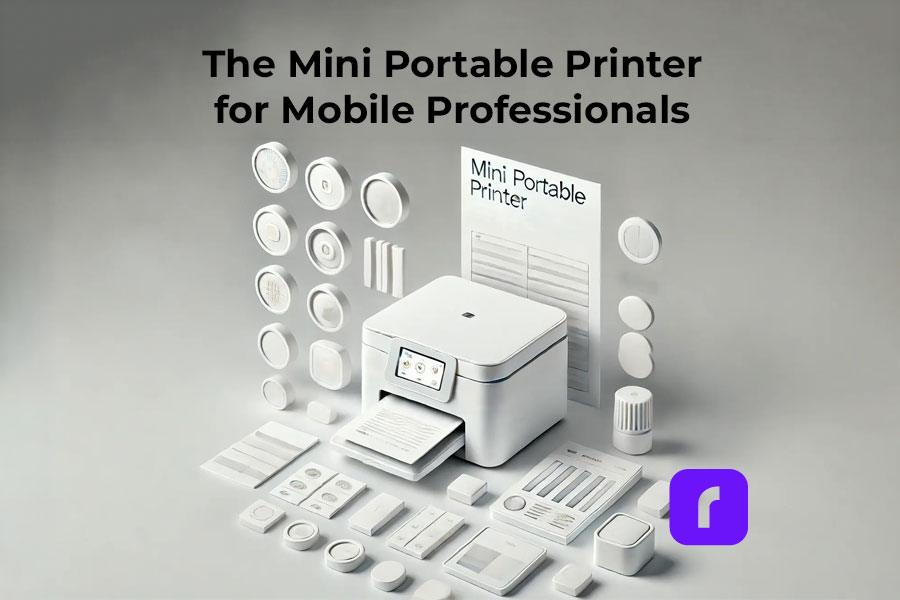
    The mini portable printer is becoming increasingly popular in our fast-paced, mobile-centric world. These compact devices offer a perfect blend of versatility, efficiency, and performance, making them a must-have for professionals and businesses on the go. In this guide, we’ll dive into the world of mini portable printers, with a special focus on Rollo and its mission to make shipping easier, faster, and more fun for small and medium-sized businesses.

    Understanding Mini Portable Printers

    First things first, let’s talk about what mini portable printers are and how they work. Also known as a portable thermal printer, these nifty little devices are designed to be compact and lightweight, so you can take them with you wherever you go. They use either thermal printing technology, which creates images through heat on special paper, or inkjet technology, which sprays ink onto paper. Thermal printers are particularly convenient because they don’t require ink cartridges.

    Rollo has made a big impact on the market with its wireless label printer, which is specifically designed for online sellers and small businesses. It’s efficient, reliable, and easy to use – everything you need to streamline your shipping process.

    How does a mini portable printer work?

    Mini portable printers work by using either thermal printing technology, which creates images through heat on special paper, or inkjet technology, which sprays ink onto paper. Thermal printers do not require ink cartridges, making them more convenient and cost-effective.

    Market Overview and Projected Growth

    graph displaying projected growth of mini portable printer market

    The mini portable printer market is booming, with more and more people looking for ways to combine mobility and document solutions. Here’s a quick rundown of the market:

    Market Size and Growth:

    • 📈 The portable printer market is expected to grow at a CAGR of around 18.84% between 2022 and 2027, with a forecast increase of USD 10,241.35 million during this period.
    • 🌍 In 2016, the global portable printer market was valued at around $844 million and is projected to reach $1,643 million by 2023, growing at a CAGR of 10.2%.
    • 🚀 By 2032, the market is anticipated to surpass a valuation of $21,909 million, growing at a CAGR of 7.6% between 2022 and 2032.

    Market Drivers:

    • 📱 There’s a growing demand for combining mobility and document solutions for remote/mobile workforce.
    • 🖨️ People are looking for convenient and compact printing solutions for on-the-go printing.
    • 💻 The increasing adoption of smart devices like smartphones, tablets, and laptops is driving the market.
    • ⚙️ Technological advancements like improved battery life, wireless connectivity, and thermal printing are also contributing to growth.

    Market Segmentation:

    • 🖨️ By Type: Thermal and inkjet printers dominate the market.
    • 🚚 By Application: Transportation & logistics, retail, manufacturing, healthcare, and others.
    • 🌍 By Geography: Asia-Pacific, North America, Europe, South America, Middle East & Africa.
    • 💼 Rollo is also making waves with its focus on helping online sellers and small businesses.

    Technical Specifications and Performance Metrics

    When you’re shopping for a mini portable printer, there are a few key technical specs and performance metrics to keep in mind:

    • 📏 DPI (dots per inch): This measures the print quality – the higher the DPI, the sharper and more detailed the prints will be.
    • Print speed: How many pages or labels the printer can churn out per minute.
    • 🌐 Connectivity options: Look for printers with wireless connectivity like Bluetooth or WiFi for maximum flexibility.
    • 🔌 Power options: Ensure your printer comes with a power plug cable suitable for your needs, especially for consistent usage.

    Rollo’s printers are known for their high efficiency and reliability, which is why they’re such a popular choice for online sellers.

    Does mini portable printer need ink?

    Most mini portable printers, like thermal printers, do not need ink. They use heat to print on special thermal paper. Inkjet mini printers do require ink cartridges, but they are designed to be compact and efficient.

    Diverse Use Case Scenarios

    Mini portable printers are incredibly versatile and can be used in a wide range of scenarios:

    • 🛒 E-commerce Applications: Printing shipping labels, invoices, and branding materials.
    • 🏥 Healthcare: Patient wristbands and medication labels.
    • 🏷️ Retail: Price tags and promotional materials.
    • 🚚 Logistics: Barcodes and shipping labels.

    Rollo’s printers are particularly well-suited for e-commerce workflows, helping online sellers streamline their operations and save time and money.

    Barnacle Foods: Scaling with Rollo’s Mini Portable Printer

    Don’t just take our word for it – here’s what real users have to say about Rollo’s printers:

    Barnacle Foods, a kelp-based food company from Juneau, Alaska, has experienced firsthand the benefits of using Rollo’s mini portable printers for their shipping needs. Founded in 2016 by a group of friends who shared a passion for fishing and discovered the potential of kelp, Barnacle Foods has grown into a thriving business that sells a variety of kelp-based products, including their top-selling Bullwhip Hot Sauce.

    One of the co-founders of Barnacle Foods shares their experience with Rollo’s printers. “When we started out with our website, we would just ship labels using our inkjet printer, which was super expensive. We were looking for thermal printers and found that Rollo is a really cost-effective option with great service.”

    One of the standout features of Rollo’s printers for Barnacle Foods is the ease of setup and use. “It doesn’t take really any time to set up. You’ll be going that day and thanking yourself,” the co-founder explains. The company also appreciates the convenient recurring orders for labels, which ensures they always have the supplies they need without having to remember to place orders manually.

    As Barnacle Foods continues to grow and expand its reach, the co-founder is confident that Rollo’s printers will be there to support their shipping needs. “Our Rollo printer can print way more than we can pack right now, so we think as our business continues to grow, it’ll be there for us so we can continue to send more kelp to more people.”

    Barnacle Foods’ success story highlights the impact that reliable and efficient mini portable printers can have on small and medium-sized businesses, particularly those in the e-commerce space. By streamlining their shipping process and reducing costs associated with traditional inkjet printers, Rollo’s printers have become an integral part of Barnacle Foods’ operations, supporting their mission to share the benefits of kelp with a wider audience.

    Comparison with Other Portable Printers

    So how do mini portable printers stack up against other types of portable printers? Let’s take a closer look:

    • 📶 Wireless thermal printers: These are similar to mini portable printers, but they’re typically larger and more expensive. They offer high-quality prints and are great for high-volume printing.
    • 💧 Inkjet portable printers: These use ink cartridges instead of thermal printing technology. They can print in color, but the print quality may not be as sharp as thermal printers. They’re also more expensive to operate due to the cost of ink cartridges.

    What are the disadvantages of a portable printer?

    Disadvantages of portable printers include limited print sizes, lower print speeds compared to larger models, and potentially higher costs per print. However, their portability and convenience often outweigh these drawbacks for mobile use.

    How Does Rollo Stand Out?

    While Rollo’s mini portable printer falls under the wireless thermal printer category, it boasts a key advantage for online sellers: its compact, user-friendly design. Here’s how:

    • Designed for Efficiency: Rollo’s printers are known for their streamlined operation, perfect for optimizing your workflow.
    • Seamless Integration: Rollo integrates effortlessly with the Rollo Ship app, creating a cohesive shipping ecosystem.
    • Focus on E-commerce Needs: From Rollo’s printer to the Ship app, everything is geared towards making life easier for online sellers.

    Sustainability and Environmental Impact

    One of the great things about thermal printing technology is that it’s more environmentally friendly than other types of printing. Here’s why:

    • 🚮 Thermal printers don’t use ink or toner, which means there’s less waste and fewer consumables to dispose of.
    • ♻️ Thermal paper is recyclable, so you can reduce your environmental impact even further by recycling your used labels and receipts.
    • 🌱 Rollo is committed to sustainability and eco-friendly practices, so you can feel good about using their printers.

    How do mini printers print without ink?

    Mini printers, such as thermal printers, print without ink by using heat-sensitive paper. The printhead applies heat to specific areas, causing a reaction that produces the desired text or image.

    Maintenance Tips and Troubleshooting

    To keep your mini portable printer in top shape, there are a few key maintenance tips to keep in mind:

    • 🧼 Clean the printhead regularly to prevent buildup and ensure sharp, clear prints.
    • 🏷️ Use high-quality thermal paper or labels to avoid jams and ensure smooth operation.
    • 🌡️ Store your printer in a cool, dry place when not in use to prevent damage.

    If you do run into issues with your printer, here are some common troubleshooting tips:

    • 📜 Check the paper or label roll to make sure it’s loaded correctly and not jammed.
    • 🔌 Make sure the printer is charged or plugged in and turned on.
    • 🔄 Restart the printer and try printing again.
    • 📞 If all else fails, consult the manufacturer’s support resources or contact customer service for help.

    Rollo’s printers are known for their reliability, but these tips can help you keep them running smoothly for years to come.

    As technology continues to evolve, we can expect to see some exciting new developments in the world of mini portable printers. Here are a few trends and innovations to watch out for:

    • 🌐 IoT (Internet of Things) integration: Printers that can connect to the internet and communicate with other devices will become more common, enabling new use cases and workflows.
    • 🤖 AI (Artificial Intelligence) and machine learning: Printers that can learn from user behavior and preferences will be able to offer more personalized and efficient printing experiences.
    • 🌿 Sustainable and eco-friendly materials: As consumers become more environmentally conscious, we can expect to see more printers that use sustainable and recyclable materials.

    Rollo is always looking for ways to innovate and improve their printers, so it will be exciting to see what they come up with next.

    Choosing the Right Mini Portable Printer

    With so many options on the market, choosing the best mini thermal printer can be a daunting task. Here are a few key factors to consider:

    • 🖨️ Print quality: Look for printers with high DPI and sharp, clear prints.
    • 📶 Connectivity: Choose a printer with wireless connectivity options that suit your needs, such as Bluetooth or WiFi.
    • 🛡️ Durability: If you’ll be using your printer on the go, look for one that’s built to withstand bumps and jostles.
    • 💰 Cost: Consider the upfront cost of the printer as well as the ongoing cost of consumables like thermal paper or labels.

    When in doubt, it’s always a good idea to test out a printer before you buy it. Many retailers offer in-store demonstrations or free trials, so take advantage of these opportunities to see how the printer performs in real-world scenarios.

    For small and medium-sized businesses, Rollo’s printers are an excellent choice. They’re reliable, efficient, and easy to use, making them a top pick for online sellers and other businesses that need to print labels and other materials on the go.

    Final Words

    Mini portable printers are a powerful tool for mobile professionals and businesses of all sizes. Their portability, versatility, and high-quality printing capabilities make them a perfect solution for printing on the go. Whether you’re an entrepreneur running an online store or a field worker needing to print receipts or reports, a mini portable printer can boost your productivity and efficiency.

    When choosing a mini portable printer, consider your specific needs and budget. For online sellers and e-commerce businesses, Rollo stands out as a top choice. Rollo’s mini portable printers are specifically designed for streamlining shipping and labeling tasks. Their user-friendly design, seamless integration with the Rollo Ship app, and focus on efficiency make them an excellent fit for businesses that need a reliable and cost-effective printing solution.

    So, if you’re looking to take your printing on the go and improve your workflow, consider investing in a mini portable printer. For e-commerce businesses, look no further than Rollo – their innovative printers and app are designed to make your life easier and help your business thrive.


    Follow Rollo on:


    Frequently Asked Questions About The Mini Portable Printer

    📌 Q: What are the main advantages of mini portable printers over traditional printers?

    💭 A: Mini portable printers, such as pocket printers and handheld printers, are designed for mobility and convenience, making them ideal for on-the-go printing tasks.


    📌 Q: How do mini portable printers contribute to sustainability?

    💭 A: Thermal mini printers eliminate the need for ink or toner, reducing waste and environmental impact.


    📌 Q: What should I consider when choosing a mini portable printer for my business?

    💭 A: Consider the type of printer (e.g., thermal, inkjet, dye-sublimation), print quality, connectivity options, and whether you need features like battery power or wireless connectivity.


    📌 Q: How do I maintain my mini portable printer?

    Regularly clean the printhead, use high-quality paper, and follow the manufacturer’s maintenance guidelines to ensure longevity and optimal performance.


    📌 Q: Can I print from my phone or tablet using a mini portable printer?

    💭 A: Yes, many mini portable printers offer wireless connectivity options such as Bluetooth or WiFi, allowing you to print directly from your smartphone or tablet.
  • Print Shipping Labels Designed to Elevate Your Brand Image

    Print Shipping Labels Designed to Elevate Your Brand Image

    Believe it or not, every time you print shipping labels for your products, you’re not just preparing a package for delivery; you’re showcasing your brand’s commitment to quality and detail. When it comes to E-commerce, there is no denying that effective brand management is crucial for success, as customers form opinions about brands across various online channels and touchpoints.

    Maintaining a unified, positive brand experience is key to your business’s image. An efficient shipping process not only keeps your business running smoothly but leaves a lasting impression on clients. Enter Rollo printers, the game-changer for entrepreneurs and small businesses looking to elevate their brand recognition through custom shipping labels. Because in this day and age, every touchpoint counts.

    [ez-toc]

    Did you know?🤔 The Rollo printer speeds through printing at 150mm/s, making quick work of any
    shipping label task.

    Telling Your Story Through Your Brand Image

    image of journal and writing quill representing telling your journey through your brand image when you print shipping labels.

    As an e-commerce entrepreneur, you understand the challenges of rising above the noise in a saturated online marketplace. Differentiating your brand is paramount. When you print shipping labels with your company logo on them, they can become powerful tools for authentic storytelling.

    • 🌟 Brand Identity: When customers unveil their package and see your logo, they’re not just receiving a product; they’re getting a glimpse into your brand’s identity. The colors, patterns, and overall aesthetic communicate your company’s origins, inspirations, and values, forging a genuine connection.
    • 🔍 Transparency and Trust: In today’s climate of consumer skepticism, transparency is crucial. Customers favor brands that are consistent across all touchpoints. User-generated content and authentic storytelling, facilitated by your custom printed shipping labels, cultivate trust.
    • 📖 Engaging Brand Story: Print shipping labels that share your brand’s narrative, from its founding tale to the creative vision behind your designs. This turns every unboxing into an opportunity for customers to engage with your brand story before encountering the product.
    • 💫 Immersive Experience: Packaging should offer an immersive experience that cements your brand’s individuality in customers’ minds. By infusing your authentic identity into these supplies, you transform each unboxing into a personal invitation to your brand’s world.

    Don’t underestimate the power of shipping supplies to amplify your brand voice. Leverage them as a storytelling medium, and you’ll cultivate the kind of customer loyalty and brand affinity that drives sustainable success.

    Print Shipping Labels Customized for Maximum Brand Impact

    Okay, so we’ve established that streamlined shipping is a must. But here’s where things get really exciting: taking your brand identity along for the journey every time you print shipping labels. It’s all about those micro-moments that leave a lasting impression.

    Stepping into the spotlight with your shipping labels means more than just sending out a package; it’s about making every parcel a billboard for your brand. Let’s get into the nitty-gritty of how we can make those labels pop!

    🖌 Custom Design Principles: This is where the essence of your brand gets to shine, one label at a time.

    • 🌟 Logo: Let your logo take the lead – bold, proud, and unmistakable.
    • 🎨 Colors: Splash your brand’s colors across the label. This isn’t just shipping; it’s storytelling.
    • 🔲 Patterns: Infuse your unique patterns that whisper (or shout) your brand’s ethos.
    • ✒️ Typography: Elevate the mundane with your brand’s signature font. It’s not just what you say; it’s how you say it.
    • 🔄 Creativity: Mix, match, and marry elements that transform a basic label into a brand ambassador.
    Pro Tip:💡 Leverage Rollo’s free design app to create labels that not only stand out but tell your
    brand’s unique story.

    📦 Material Matters: The journey matters as much as the destination. Choose materials that go the distance and arrive as intended.

    • 🛡️ Thermal Labels: These labels aren’t just survivors; they’re showstoppers, keeping your brand crisp from dispatch to delivery.
    • 💫 Glossy Finish: Elevate the unboxing with labels that dazzle and delight, making first impressions count double.
    • 🔒 Adhesive Quality: Stick with it – literally. A label that stays put is a testament to your brand’s commitment to detail.
    Keep in Mind:🧠 Opt for thermal labels with Rollo for that durable, glossy finish, ensuring your
    packages look great upon arrival.

    Transforming your shipping labels from mere necessities to marketing powerhouses is more than a strategy; it’s a statement. With these tweaks, you will print shipping labels that become memorable touchpoints that deepen your brand’s connection with its audience.

    KSX Art’s Unique Branding Shines with Custom Rollo Labels

    Kellie, the creative visionary behind KSX Art, discovered an ingenious way to merge her passions for printmaking and sustainable fashion during the pandemic. After losing both of her jobs, Kellie began printing intricate botanical designs onto thrifted denim pieces, giving well-loved garments new life.

    • 🌿 Artistic Beginnings: What started as an artistic outlet quickly blossomed into a booming business with a distinctive retro aesthetic. Needing to match her brand’s vibrancy, Kellie looked for a way to create branded shipping labels as unique as her denim creations.
    • 🖨️ Rollo’s Solution: Rollo’s Wireless Thermal Printer came to the rescue. Utilizing their design app, Kellie custom formatted her logo—a graphic of a jean overall-clad figure with hands in pockets alongside “KSX Art” text—infusing her brand’s identity into each shipping label.
    • 🎨 Visual Impact: The results were stunning. Each shipping label, adorned with bold patterns and colors, turned into miniature artworks. These labels not only captured attention but also encouraged customers to share their unboxing experiences on social media, generating buzz.
    • 📦 Streamlined Shipping: Rollo didn’t just enhance KSX Art’s aesthetic appeal; it also simplified the entire shipping process. With clear text for easy scanning and wireless mobile printing capabilities, Kellie found herself effortlessly managing a growing volume of orders.
    • 💼 Business Expansion: As KSX Art expanded into a larger studio space, Kellie continued to prioritize the unique branded experience that set her business apart. With Rollo, each shipment became a memorable moment of brand engagement.

    Kellie’s use of Rollo’s technology underscores the importance of branding, turning shipping labels into art and deeply connecting with her audience. As KSX Art grows, her dedication to unique experiences highlights a valuable lesson for all entrepreneurs.

    Inspiration Corner:✨ See how KSX Art, propelled by Rollo’s custom labels, turned packages into
    pivotal branding opportunities.

    How to Print Shipping Labels with Rollo Printers

    Alright, so you’re all hyped about the power of custom shipping labels. Now let’s get practical about how to actually print shipping labels with Rollo. You’re about to discover the ease and efficiency of printing custom shipping labels at home or in your office. Let’s dive into how you can get started with your Rollo printer to produce professional-quality labels.

    Setting Up Your Rollo Printer

    Initial Setup:

    1. Power Connection: First, connect your Rollo printer to power, turn it on, and carefully feed the labels into it from the back. Make sure to check the labels for instructions on which side should be facing down.
    2. Download the Rollo App: After setting up your printer, download the Rollo app from either the App Store or Google Play to begin.

    Phone Setup:

    1. Connectivity: Open the Rollo app on your phone. The app will search and identify your Rollo printer. Once detected, select your printer and click “Next”.
    2. Network Configuration: Choose your Wi-Fi network from the list and enter the password to connect your Rollo printer to the internet.
    3. Test Print: After successfully connecting to Wi-Fi, perform a test print to ensure everything is set up correctly. Your Rollo should now be ready to use. If you encounter any issues during setup, Rollo support is readily available to assist.

    Printing Your Shipping Labels

    Designing Labels:

    Before you print shipping labels, design them with the Rollo Label Design App. This free, multi-platform app simplifies creating custom shipping labels:

    1. Design with Ease: Launch the Rollo Label Design App on web, iOS, or Android. Choose from a variety of pre-designed templates or start from scratch to craft labels that perfectly align with your brand identity.
    2. Customize Your Design: Utilize the app’s extensive library of icons, graphics, and design elements. Add essential details like text, logos, barcodes, and QR codes. Fine-tune your label’s layout, colors, and overall aesthetics to capture your brand’s essence.
    3. Print Seamlessly: Directly from the app, send your custom label designs to your Rollo printer. This streamlined process from design to print ensures your packages carry a piece of your brand identity with every shipment.

    Step-by-Step Printing Guide:

    1. Prepare Your Design Files: With your labels designed in the Rollo app, ensure they are ready for printing.
    2. Load Your Printer: Insert the appropriate label material into your Rollo printer. The thermal printing technology guarantees sharp, durable results without the mess of ink.
    3. Select and Print: Through the Rollo app or your computer, choose the label size and type, then command your printer to bring your designs to life. Watch as your custom labels print out, ready to elevate your shipping game.

    PRINT SHIPPING LABELS WIRELESSLY.


    From any device, any app, or any file.


    ORDER A ROLLO LABEL PRINTER

    Shipping Made Simple:

    • Schedule Pickups: With the Rollo app, you can schedule a pickup for your package directly, avoiding the hassle of waiting in lines at a shipping center.
    • Discounts on Shipping: Rollo customers enjoy up to 90% discounts on shipping rates, making it not only convenient but also cost-effective.

    No Printer? No Problem: For those without a direct access to a Rollo printer, the Rollo design app offers the flexibility to upload your design and then print from with any 4×6 inch label printer.

    Optimizing Your Shipping Process

    an architectural model of an optimized shipping process.

    Shipping’s about more than just slapping on a label, though. There are a couple key areas that can really level up your operation:

    Prioritizing Shipments: You know that feeling of pure giddiness when a package arrives way ahead of schedule? That’s the power of priority mail. Depending on your product and customer base, using this expedited service can seriously boost satisfaction and repeat business. Just weigh the shipping costs against customer expectations to find that sweet spot.

    Going Mobile: Admit it, you’re glued to your phone anyway – why not put it to work? With the Rollo mobile app, you can generate and print shipping labels on the fly, no computer required. Headed to the post office? No problem, just crank out a fresh label for that late-night order. Hello, ultimate flexibility!

    NO MONTHLY SUBSCRIPTIONS.


    When you print shipping labels with Rollo, the first 200 are on us.


    Every next label is just 5 cents.


    Schedule pickups, consolidate orders, and print bulk labels.


    Up to 90% off UPS, FedEx, and USPS shipping.


    JOIN FOR FREE NOW

    Maximizing Savings: Is it Cheaper to Print Shipping Labels Yourself?

    piggy bank on thermal label printer representing savings.

    Of course, penny-pinching is a must for any scrappy business owner or reseller looking to unlock e-commerce savings. So is it actually more cost-effective to print shipping labels yourself? Short answer: most likely. Let’s peel back the layers and see just how much you can save by bringing label production in-house.

    💸 The Big Picture on Savings: When it’s time to crunch the numbers, every penny counts.

    • 🖨️ Thermal Printers: Sure, there’s an upfront cost, but think of it as an investment. With prices ranging from $100-$300, the break-even point comes quicker than you might think.
    • 🏷️ Bulk Buying Labels: Stocking up on labels in bulk? That’s going to slash your per-label cost dramatically, making each shipment cheaper by the mile.
    • 💰 Per Label Pennies: Ditch the pricey per-label fees from shipping services. At $0.05-$0.15 a pop, printing your own labels could save you a bundle.
    • 📊 Volume Matters: The more you ship, the sweeter the savings. High-volume shippers will see the most significant cost benefits over time.

    🔄 Cutting Out the Middleman: Direct control over your label printing means no more waiting or overpaying.

    • 📉 Compare and Contrast: Sure, commercial printers offer convenience, but at what cost? Doing a side-by-side with your DIY setup will show the savings stacking up in your favor.
    • 🚚 Shipping Rate Discounts: Some platforms offer discounted shipping rates, but guess what? You can still access those savings when printing your own labels, ensuring the best of both worlds.
    Quick Insight:💭 Printing your own labels with Rollo can be a game-changer, offering significant
    savings and brand personalization.

    🤔 To Print or Not to Print? It’s more than just a question; it’s a strategic decision.

    • 📚 Educate Yourself: Understand your shipping volume and needs. Small startups might tread lightly, while scaling businesses could dive in and print shipping labels headfirst.
    • 🔄 Flexibility & Customization: Beyond savings, printing your own labels offers unmatched brand continuity and personalization – worth its weight in gold.

    By taking charge of your label production, you’re not just cutting costs; you’re upping your game in brand consistency and customer experience. So, yes, printing your own labels can be a wallet-friendly move with the right approach and volume. Dive in, the savings are fine!

    Did you know?🤔 Rollo seamlessly integrates with leading e-commerce platforms, streamlining
    your label printing process.

    Final Words

    At the end of the day, efficient shipping operations and eye-catching branding go hand-in-hand. With Rollo, you can print shipping labels that merge those two elements seamlessly.

    Let’s recap the highlights: thermal label printers allowing for vibrant, custom designs. A suite of easy printing methods, from desktop to mobile to mail-in. And smart integrations with carriers to score the best rates.

    But most importantly? Print shipping labels that elevate every single package into a miniature brand experience. To transform a mundane shipping label into a work of art. To put that indelible final touch on your customer’s journey – the cherry on top of a flawless fulfillment process.

    So don’t sleep on the humble shipping label, folks. Tap into Rollo’s suite of solutions and start making those deliveries do the real work of powering your brand’s growth. Let’s get shipping!

    Final Thought:🔮 In the evolving world of e-commerce, standing out means blending creativity with
    efficiency, something Rollo printers excel at.

    Follow Rollo on:

    Frequently Asked Questions About Printing Shipping Labels

    📌 Q: Why are custom shipping labels important for my brand?

    💭 A: Custom shipping labels are crucial for enhancing brand recognition and creating a memorable unboxing experience for your customers. They allow you to showcase your brand’s identity directly on the packaging, turning every shipment into a branding opportunity and deepening the connection with your audience.

    📌 Q: How can I design custom shipping labels for my brand?

    💭 A: Utilize the Rollo Label Design App, which is available for web, iOS, and Android. This app provides a wide range of design tools, templates, and elements, enabling you to craft labels that accurately reflect your brand’s visual identity, from logos to color schemes and patterns.

    📌 Q: Are there any tips for maximizing the impact of my shipping labels?

    💭 A: To maximize the impact, ensure your brand’s logo, colors, and unique design elements are prominently featured. Opt for high-quality labels with strong adhesion to survive the shipping process. Additionally, thermal labels can offer durability and a professional appearance that elevates customer perception.

    📌 Q: Can printing my own shipping labels save money?

    💭 A: Yes, by printing your own labels, especially if you buy labels in bulk and utilize a thermal printer like Rollo, you can significantly reduce the cost per label. This approach also allows you to access discounted shipping rates, further lowering your shipping expenses and enhancing overall cost efficiency.

    📌 Q: How do I get started with Rollo printers for my shipping needs?

    💭 A: Begin by connecting your Rollo printer to a power source and your device. Load the thermal labels and download the Rollo app to guide you through connecting the printer to your Wi-Fi network. Perform a test print to ensure everything is correctly set up, and then you can start designing and printing your custom shipping labels directly from the app.

  • Eco-Friendly Sticker Label Printer For Creative Label Ideas

    Eco-Friendly Sticker Label Printer For Creative Label Ideas

    Sticker Label printers have come a long way from simply churning out basic shipping and product labels. Modern label printers have many functions for creative projects and branding. They can print without ink, have easy-to-use software, and use eco-friendly materials. A good quality sticker label printer is essential for both creative projects and business branding needs.

    Understanding the range of possibilities unlocked by these innovations is key to maximizing value. Whether you’re a crafter exploring printable sticker ideas or a business strengthening branding through custom labels, the right sticker label printer unlocks new potential.

    Did you know? 🤔 The move towards eco-friendly printing solutions is not just a
    trend but a response to growing environmental concerns. Today's sticker label
    printers are at the forefront of this shift, offering sustainable options that
    don't compromise on quality or creativity.

    [ez-toc]

    Exploring the Multifaceted Uses of a Sticker Label Printer

    Once regarded as purely utilitarian tools, sticker label printers now power creative applications from scrapbooking to gift personalization and beyond. The versatility of a modern sticker label printer allows it to be used for countless applications. Their versatility stems from technologies that printable on an expansive range of materials with precision and consistency.

    Direct thermal printing allows many label printers to apply images and text directly onto specially coated paper simply using heat, eliminating the need for toner or ink. The results are waterproof, smudge-proof, and fade-resistant labels customizable to any project.

    Keep in mind ⚠️ While direct thermal printing offers a quick and efficient way to
    produce labels, exploring direct thermal printing, the technology used by
    Rollo's Sticker Label Printer, can unlock even more creative possibilities with
    a wider range of materials and finishes.

    Meanwhile, thermal transfer printing provides even more substrate flexibility using heat to transfer images from a ribbon onto the material. This accommodates everything from glossy photo paper to acetate film for weatherproof decals.

    These techniques turn virtually any printable surface into potential sticker sheet stock or part of a creative endeavor. Common examples include:

    • 🏷️ Custom return address labels
    • 📸 Photo collage sticker sheets
    • 📅 Planner stickers
    • 🎫 Event signage and name badges
    • 📦 Personalized packaging
    • 🖼️ Decorative window and wall decals
    • 🚗 Bumper stickers and car decals
    • 📔 Unique stickers for scrapbooks or journals
    Pro Tip: 💡 When unleashing your creativity with a sticker label printer, don't
    overlook the power of experimenting with different materials and finishes.
    Many printers support a variety of substrates beyond traditional paper labels,
    including transparent, metallic, and textured options. This versatility
    can elevate your projects from simple labels to standout pieces that
    capture attention.

    The versatility empowers endless custom crafts and labeling functionality at home, school, events, small businesses, and beyond.

    Unleashing Creativity with a Sticker Label Printer

    Unleashing Creativity with Your Sticker Label Printer

    Most label printer manufacturers provide complementary software to unleash creative potential.

    Intuitive design apps allow you to customize templates or create new label and sticker ideas from scratch. Built-in drawing tools, text effects, and image libraries streamline building professional-looking designs.

    Bring personalized gifts and creative projects to life with capabilities like:

    • 📸 Uploading photos to create custom photo collage labels
    • 🎨 Designing planner stickers tuned to your lifestyle
    • 🎄 Printing decorative window decals with holiday designs
    • 🎁 Making personalized favor and gift tags
    • 🏷️ Producing branding and inventory asset tags
    • 📛 Creating event signage with attendee name badges

    With the right sticker label printer and design software, your creativity knows no bounds.

    Unique designs make regular labels stand out, whether you’re organizing at home, adding a personal touch to gifts, or sending an order to your customers

    Transfer paper support additionally broadens the possibilities for one-of-a-kind iron-on decals and stickers. For instance, create unique bumper stickers, water bottles, storage boxes, and scrapbook pages from the same custom designs.

    Pro Tip: 💡 When exploring the creative potential of your label printer, don't
    hesitate to mix and match software features with your unique ideas. Combining
    built-in drawing tools with your own photos or designs can lead to truly unique
    creations that stand out. Remember, the only limit is your imagination!
    Embracing Sustainability in Label Printing

    Embracing Sustainability with The Sticker Label Printer

    Environmental responsibility gains increasing priority in consumer preferences and buying decisions across industries. Eco-conscious printing aligns with those values. Many eco-friendly sticker label printers use recycled materials and energy-efficient processes.

    Direct thermal printing’s ink-free process provides one avenue for more sustainable label production through:

    • 🗑️ Reduced material waste from cartridges and toners
    • ♻️ Ability to print on recycled label materials
    • ⚡ Energy efficiency in the printing process
    • 🚫 Avoiding VOCs from conventional ink

    Many modern label printers take sustainability further by using Forest Stewardship Council (FSC) certified label rolls. This designation verifies sourcing paper pulp from responsibly managed forests.

    Did you know? 🤔 Did you know that choosing eco-friendly label materials for
    your sticker label printer not only benefits the environment but can also
    appeal to a growing segment of consumers looking for sustainable products?
    By using labels made from recycled materials or certified by the
    Forest Stewardship Council (FSC), you're not just making an eco-friendly
    choice; you're also making a smart branding decision.

    Prioritizing recycled materials demonstrates shared values increasingly expected from environmentally conscious businesses. It also enables customer education about making sustainable choices accessible at every purchasing level.

    Innovation of Sticker Label Printer

    The Innovation Driving Today’s Label Printers

    Intelligent design permeates modern label printing’s core technology and functionality, powering everything seen already plus:

    • 🤖 Automatic label format detection
    • 📦 Pre-formatted label packs for common uses
    • 🔧 Automated feed alignment
    • 🔄 Easy cartridge-free material changes

    Innovations in sticker label printer technology have greatly expanded their capabilities. For example, the Rollo sticker label printer scans each new label roll to detect size, shape, and orientation. Print preferences instantly adjust for optimal alignment without manual calibration.

    Material flexibility reaches new heights with direct thermal technology spanning matte, glossy, clear, metallic, and even pre-cut label sheets. Meanwhile, thermal transfer options encompass weatherproof vinyl and heat transfer materials for countless applications.

    Demand-driven engineering even cuts routine printer maintenance like cleaning print heads. Smart sensors gauge usage patterns to handle upkeep autonomously between jobs.

    Innovations build upon the core foundations of earlier thermal printing but with expanded creative prospects in focus alongside commercial applications.

    Keep in mind: ⚠️ that while the latest innovations in label printing technology
    offer incredible flexibility and efficiency, the key to truly leveraging these
    advancements lies in regular maintenance and staying updated on new software
    releases. This ensures your sticker label printer remains at the cutting edge,
    ready to bring your creative visions to life.

    Strengthening Your Brand with High-Quality Labels

    A high-quality sticker label printer is a must for producing professional product labels and branding materials. Label production intersects branding and marketing through:

    • 📦 Product Packaging – Custom label designs help products stand out on shelves and convey brand identity with logos, stylized text, and graphics. These communicate brand values to build connections distinct from competitors.
    • 🏷️ Barcode Labels – Essential for inventory, tracking, pricing, and point-of-sale scanning. Reliable barcode printing maintains critical organization.
    • 🚚 Shipping Labels – Reinforce branding with custom return addresses and shipping labels featuring logos, graphics, and stylized text. Both functional and an advertising touchpoint.

    Detail and print quality go hand in hand with professionalism across labeling applications, backed by crisp text, logos, and scannable barcodes.

    Pro Tip: 💡 High-quality labels are a direct reflection of your brand's
    commitment to excellence. Investing in a label printer that offers
    precision and durability, like those with direct thermal or thermal
    transfer capabilities, ensures that every label you produce enhances
    your brand's image.

    Direct thermal printing’s precision empowers flawless results, essential for marketability. Thermal transfer takes durability further with smudge, tear, water, fade, and scratch resistance for long-lasting brand exposure.

    Maximizing Efficiency and Creativity in Label Printing

    Maximizing Efficiency and Creativity in Label Printing

    Modern innovations place versatile, professional-quality printing within anyone’s reach. Properly maintaining your sticker label printer is key for efficient operation. Consider the following tips to hit the ground running:

    Streamline Label Design

    • 💻 Use label printer software to access ready-made templates for common applications like shipping labels, file folder labels, and name badges formatted to the correct size.
    • 🎨 Start designs from scratch when templates don’t suffice. Drawing tools, text effects, image uploads, and drag-and-drop simplicity speed layouts.
    • 🔄 Create batches when printing multiple units of a label design to conserve supplies.

    Organize Media Efficiently

    • 🗄️ Store label rolls neatly to prevent dust and debris build-up.
    • ⏱️ Use print-time estimates before jobs to anticipate required material.
    • 🔍 Monitor usage to reorder specialized media before stock outs.
    Did you know? 🤔 that organizing your media efficiently and using print-time
    estimates can significantly reduce waste and save on costs? By planning your
    label printing jobs carefully, you can ensure that every label is printed
    efficiently, maximizing the potential of your label printer.

    Enhance Print Quality

    • 🧪 Print a small test batch when using new label materials to confirm ideal settings.
    • 🧼 Clean the print head when changing between glossy and matte materials to prevent residue transfer.
    • 📐 Check label alignment with automated positioning systems before full print jobs.

    The same strategies that maximize efficiency day-to-day lay the foundations for fully harnessing creative possibilities over time.

    Modern label printers mark a new frontier empowering remarkably versatility. Whether pursuing practical organization or embracing creative passions, the right printing capabilities unlock potential in ways unimaginable just a generation ago.

    Innovations like direct thermal and thermal transfer printing continue removing barriers with design flexibility, precision results, intuitive software, and sustainable materials. Supporting those engineering feats, intelligent technology streamlines everything from nourish detection to routine maintenance.

    These capabilities provide invaluable tools adaptable across personal and professional domains for ordinary and extraordinary labeling needs alike. If you need a versatile sticker label printer for creative projects or business uses, Rollo’s modern options offer amazing possibilities.

    Keep in mind: ⚠️ as you explore the vast possibilities of modern label
    printing, the journey doesn't end with purchasing the right equipment.
    Continuous learning, experimenting with new materials, and embracing
    the latest software updates are essential steps in unlocking the full
    potential of your eco-friendly sticker label printer.

    Follow Rollo on:

    Frequently Asked Questions about The Sticker Label Printer for Creative Label Ideas:

    📌 Q: Can eco-friendly label printers handle high-volume printing tasks?

    💭 A: Yes, many modern eco-friendly label printers are designed to handle high-volume printing tasks efficiently. They are equipped with advanced technologies that ensure fast printing speeds without compromising on quality or environmental standards.

    📌 Q: Are there biodegradable options for label materials?

    💭 A: Yes, alongside recycled materials, some label printers support biodegradable label options. These materials break down more quickly in the environment, further reducing the ecological footprint of your printing activities.

    📌 Q: How do I dispose of or recycle used label rolls?

    💭 A: Many manufacturers, including Rollo, encourage recycling used label rolls. It’s best to check with the manufacturer of your label printer for specific recycling guidelines. Additionally, local recycling centers may accept these items.

    📌 Q: Are there any limitations to the types of designs I can print with Rollo’s eco-friendly thermal label printer?

    💭 A: With Rollo’s label design app, users can create custom labels for a wide array of use cases, from simple text to complex graphics. While the thermal printing process means labels are produced in black and white, the app’s versatility, combined with the printer’s high resolution, allows for significant creativity in label design. The use of various label materials further enhances design flexibility, making Rollo’s printer a powerful tool for both personal and professional labeling needs.
  • Commercial Label Printer: How to Choose The Right One

    Commercial Label Printer: How to Choose The Right One

    All types of companies need good label printing to keep their operations running smoothly. Investing in a commercial label printer delivers versatility, efficiency, and savings – key pillars that set businesses up for success.

    This guide will explore everything you need to know, from the technologies powering modern label printers to practical factors like maintenance and integration. Read on to make an informed decision in choosing the right labeling solution for your evolving business needs.

    Did you know? 🤔 Did you know that efficient label printing can reduce operational costs by up to 30% for businesses? 

    Understanding Commercial Label Printers

    Understanding Commercial Label Printers

    Before we dive into specific features, let’s clearly define what a commercial label printer is and how it differs from a regular home or office printer.

    What is a Commercial Label Printer Used For?

    Designed for high-volume label printing needs, commercial label printers empower businesses to efficiently create product labels, shipping labels, barcode labels, packaging components, signage, and much more in-house. This eliminates reliance on third-party printing services.

    Common applications include:

    • 📦 Product and inventory labeling
    • 🚚 Shipping and postage labels
    • 📊 Barcode and QR code generation
    • 📦 Boxes, bags, and packaging printing
    • 🎁 Promotional and gift labeling
    • 🎉 Event materials and signage
    • 🏥 Patient record labeling in healthcare
    • 💻 Asset tracking and IT equipment tagging
    • 🌟 And countless other uses

    With on-demand printing capabilities measured in thousands of labels per day, investing in the right commercial equipment brings labeling operations entirely under your own control.

    Commercial vs Regular Label Printers: Key Differences

    While regular document printers found in most offices allow basic label printing, commercial label makers are in a class of their own. Built for business, commercial printers offer:

    • 🏭 Industrial-grade production: Print up to thousands of labels per day with speeds exceeding 5 inches per second. Regular printers max out at a few dozen per day.
    • ⚙️ Advanced functionalities: Features like automatic cutters, peel & present mechanisms, and label rolls ensure smooth high-volume printing. Most basic printers lack these capabilities.
    • 🔩 Durable parts designed for constant use: Expect a minimum 5-year lifespan supported by solid warranties – far longer than the lifespan of a regular printer.
    • 🔄 Flexibility: Print on a wide array of label materials and sizes exceeding well beyond address or shipping label capabilities on conventional printers.
    • 🔍 Precision and consistency: Get sharp, detailed prints even at small font sizes thanks to advanced printing technologies exceeding 600 or 1200 DPI resolution.

    Pick a label printer that handles your business’s current and future printing volumes. It should grow with your company rather than limit it. Buying a higher-capacity printer now saves money later on. The long-term savings make the initial investment worthwhile for most small and large businesses.

    ⚠️ Keep in mind While exploring commercial label printers, it's crucial to consider not just the initial cost but also the printer's compatibility with various label materials and technologies. This ensures your chosen solution can adapt to future labeling requirements and industry trends, maximizing your investment's value over time.


    Technologies and Features Behind Commercial Label Printers

    Modern commercial label printers leverage innovative technologies to deliver versatile, high-quality printing with precision and efficiency. Let’s explore some of these technologies empowering businesses daily:

    Innovative Printing Technologies

    Industrial label printers rely on thermal, inkjet or laser technology to transform blank label materials into professional-grade items. Highlights include:

    • 🔥 Thermal Printing: Uses heat to transfer images onto thermally sensitive labels, delivering sharp and consistent results cost-effectively. Ideal for shipping labels, product labels, healthcare, and more.
    • 💧 Inkjet Printing: Squirts tiny ink droplets creating images directly onto the label surface. Delivers vibrant multi-color printing. Best suited for high-detail promotional, gift, and retail labeling applications.
    • Laser Printing: Uses electrostatic charges and toner to fuse print onto labels, similar to how office copiers work. Allows printing on specialty label stocks. Ideal for durable goods and manufacturing labeling.

    Start Commercial Label Printing.

    Efficiently, Fast, Eco-friendly.

    Commercial label printers now come in thermal, inkjet, or laser technologies. Prioritize color needs, print quality, material flexibility, and printing volume when choosing the best technology for your business.

    PRO TIP:  When evaluating the technologies and features behind commercial label printers, consider printers with scalable resolutions. Printers offering adjustable DPI (dots per inch) settings provide flexibility for various applications, from high-detail graphics for promotional labels to simple, clear text for shipping labels. This adaptability ensures your printer can meet diverse printing needs as your business evolves.

    Commercial Label Printers are Versatile in Materials and Designs

    Versatility in Materials and Designs

    The materials your business prints on depend entirely on the application and product. Modern commercial label printers offer versatility in handling:

    • 📄 Paper and synthetic labels like matte, high-gloss, or polyester options.
    • 🛡️ Specialty label materials including weatherproof, security, high-temperature, metallic, magnetic stripes, and more.
    • Different label finishes from frosted to reflective – all popular in gifts, retail, and food packaging.
    • 🔲 Various label shapes and sizes like round, rectangular, or die cut.

    These printers use design software for printing text, numbers, barcodes, tables, diagrams, and images onto labels.

    This equates to endless labeling possibilities allowing customization to new products, changing regulations, and evolving business needs.

    Connectivity for Modern Business Needs

    Many businesses now store data in the cloud. So label printers need to connect to these centralized systems. Most commercial printers easily plug into:

    • 🔌 USB: Simple plug-and-play connectivity to individual computers.
    • 🌐 Ethernet: Wired network connectivity for access by multiple devices.
    • 📶 Wi-Fi: Wireless network connectivity centrally managed through infrastructures.

    More advanced network management protocols like SNMP allow deeper integration with business networks and systems.

    How To Select the Right Commercial Label Printer

    Label printer technology keeps improving quickly. So the printer you need today may not fit your future business growth. But considering a few key factors allows you to make a printer investment that scales up with your company’s expanding needs:

    Key Consideration Factors

    Assess requirements across three key areas – volume, materials/purpose, and connectivity:

    • 📈 Current and Expected Volume: Print speed, duty cycle, and input label roll size must match usage levels. Thermal printers handle most moderate-volume labeling needs, with inkjet and laser stepping in for 24/7 production.
    • 🏷️ Label Materials and Purpose: The label stock, ink/toner durability, resolution, and colors dictate which print technology is best suited. Consider end-use when prioritizing criteria.
    • 🌍 Networking and Connectivity: More networked environments benefit from centrally connected printers with protocols like SNMP allowing deeper integration with systems.

    While upfront cost drives most purchase decisions, don’t let that be the dominant factor. An undersized label printer incapable of growing with your business turns out far more expensive long-term.

    Did you know? 🤔 The rise of smart labels with RFID and NFC technology allows for real-time tracking and consumer engagement. Even address labels Amazon uses now are incorporating these smart technologies. This trend towards digital printing also supports small batch and personalized label production. When choosing a label printer, consider one that accommodates these advanced features to future-proof your investment. 

    Cost Considerations and Calculating ROI

    The printer itself represents only one piece of the investment. Ink, toner, label materials, maintenance parts, and possible downtime also add up over years of ownership.

    Consider:

    • 💸 Operational Costs: Factor around 2 years of ink/toner, labels, and parts into cost projections when comparing models. Cheaper printers have higher long-term running costs.
    • 💰 Value Over Lifespan: Given 5+ year lifecycles, a commercial label printer costing more upfront often saves money over the long run through efficiencies.
    • ⚖️ Scalability: Weigh if capabilities accommodate reasonable business growth without requiring whole replacements after just 1-2 years.

    When you calculate costs over the several-year lifespan of a commercial printer, you always save money by printing in-house instead of outsourcing. You also gain efficiency and can respond faster to customers.

    Advanced Applications to Enhance Business Functions

    Advanced Applications of Commercial Label Printers to Enhance Business Operations

    Beyond everyday shipping and inventory labels, modern commercial printers empower advanced applications:

    Barcode and QR Code Printing

    A commercial barcode printer for labeling streamlines inventory management and shipping by allowing tracking through production, warehouse storage, final mile delivery, and even customer use.

    Most commercial label printers seamlessly integrate with barcode label design software for printing scan-readable UPC, QR, and other codes. RFID smart labeling takes it a step further by actively tracking goods.

    This brings simplicity where spreadsheets and manual tracking once created headaches.

    Eco-Friendly Printing

    Sustainability in labeling influences everything from materials used to energy efficiency of printers, and responsible disposal/recycling.

    Many modern commercial printers adopt eco-conscious practices like:

    • ♻️ Recycled label materials using post-consumer waste content.
    • 🌱 Soy-based inks replacing oil-based options.
    • 💡 Energy efficiency reduces power consumption, sometimes by 40% or more.
    • 🔄 Responsible recycling programs to keep printer components out of landfills.

    Decisions like opting for thermal printing and only printing what’s essential further minimize environmental footprints.

    ⚠️ Keep in mind As you delve into advanced applications to enhance your business functions, remember that the integration capabilities of your commercial label printer with existing systems and workflows are just as important as its technical features. Ensuring seamless connectivity can significantly streamline operations and boost efficiency.

    ENHANCE BUSINESS FUNCTION WITH ROLLO SHIP.

    The first 200 shipping labels (commercial shipping labels) are on us.

    Every next label is just 5 cents.

    Schedule pickups, consolidate orders, and print bulk labels.

    Up to 90% off UPS, FedEx, and USPS shipping.


    Maintaining and Troubleshooting Commercial Label Printers

    Maintaining and Troubleshooting Commercial Label Printers

    Commercial label printers last longer than regular office printers. But taking good care of them extends their life and keeps them performing well.


    Maintenance Tips

    Follow some basic usage and maintenance guidelines to keep printers in top shape:

    • Use only approved label materials to avoid jamming and wear.
    • 🧹 Schedule periodic cleaning using compressed air, lint-free cloths, and cleaning cartridges.
    • 🛠️ Follow manufacturer-recommended maintenance schedules to replace key components like printheads before they fail.
    • 🔄 Keep firmware and drivers updated to maximize performance and fix bugs.
    • 🧽 Clean out dust and label fragments before buildup impairs printing.

    Respecting simple precautions goes a long way to enjoying years of trouble-free operation.


    Software Integration

    While all commercial label printers include basic design software, third-party programs integrate tightly to boost capabilities.

    Learn all about Rollo’s shipping integrations for e-commerce platforms, marketplaces, and major shipping carriers.

    Specialty software helps make the most of commercial printers. Programs for specific barcodes, hazard labels, graphics, and data help get the full value from the printers.

    Look for label software that delivers:

    • 🔗 Compatibility with major printers to avoid limitations. Web-based apps offer wider support.
    • 📊 Barcode generation with verification checks to confirm scanability.
    • 🎨 Graphics libraries for logos, icons, and images to enhance visuals.
    • 🖥️ CSV/database connectivity for printing serialized variable data.
    • 🧙‍♂️ Template design wizards speeding up common label jobs.
    • Certified compliance templates meeting regulatory mandates.

    While built-in and free label software works for basic needs, commercial solutions speed up specialized labeling projects.


    Troubleshooting Common Printer Issues

    Like any device, label printers can have jams, feeding problems, or low ink warnings. But knowing basic troubleshooting fixes most issues.

    • 🚫 Misfeeds or jamming – Gently remove labels and fragments causing obstructions. Avoid tearing the label material and use caution around heated printheads.
    • 🧽 Streaking/Fading Print – Clean printheads and platen rolls according to cleaning instructions. Replace worn parts as needed.
    • ⚙️ Sync Errors – Update printer and computer software if you see blinking lights or uneven printing.
    • 🌐 Network Issues – With cloud-connected printers, check wires, reboot wifi, or set static IPs to fix connection problems.

    Following factory-prescribed maintenance, using approved media, and avoiding label fragments/dust build-up minimizes problems. Refer to manufacturer guides for step-by-step troubleshooting advice on any specific models in use.

    PRO TIP:  Regularly calibrating your commercial label printer can significantly reduce the chances of print errors and misalignments. This simple maintenance step ensures consistent quality and efficiency, saving time and resources by minimizing the need for reprints and adjustments. Always refer to your printer's manual for specific calibration instructions to keep it operating at peak performance.


    The Future of Commercial Label Printers

    While meeting today’s demands, commercial printers continuously adopt the latest technology innovations to deliver more value:

    Emerging Printer-Side Innovations

    • 📊 Embedded sensors monitor printer health stats for preventative alerts and predictive maintenance.
    • 🌍 Expanded connectivity protocols allow managing fleets of dispersed printers from a central dashboard.
    • 🤖 Automated maintenance performs prescribed cleaning and upkeep without user intervention.
    • 🕶️ Augmented reality-enabled printers integrate with smart glasses for diagnoses and troubleshooting guides projected virtually in the field of vision.


    Label & Material Advancements

    • 📡 RFID smart tags transform standard labels into micro-networked trackers relaying data to enterprise systems.
    • 📱 NFC (near-field communication) allows tap-scanning labels with mobile devices to pull up detailed information.
    • 🌡️ Smart labels change visual properties by reacting to temperatures, tampering or other states.
    • 🛡️ Highly durable specialty label materials expand the range of printable surfaces from textiles to electronics.

    Tighter Infrastructure Integration

    • 🔗 APIs and instant platform integration allow embedding label printing capabilities into eCommerce sites, mobile apps, ERP systems, and custom software.
    • ⚙️ End-to-end automated workflows tie together enterprise data, custom-designed labels, validated output, and multilayered business logic for integrated processes not previously possible.
    Did you know? 🤔 According to a recent report by Smithers Pira, the future of label printing looks bright, with the market expected to grow from $39.46 billion in 2018 to a staggering $49.90 billion by 2024, marking a growth rate of 4.0%. This significant increase highlights the evolving demand and technological advancements in the label printing industry. 

    Final Words: The Key to Maintaining Efficiency

    An investment in the right commercial label printer today pays dividends through years of use, only seeing returns multiply as labeling needs grow over time.

    ⚠️ Keep in mind In your journey to select the right commercial label printer, remember that this decision is not just about addressing current needs but also about anticipating future demands. Investing in a versatile and scalable printing solution will serve your business well into the future, supporting growth and adapting to evolving market trends.

    While next-generation technology holds exciting potential, even current affordable and capable options deliver value, safety compliance, customer responsiveness, and sustainability – all central to staying competitively efficient in this modern economy.

    Hopefully, this guide provided helpful insights into the full lifecycle around selecting, using, and maintaining industrial label printers optimized for the unique needs of your business.

    What label printing technology does your business currently use? Share your experiences or questions below!

    Follow Rollo on:

    Frequently Asked Questions about Choosing The Right Commercial Label Printer:

    📌 Q: What factors should I consider when choosing a commercial label printer?

    💭 A: Consider print volume, label material compatibility, print technology (thermal, inkjet, or laser), connectivity options (USB, Ethernet, Wi-Fi), and future scalability to ensure the printer meets both current and future needs.


    📌 Q: How do I decide between thermal, inkjet, and laser label printers?

    💭 A: Thermal printers are ideal for most businesses due to their cost efficiency and reliability for continuous label printing. Unlike inkjet printers, which require frequent ink purchases, and laser printers, known for their high initial costs and energy use, thermal printers offer a more economical and sustainable solution for producing high-quality labels without extra expenses.


    📌 Q: Can commercial label printers integrate with my existing business systems?

    💭 A: Yes, many modern label printers support various connectivity options and protocols like SNMP for integration with business networks, ERP systems, and cloud-based platforms, enhancing workflow efficiency.


    📌 Q: What maintenance is required to keep a commercial label printer in good condition?

    💭 A: Regular maintenance includes using approved label materials, periodic cleaning with compressed air and lint-free cloths, following the manufacturer’s maintenance schedule for component replacement, and keeping firmware and drivers updated.


    📌 Q: How can I calculate the ROI of investing in a commercial label printer?

    💭 A: Consider the initial purchase cost, operational costs (ink, toner, labels, maintenance), and potential savings from in-house printing versus outsourcing. Factor in efficiency gains, reduced downtime, and the ability to quickly respond to labeling needs, which can significantly impact ROI.