Navigating the world of e-commerce can be a complex journey, especially when it comes to managing logistics. For Shopify store owners, understanding the intricacies of shipping labels is a vital step toward ensuring efficient, cost-effective delivery services. In this Shopify shipping labels guide, we delve into everything you need to know about creating, customizing, and optimizing shipping labels on Shopify. From the basics to advanced tips, this handbook is your go-to resource for mastering Shopify shipping labels.
Features of Shopify Shipping Labels

What are Shopify Shipping Labels?
Shopify shipping labels are digital postage labels that can be easily created and printed directly from your Shopify dashboard. They play a crucial role in streamlining your shipping process, offering seamless integration with various carriers and providing a professional look to your packages. Here’s what makes them stand out:
- 🥇 Easy Creation and Printing: Shopify allows you to generate and print shipping labels directly from the dashboard, in case you wish to opt out of third-party shipping apps.
- 🧩 Integration with Multiple Carriers: Shopify shipping labels are integrated with major carriers like USPS, UPS, and DHL, offering a range of options for delivery speeds and prices. If you wish to take advantage of shipping discounts, or shipping via FedEx, you can utilize Rollo Ship App.
- 🪄 Custom Branding Options: Shopify allows customization of shipping labels with your brand’s logo and other details, enhancing brand visibility.
- 👔 Professional Appearance: These labels provide a professional look to your shipments, featuring essential information like the sender’s address, recipient’s address, and a tracking barcode. Shipping labels from Shopify can also be generated in the Rollo Ship App by linking your Shopify store to the platform. The perks are you will get notified of every new order and can consolidate orders, provide tracking information, print shipping labels, and more. Read on to learn!
- 🎯 Automation and Efficiency: The process of creating shipping labels in Shopify is streamlined, which can automatically pull in customer addresses and order details, saving time and reducing errors.
Shopify Shipping Label Size
The standard size for Shopify shipping labels is 4 x 6 inches, compatible with most thermal and regular printers. This size is optimized for readability by both humans and postal scanning systems.
4 x 6 Inches Standard:
This size is a universal standard, fitting a wide range of packages from envelopes to boxes.
Printer Compatibility:
This size is compatible with most thermal label printers and regular printers, making it accessible for businesses of varying scales. Both Rollo USB shipping label printer, and the Rollo wireless shipping label printer.
Optimized Readability:
The 4 x 6-inch size of the Shopify shipping labels provides ample space for all necessary information, ensuring clarity and legibility, which is vital for smooth processing by shipping carriers.
Shopify Shipping Label Settings
Customizing your Shopify shipping label settings is straightforward. In your Shopify admin, you can adjust preferences like default package types, weights, and printing formats, ensuring a personalized and efficient shipping process.
Shopify shipping labels’ settings offer a high degree of customization to match the specific needs of your business:
- 📦 Default Package Types: You can set default package types to speed up the label creation process. This is especially useful if you frequently ship products of similar size and weight.
- 📏 Adjustable Weights and Sizes: The ability to adjust package weight and size settings for each shipment allows for precise postage calculations, which is crucial for cost management.
- 📝 Printing Format Customization: Shopify offers flexibility in printing formats. Whether you’re using a standard office printer or a specialized label printer, you can choose the format that works best for you.
- 🦾 Integration with Shipping Apps: Shopify’s settings can integrate with various shipping apps for additional functionalities like bulk printing and advanced customization options.
The design and functionality of Shopify shipping labels are geared towards making the e-commerce shipping process as efficient and straightforward as possible, while also offering the flexibility needed to accommodate the diverse needs of online businesses. This balance of ease of use and customization is what makes Shopify’s shipping label solution a valuable tool for online retailers.
Pro Tip: When optimizing your Shopify shipping label settings for efficiency and cost-effectiveness, consider integrating with the Rollo App. This app complements Shopify’s customizable label settings by offering advanced features that cater to the diverse needs of e-commerce businesses.
Here’s why Rollo Ship stands out as a valuable addition:
Enhanced Precision in Weights and Sizes:
Rollo Ship’s interface offers an intuitive and user-friendly way to adjust package weights and sizes for each shipment. This precision not only ensures accurate postage calculations but also aids significantly in cost management, a crucial aspect for growing e-commerce operations. In combination with the Rollo digital shipping scale, precision is a success.
Advanced Printing Format Options:
While Shopify provides flexibility in printing formats, Rollo Ship takes this a step further. With Rollo Ship, you can print Shopify shipping labels to any printer of your choosing, including the highly efficient Rollo printers that offer features like intelligent label detection and high-speed printing.
Comprehensive Integration with Shipping Apps:
The Rollo Ship app integrates seamlessly with Shopify and other shipping apps, enabling functionalities like bulk printing and advanced customization. This integration means you can manage all your shipping needs from one platform, simplifying your logistics and saving valuable time.
With Rollo Label Designer:
A free online tool for creating custom labels, you can design additional labels for your Shopify orders.
How to Create?
How to Create Shopify Shipping Labels?
Creating a Shopify shipping label is a simple process:
- Go to the ‘Orders’ section in your Shopify admin.
- Select the order you’re shipping.
- Choose the ‘Create shipping label’ option.
- Enter the package details and select a shipping carrier and service.
- Review and buy the label.
How to Print Shopify Shipping Labels
Once you’ve purchased a Shopify shipping label, printing it is just a click away:
- Click on the ‘Print label’ button.
- Ensure your printer is correctly set up.
- Select “Print”, and your label is ready to be attached to your package.
How Does It Work?
📌 How Do Shopify Shipping Labels Work?
Shopify’s shipping label feature integrates directly with your order management system. When an order is placed, Shopify uses the buyer’s address and your package details to generate a label with the correct postage.
📌 How to Change Shipping Label Format on Shopify?
Changing the shipping label format in Shopify is easy. In your shipping settings, you can select from various formats (like 4 x 6, 8.5 x 11) based on your printer type and preferences.
Customizing Shopify Shipping Labels
Options for Customization
Shopify allows you to customize your shipping labels with your brand logo, return address, and other essential details. This customization not only enhances your brand visibility but also provides a professional touch to your shipments.
Benefits of Customizing
Customized shipping labels can significantly improve customer experience and reinforce brand recognition. They make your packages stand out and can lead to increased customer loyalty and brand recall.
Cost & Payment
Shopify Shipping Labels Cost
The cost of Shopify shipping labels depends on factors like package weight, dimensions, and the selected carrier service. Shopify offers competitive rates, often lower than standard carrier costs.
📌 Do You Have to Pay for Shipping Labels on Shopify?Yes, you do pay for shipping labels on Shopify, but the platform often provides discounts on standard carrier rates, making it a cost-effective option.
📌 How Do You Pay for Shopify Shipping Labels?
Payment for Shopify shipping labels is straightforward. Once you create a label, the cost is calculated and charged to your account. You can view and manage these expenses directly in your Shopify admin.
Tips for Cost-Saving and Maximizing Efficiency
- Compare carrier rates within Shopify to find the best deal.
- Utilize Shopify’s discounts on bulk label purchases.
- Optimize packaging to reduce weight and dimensions, lowering shipping costs.
Shopify Shipping Label Printer

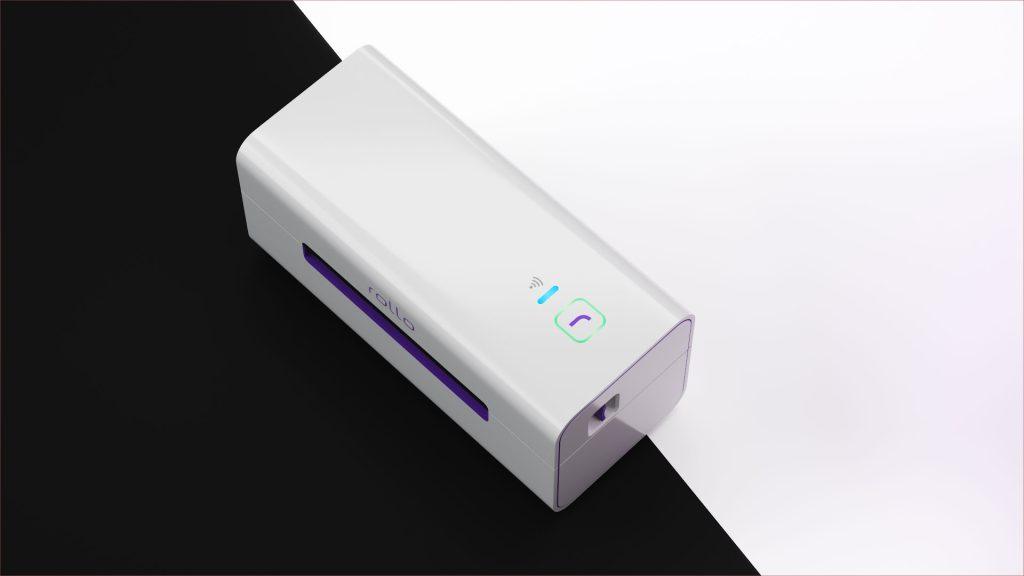
Rollo Wireless Shipping Label Printer
When it comes to choosing the best label printer for Shopify, the Rollo wireless shipping label printer stands out as an exceptional choice. Renowned for its efficiency and versatility, this printer is a must-have for any Shopify store owner looking to streamline their shipping process.
Features of the Rollo Printer:
- High Volume Printing: With the capacity to print up to 325,000 ft of labels without any need for ink, the Rollo printer is ideal for businesses of all sizes.
- Intelligent Label Detection: Say goodbye to the hassle of manually cropping your labels. The Rollo Wireless model automates this process, saving you time and effort.
- Device Compatibility: The Rollo printer comes in two models:
- Compact and Fast: Both models are compact enough to carry in your bag and offer fast printing capabilities, printing one label per second.
Models
There are two models:
- Wireless: Compatible with a wide range of devices including Mac, iPhone, iPad, Android, Windows, Chromebook, and Linux. This AirPrint and WiFi-certified printer allows you to print from any app, on any file, from any device.
- USB model: Offers Mac and Windows compatibility with USB connectivity.
Why Choose Rollo for Shopify?
Rollo printers are not just printers; they are a holistic solution for your Shopify shipping needs. Whether you are dealing with a handful of orders or managing a large volume, the Rollo printer’s versatility and speed make it an indispensable tool.
Ready to revolutionize your shipping process?
Experience the efficiency
and reliability that only Rollo can provide
for your Shopify store!
Why Rollo is the Best Label Printer for Shopify Shipping Labels
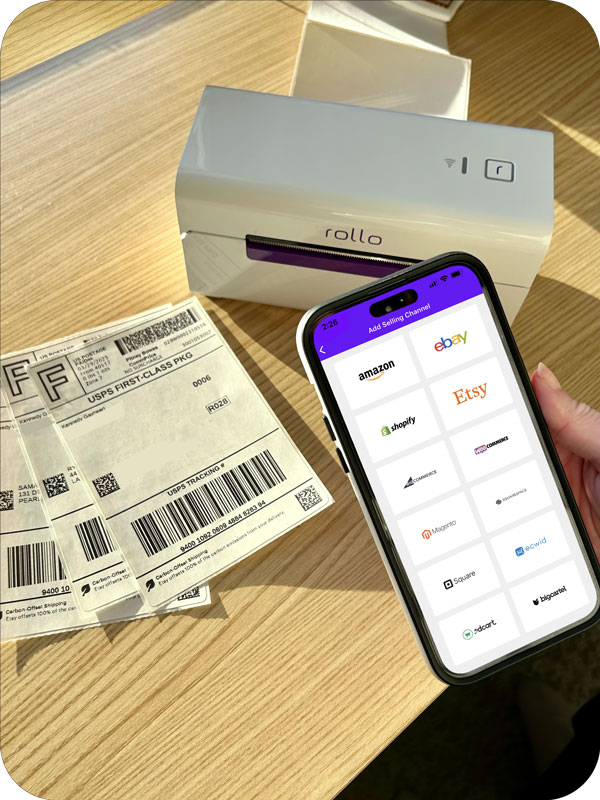
The Rollo printer’s compact size, versatility, and high-speed printing make it an ideal choice for Shopify store owners. Whether you’re handling large volumes or need a portable solution, Rollo fits the bill perfectly.
Shopify Setup for Rollo Printer
Setting up your Rollo Printer with Shopify is a breeze. Here’s how you can seamlessly integrate it into your Shopify shipping workflow:
- Change Format for Optimal Printing: After purchasing a shipping label on Shopify, click on “Change Format” on the right-hand side of your screen.
- Select the 4 x 6 Format: This is the ideal size for Rollo printers, ensuring your labels are perfectly formatted for printing.
This simple setup process ensures that your Rollo printer works in harmony with Shopify, providing you with high-quality shipping labels every time.
Shopify Multi-Carrier Shipping Label App: Rollo Ship
The Rollo Ship App is a comprehensive solution for Shopify store owners looking to optimize their shipping process. This multi-functional app offers a variety of features that cater to the diverse needs of e-commerce businesses.
Features of the Rollo Ship App
✅ Order Consolidation: Easily consolidate orders from Shopify and other platforms.
✅ Multi-Carrier Shipping: Ship with major carriers like UPS, USPS, and FedEx.
✅ Bulk Printing: Print shipping labels in bulk for increased efficiency.
✅ AI-Driven Fulfillment: Utilize AI for order fulfillment and tracking.
✅ Branding: Customize your shipments for brand consistency.
✅ E-commerce Integration: Connect with multiple marketplaces and e-commerce platforms.
Enhance your Shopify shipping process today!
take your Shopify shipping to the next level
with streamlined operations,
multi-carrier options, and advanced features.
Shopify Setup for Rollo Ship App
Integrating Shopify with your Rollo Ship account brings numerous benefits to your shipping operations:
On the Rollo Ship iOS or Android App:
- 🐾 Launch and Login: Open the Rollo App and log in.
- 🐾 Navigate to Connections: Click the Menu Icon and select “Connections”.
- 🐾 Add Shopify as a Selling Channel: Press “Add New” and select Shopify.
- 🐾 Connect Your Store: Enter your Shopify store’s domain name (e.g., mystore.myshopify.com) and connect using your Shopify credentials.
On Rollo Ship Web:
- 🐾 Login to Rollo Ship: Access your account on the Rollo Ship website.
- 🐾 Connect Shopify: Click on “Connection” → “Selling Channels”, then select the Shopify logo.
- 🐾 Complete the Setup: Enter your Shopify store’s domain and connect with your credentials.
This integration allows for a streamlined process where Shopify orders are automatically available in Rollo Ship for easy label printing on your Rollo printer.
Streamline Your Shopify Shipping!
Final Words
Navigating the realm of Shopify shipping labels might seem daunting at first, but with the right tools and knowledge, it transforms into a streamlined, efficient process. Throughout this article, we’ve covered the essentials—from the features and benefits of using Shopify’s shipping label system to the integration and optimization with the Rollo wireless shipping label printer and Rollo Ship App.
Remember, the key to success in e-commerce shipping lies in understanding the nuances of the tools at your disposal. Shopify’s customizable settings, combined with the advanced capabilities of Rollo’s solutions, present a powerful duo for any Shopify store owner. Whether you’re printing your first label, customizing your shipping settings, or seeking the most efficient way to manage multiple orders, the journey toward efficient shipping is now within your grasp.
Embrace the change, optimize your shipping, and propel your Shopify store towards greater heights of success.
Follow Rollo on:
Frequently Asked Questions about Shopify Shipping Labels
📌 Q: Can you print Shopify shipping labels without an order?
💭 A: Yes, Shopify allows the printing of shipping labels even without a direct order, which is useful for returns or exchanges.
📌 Q: Can I use any label printer with Shopify?
💭 A: Shopify supports a wide range of label printers, but for optimal performance and compatibility, printers like the Rollo Wireless are recommended.
📌 Q: How to void a Shopify shipping label?