In today’s rapidly evolving eCommerce world, the efficiency of your shipping operations can make or break your business. One cornerstone of that efficiency is having a reliable FedEx label printer. Whether you’re an established online retailer, a growing small business, or an individual looking to simplify your shipping process, choosing the right FedEx label printer is crucial.
So, how do you go about selecting the best label printer for FedEx shipping labels? In this in-depth guide, we aim to provide comprehensive insights. We’ll delve into the impressive features of Rollo printers and the Rollo Ship app, which, when used in tandem, can significantly streamline your FedEx label printing processes.
Why Choose a Thermal Printer for Printing Shipping Labels from FedEx
When considering various FedEx label printers, you’ll find numerous options, including inkjet and laser printers. However, when it comes to printing FedEx shipping labels, thermal printers often hold the edge. Why is that?
Rollo Wireless Printer and Rollo Ship App from Rollo on Vimeo.
Key Advantages of Thermal Printers as FedEx Label Printers
- No Ink or Toner: One of the biggest advantages is that thermal FedEx label printers don’t require ink or toner. This alone can save you a lot of time and money in the long run.
- Speed is of the Essence: With FedEx’s strict timelines, a slow printer can be a bottleneck. Thermal printers are renowned for their speed, often printing a label in less than a second.
- Quality and Reliability: The last thing you need is a smudged or unreadable label. Thermal printers offer high-quality prints that are easy to scan, making them ideal FedEx label printers.
Rollo Printers: The Best Label Printer for FedEx
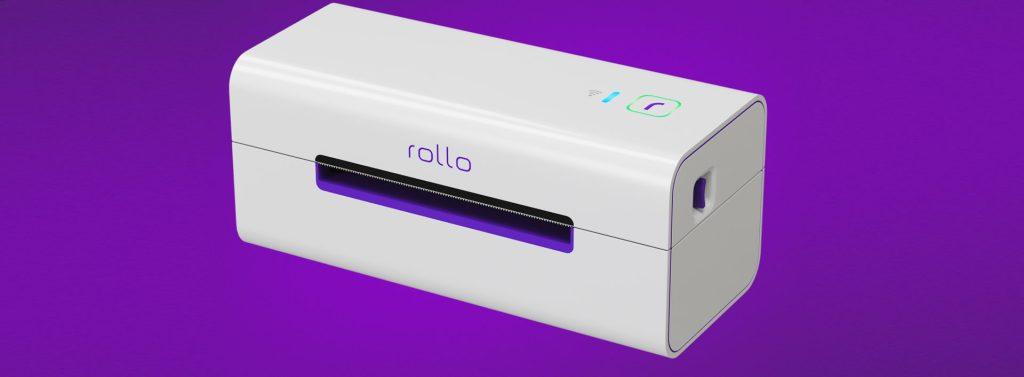
When it comes to choosing the best FedEx label printer, it’s hard to overlook what Rollo printers bring to the table to create labels:
- Unmatched Efficiency: These printers have an astonishing capability of printing up to 325,000 feet of thermal labels without requiring any ink or toner. That’s efficiency redefined.
- Smart Label Detection: Say goodbye to the tedious task of manually adjusting your labels. Rollo printers automatically detect label sizes, with the intelligent feature being particularly enhanced in the wireless model.
- Wide-ranging Compatibility: Rollo printers can be easily integrated into virtually any tech ecosystem. Whether you’re operating on a Mac, Windows, iPhone, iPad, Android, or even Chromebook, these printers have you covered. Their compatibility is further extended as they are AirPrint and WiFi certified, which makes printing from any device a breeze.
What Sets Rollo Apart: The Rollo Ship App
The Rollo Ship App is another compelling reason why the purchase of a Rollo printer is an excellent choice for a FedEx label printer. This app, available on multiple platforms including iOS, Android, and Desktop, not only consolidates your shipping needs but also offers a myriad of features that make it stand out.
Empowerment Through Unified Carrier Connections
Beyond just selling channels, the Rollo Ship App steps up the game by offering an integrated platform to manage all your shipping carrier accounts. Instead of juggling multiple carrier portals and interfaces, Rollo offers a singular dashboard. This not only means less hassle but also quicker decisions as you can compare and choose the best shipping options at a glance.
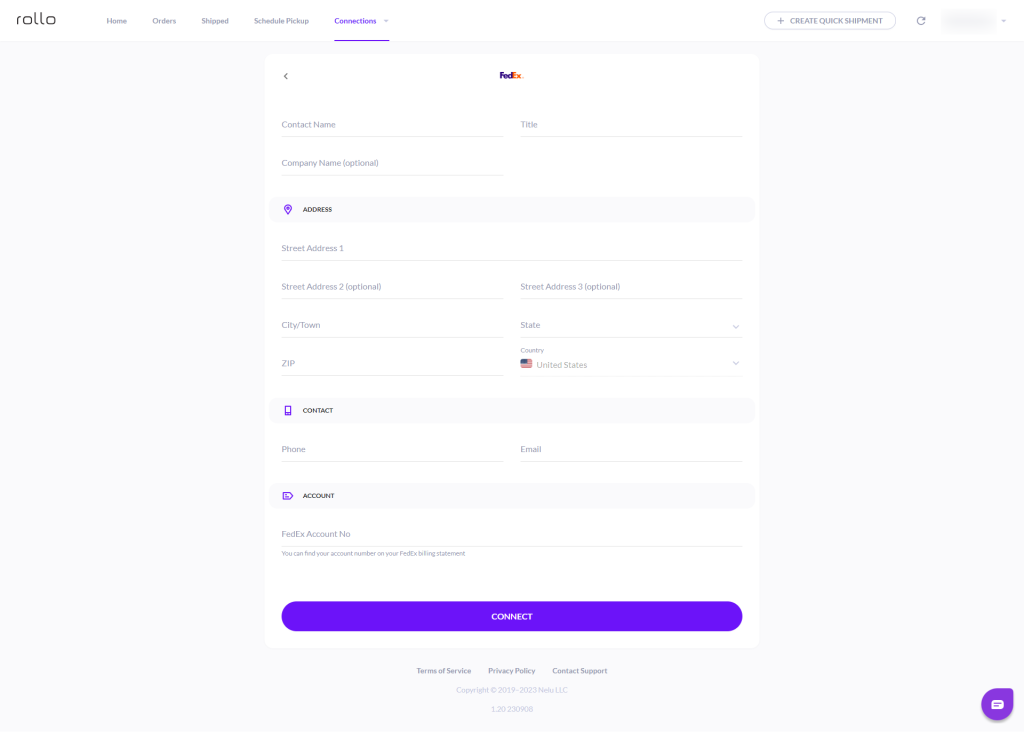
Here’s how simple it is: With just a few taps, you can link your Rollo FedEx label printer and your shipping carriers. Dive into the Rollo Ship App, navigate to “Connections”, move to “Shipping Carriers”, and there you are – just a click on the FedEx logo, a swift entry of your FedEx details, and you’re all set. Shipping with FedEx, or any other carrier for that matter, becomes as easy as hitting the “print” button.
How to print FedEx shipping labels by connecting Rollo to your FedEx account
Step 1: Log into your Rollo Ship App on your Desktop via ship.rollo.com or on your mobile app.
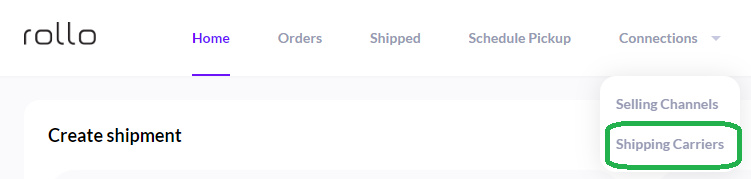
Step 2: Click on Connections > Shipping Carriers. Click on the FedEx logo:
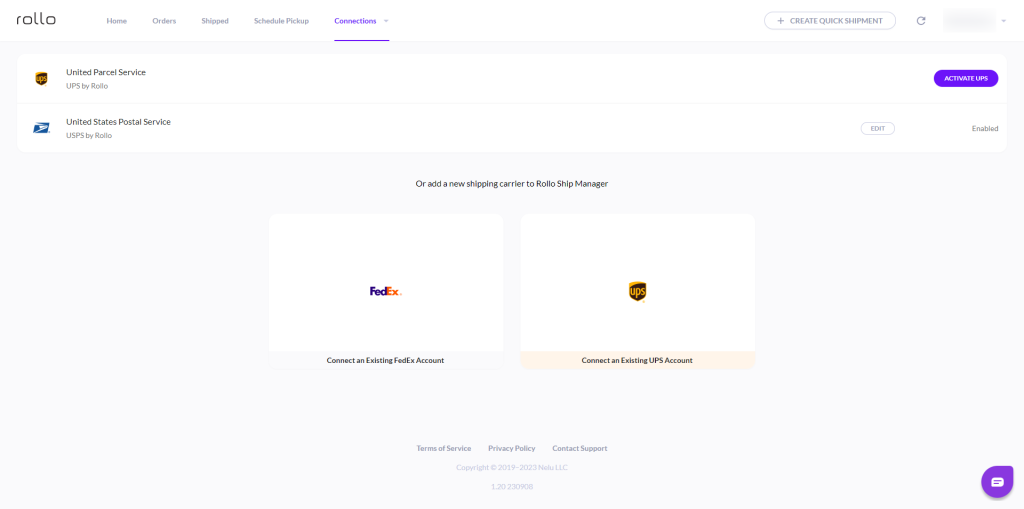
Step 3: Input your information and your FedEx Account number:
Features That Make the Rollo Ship App Indispensable for FedEx Shipping Labels
- Unified Dashboard: One account lets you integrate orders from various marketplaces. This includes popular platforms like Amazon, Etsy, Shopify, and eBay among others, simplifying your FedEx label printer experience.
- AI-Driven: With advanced AI algorithms, the Rollo Ship App will automatically import your new orders from connected stores, group them, and even notify you. This is especially useful when using FedEx shipping labels for bulk shipments.
- Automated Notifications: Once your FedEx shipping labels are printed and your packages are shipped, the app can automatically notify your customers with tracking information.
- Zero Obligations: The best part? You are not obliged to connect your store to use this app, nor do you have to own a Rollo printer to print FedEx labels.
A Closer Look: The Cost-Effectiveness of Rollo Ship App
In terms of cost, this app is a game-changer. There is no monthly subscription fee, and the cost to create a shipping label is a nominal 5 cents, which is waived for your first 200 labels. Additionally, Rollo has negotiated shipping discounts with major carriers, including FedEx, that can result in up to 90% off on your shipping costs.
Step-By-Step Guide: Setting Up Your Rollo FedEx Label Printer
The Rollo FedEx label printer streamlines the shipping process, offering you a seamless way to print various types of shipping labels, including FedEx labels. With user-friendly features and compatibility with a range of platforms, this printer is a reliable choice for all your shipping needs. Here’s your definitive guide to getting it all set up:
Initial Setup
🐾 Step 1:
🔌 Connect Your Rollo Printer
Initial Setup
🐾 Step 2:
⬇️ Download Required Drivers
Initial Setup
🐾 Step 3:
🔎 Identify Printer Port
Fine-Tuning Your Printer for FedEx Labels
🐾 Step 1:
💻 Configure Port Settings
Fine-Tuning Your Printer for FedEx Labels
🐾 Step 2:
💾 Install Printer Driver
Fine-Tuning Your Printer for FedEx Labels
🐾 Step 3:
🔗Printer Preferences
Fine-Tuning Your Printer for FedEx Labels
🐾 Step 4:
📎 Testing Your Setup
Fine-Tuning Your Printer for FedEx Labels
🐾 Step 5:
🕹️ Navigate to FedEx Ship Manager
Fine-Tuning Your Printer for FedEx Labels
🐾 Step 6:
✅ Select Your Rollo Printer
Fine-Tuning Your Printer for FedEx Labels
🐾 Step 7:
📄 Run a Test Print
⚠️ Extra Tips
- 👓 It’s worth mentioning that setting up your Rollo printer on FedEx Ship Manager might require an activation code, which FedEx will email to you after verifying your account information.
- 🖨️ Rollo can be installed as a ZPL printer, especially beneficial if you plan to use FedEx Ship Manager for your shipping needs.
- 📢 If you want an alternative to FedEx Ship Manager, consider commercial platforms like Rollo Ship App. Such platforms are FedEx-approved partners and offer a simpler setup process.
By successfully setting up your Rollo FedEx label printer, you’ve significantly improved your shipping capabilities, particularly for printing FedEx shipping labels.
The Ultimate FedEx Label Printer Solution
When it comes to finding the best label printer for FedEx, the Rollo thermal printer, accompanied by the feature-rich Rollo Ship App, offers a holistic and cost-effective solution. The Rollo printer’s easy setup, rapid printing, and exceptional reliability make it a superb choice for any FedEx shipping needs, whether you’re a small business owner or running a large-scale operation.
This comprehensive guide aimed to shed light on why Rollo stands out as the best FedEx label printer and how you can set it up to print FedEx shipping labels effortlessly. With the Rollo Ship App’s wide array of functionalities, you can streamline your FedEx label printing, enhance your logistics, and substantially reduce your shipping costs.
So if you’re still pondering the question, “What is the best FedEx label printer for me?” The answer is clear: Look no further than a Rollo thermal printer.
Rollo Ship App: A Closer Look
If you’re already familiar with Rollo’s FedEx label printer, you might be intrigued by another tool in the Rollo suite: the Rollo Ship App. This application serves as a centralized hub, connecting the dots between multiple platforms and your shipping process. Designed to streamline the entire shipping workflow, from order management to label printing, let’s dive deeper into the remarkable features that make the Rollo Ship App a must-have tool for e-commerce vendors.
🤖 AI-Driven Automation: Smart Shipping for the Modern World
One of the standout features of the Rollo Ship App is its artificial intelligence-based automation. Instead of manually keeping track of incoming orders from various platforms, the app uses AI algorithms to automatically import new orders from marketplaces like Amazon, Etsy, Shopify, and eBay. This goes beyond simple tracking: the AI can categorize orders based on different parameters, such as delivery timelines, destinations, or product type, and alert you when it’s time to process and ship the orders. This automated intelligence allows you to focus more on the core aspects of your business, leaving the grunt work to the app.
🧲 Multi-Platform Support: Manage Your Shipping Anywhere, Anytime
With the Rollo Ship App, you’re not tied down to a specific operating system or device. Whether you prefer to manage operations via iOS, Android, or a desktop computer, the app has got you covered. This cross-platform availability ensures you can handle your shipping tasks from the office, home, or even on the go. It’s an ideal feature for those who operate in a dynamic environment or have a diversified team.
🧮 Affordable and Flexible: No Strings Attached
The Rollo Ship App operates on a ‘pay-as-you-go’ model, making it incredibly cost-effective for businesses of all sizes. Unlike other shipping software that might require hefty monthly subscriptions, the Rollo Ship App only charges you 5 cents per printed label. As an added bonus, the fee for the first 200 labels is completely waived, giving you ample opportunity to get acquainted with the system before incurring any costs. This affordability, combined with the lack of contractual obligations, makes it an excellent choice for both small-scale sellers and larger enterprises.
⚙️ Broad Integration: One App to Rule Them All
The efficiency of any shipping tool relies heavily on how well it integrates with other platforms you’re already using. In this regard, the Rollo Ship App excels spectacularly. Capable of integrating with leading marketplaces and e-commerce platforms like Amazon, Etsy, Shopify, and eBay, the app serves as a centralized control panel for all your shipping activities. This not only saves you time from having to toggle between different platforms but also provides a uniform experience for managing orders and shipments.
💰 FedEx and Other Major Carriers: Savings That Add Up
One often-overlooked perk of the Rollo Ship App is its partnerships with major shipping carriers, including FedEx. The app offers exclusive shipping discounts, enabling you to save a significant amount on shipping costs. This is particularly beneficial if you have high shipping volumes or operate on a global scale. With reduced shipping costs, you can either improve your profit margins or pass on the savings to your customers, making your products more competitive in the market.
NO MONTHLY SUBSCRIPTIONS.
The first 200 FedEx shipping labels are free.
Every next generated label is 5 cents.
Up to 90% off UPS, FedEx, and USPS shipping.
In summary, the Rollo Ship App isn’t just an add-on to your Rollo FedEx label printer; it’s a comprehensive shipping solution. With its AI-driven automation, multi-platform support, cost-effectiveness, broad integration capabilities, and partnership with major carriers like FedEx, the Rollo Ship App is a powerhouse that can significantly uplift your shipping game
Final Thoughts: Why Rollo is the Go-To FedEx Label Printer
If you’re looking for the best label printer for FedEx, you cannot go wrong with a Rollo printer, especially when coupled with their advanced Ship App. Easy to set up, convenient to use, and cost-effective in operation, it’s the all-in-one FedEx shipping label solution you’ve been searching for.
Whether you’re just starting out with your shipping journey or looking to optimize your established operations, Rollo provides a highly effective and efficient way to handle your FedEx shipping labels. So when it comes to selecting a FedEx label printer, make Rollo your first choice.
Follow Rollo on:
Frequently Asked Questions about FedEx label printer:
📌 Q1: What Label Printers Work with FedEx Ship Manager?
💭 A1: Not all label printers are compatible with FedEx Ship Manager. However, Rollo printers, given their compatibility with the Zebra LP 2844 drivers, can easily be used with the FedEx Ship Manager.
📌 Q2: Does FedEx Provide Label Printers?
📌 Q3: Can I Print Out My Own FedEx Label?
📌 Q4: Can FedEx Print a Label from Your Phone?
📌 Q5: Is It Cheaper to Print FedEx Labels at Home?
📌 Q6: Can You Print FedEx Labels on a Thermal Printer?
📌 Q7: Can I Print My Own FedEx Label?
📌 Q8: Which Label Printers Work with FedEx?