Rollo

Tag: custom labels

  • Label Printing for Online Sellers: Professional and Quick

    Label Printing for Online Sellers: Professional and Quick

    In the world of online selling, having quick and professional label printing is key. Labels are more than just package markers. They are vital for branding, keeping customers happy, and running smoothly. Custom sticker labels let sellers personalize their orders, choosing the right materials and designs for their needs.

    Label Printing via Rollo

    Printing labels is crucial for businesses, especially those selling online. To print labels with the Rollo label printer, follow these steps:
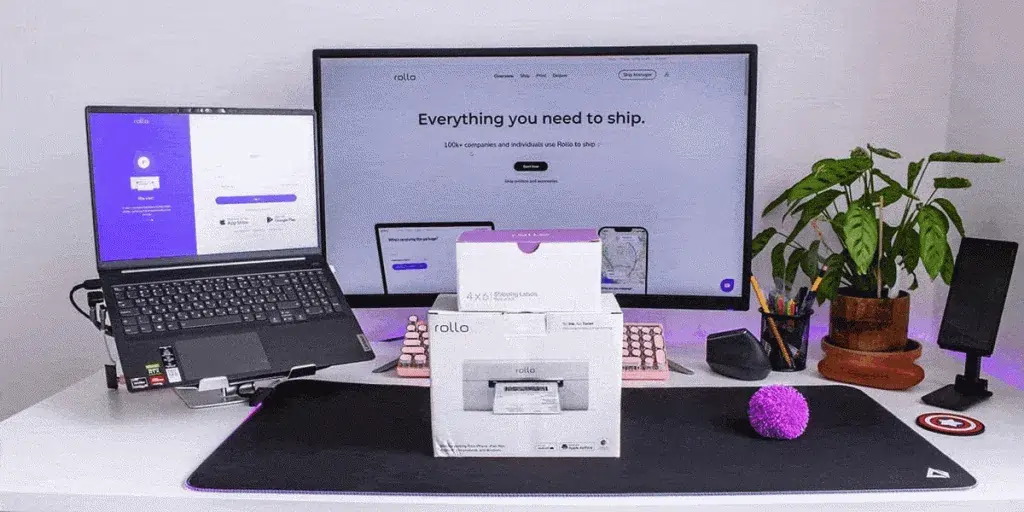
    Rollo wireless printer box in front of laptop and desktop monitor.

    1. Connect to Your Label Printer

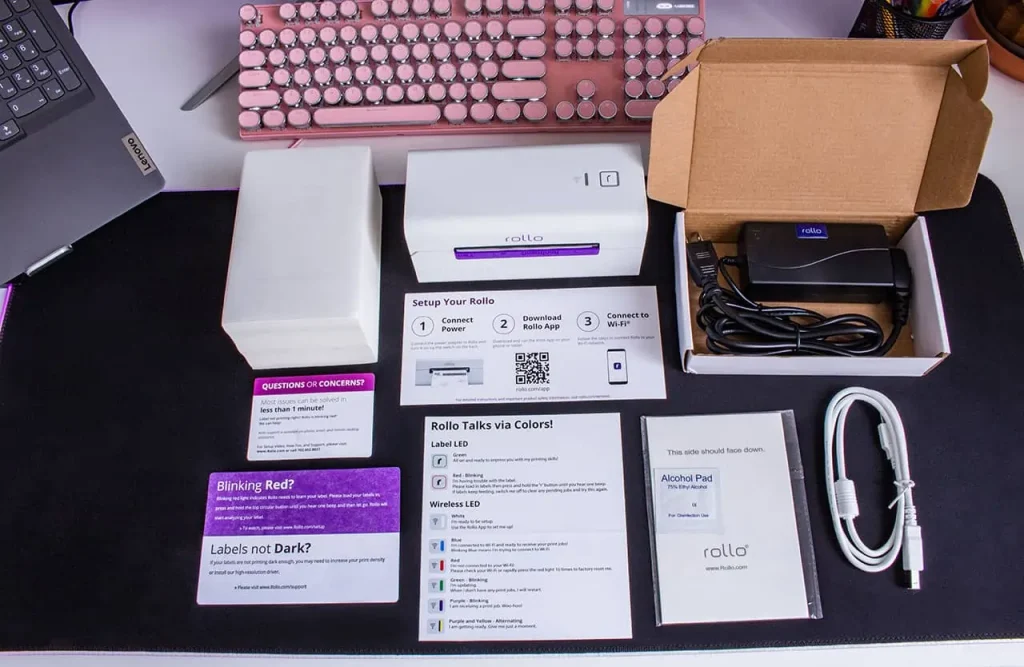
    • First, make sure your Rollo label printer is connected to your computer or network. For the USB model, plug it in with the USB cable. Download the needed drivers. More here.
    • For the wireless model, connect it to your WiFi network by following the setup on the Rollo wireless setup page.

    2. Load the Labels

    Put your labels into the printer. Make sure they’re aligned with the guides to avoid mistakes.

    3. Open the Rollo Ship App

    Start the Rollo Ship App on your device. It’s free to use! This app makes managing your label printing easy.

    4. Import Orders

    Use the app to add your orders from your online stores. For a full list of integrations, check here. This makes sure all your shipping details are ready for printing.

    5. Print Your Labels

    Pick the orders you want to print labels for. The Rollo printer will quickly make your labels. They’re ready to go on your packages. No more work needed! Yay!

    Detailed Customization Options with Rollo Label Design Tool

    Creating custom labels with the Rollo Label Design Tool is easy and free.

    The tool lets you upload or make your own design. It has lots of templates and sizes, unlike other platforms. You can print your labels in the exact size you need, ensuring they’re precise and consistent.

    Advanced Customization Techniques

    Advanced customization is key for enhancing your brand with custom labels. Here are some strategies:

    Typography

    Choose fonts that are easy to read and match your brand’s tone. Whether it’s a fun font for kids’ products or a sleek one for tech, the right font is important.

    Layout and Design

    Make sure your label design is simple and not too busy. Important info should be easy to see, and the design should be balanced.

    Get Into Label Design.

    Benefits of Rollo Ship App and Rollo Label Printers

    Integration with E-commerce Platforms

    Rollo Ship App and Rollo printers work well with Amazon, TikTok Shop, and Shopify. Some other popular platform integrations include:

    They make managing orders and shipping easy. They import orders automatically and let you track shipments in real-time.

    This keeps your customers happy and informed.


    Speed and Efficiency of Label Printing

    Rollo printers print labels fast, up to one per second.

    They can handle a lot of labels without needing ink. 325,000 feet to be exact. This makes them great for sellers who ship a lot.

    Rollo also has smart features that make printing labels quick and easy. This means you can get orders out faster, making customers happier.


    Enhancing Brand Perception with Professional Labels

    Good-looking labels are key for online sellers. They make your brand look better and improve customer experience. Rollo’s Label Design Tool lets you create labels that match your brand.

    You can add logos, images, and even barcodes. This makes your labels unique and helps your brand stand out.


    Start Shipping Label Printing in Bulk.

    Label Printing in Word

    If you like using Microsoft Word, Rollo printers work with it. Here’s how to print labels in Word:

    1. Open a new document.
    2. Go to the ‘Mailings’ tab > select ‘Labels’. In the dialog box click on ‘Options’.
    3. Choose the type of label you are using. Word has many templates. You can also customize them.
    4. Enter your label details in the ‘Address’ box. You can add images and barcodes too.
    5. Set up your printer. Make sure it’s connected via USB or the same network.
    6. Click ‘Print’. Word will send the label info to your Rollo printer, and it will print them.


    How to Print PDF to Barcode Labels

    Printing PDFs to barcode labels is common for businesses. Here’s how to do it with a Rollo barcode label printer:

    1. Prepare the PDF File: Make sure your PDF is ready for barcode labels. Each page should match one label.
    2. Open the PDF: Use a PDF reader like Adobe Acrobat Reader to open your file.
    3. Select Print: Go to ‘File’ and choose ‘Print’ in the PDF reader.
    4. Set Printer Options: Pick your Rollo label printer. Choose the right label size and orientation in the settings.
    5. Adjust Settings for Barcode: Set the print quality to high for clear barcodes. Make sure labels are aligned right.
    6. Click ‘Print’. Your Rollo label printer will print each label accurately. This makes sure barcodes are scannable and clear.


    High-Quality Label Printing.

    Successful Businesses Using Rollo

    Artisan Soap Company

    An Artisan Soap Company uses Rollo to make labels that show off its natural ingredients and quality. They add botanical illustrations to highlight their eco-friendly and handcrafted products. They also use polypropylene labels that look like they have no label, are oil and water-resistant, and fit well with products that get wet or oily.

    These labels make the products look better and show the company’s commitment to quality and the environment. The Rollo printer can handle detailed designs and keeps the print quality high. This means the labels are made well and fast.

    High-End Candle Brand

    A high-end candle brand uses Rollo to make simple labels that look luxurious. They use sleek logos and colors to show they are premium. They also use a permanent marker for adding details to labels, making it easy to customize.

    Choosing a simple design makes the labels look good and easy to read. The Rollo printer’s accuracy and reliability help keep the high standards customers expect. This leads to good reviews and more business.

    Comparison with Competitors

    Many platforms offer label printing and shipping solutions. But Rollo stands out in key areas that make it a top choice for online sellers.
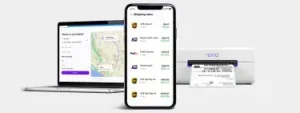
    laptop and mobile phone with Rollo Ship dashboard on screen next to rollo wireless label printer.

    Unique Selling Points of Rollo

    Rollo printers print labels fast, up to one per second. This makes shipping quicker and more efficient. Roll labels are also great for big orders and work well with label dispensers. This speed is key for businesses with lots of orders or need to ship fast.

    Customization 

    The Rollo Label Design Tool lets users create custom labels with logos, images, barcodes, and QR codes. It has many templates and allows for custom sizes. This is important for businesses wanting to stand out and show their brand.

    User-Friendly Interface 

    Speed and Efficiency 

    The Rollo Ship App is easy to use, unlike some other platforms. It makes managing shipping simple. Users can import orders, compare rates, print labels, and track shipments all in one place. This saves time and effort, letting businesses focus on other important things.

    Cost Efficiency 

    Rollo uses direct thermal label printing, which saves money by not needing ink or toner. It also works with many label types, saving more money. The Rollo Ship App gives access to special shipping rates, helping small businesses save on shipping costs.

    Customer Support and Service 

    Rollo is known for its great customer support. The team answers quickly and helps solve problems. This makes users feel supported and helps them enjoy using Rollo.

    Environmental Impact 

    Rollo cares about the environment. They use FSC-certified and BPA-free labels. No ink cartridges needed. This reduces waste and helps businesses be more eco-friendly. Plus, this sustainable approach appeals to conscious consumers.

    Testimonials and User Experiences

    Positive Feedback 

    Many users love Rollo for its easy setup and reliable performance. It offers customizable labels and quick service. A business owner says printing labels with Rollo is fun and efficient (Shipping School). Others save money with Rollo’s direct thermal printing, no ink or toner needed (Ynet News).
    label printing with Rollo printers.

    User Tips and Best Practices

    Regular Maintenance 

    To keep your printer working well and printing quality labels:

    • Clean the printhead often to avoid quality issues.
    • Follow the manufacturer’s maintenance tips, including cleaning and updates.
    rollo printer printing barcode labels

    Optimize Settings 

    Use the Rollo Ship App to improve your label settings:

    • Adjust print quality and speed as needed. Better quality might slow down printing.
    • Manage your label templates and settings in the app for consistency and efficiency.

    Leverage Discounts

    The Rollo Ship App offers big shipping discounts, great for those who ship a lot:

    • Use the app to find the best shipping rates and save money.
    • Check the app for new discounts and promotions to keep saving.

    User Experiences and Feedback 

    Customers love how easy Rollo is to use and how reliable it is:

    • They find the setup simple and the app easy to use. It’s great for managing orders and tracking shipments.
    • Even when there are problems, Rollo’s support team is quick to help. This keeps operations running smoothly.
    rollo printer printing labels with thumbs up signs and five stars symbols around it to represent user feedback.

    Advanced Shipping Strategies

    Batch Processing for High-Volume Shippers 

    Batch processing is key for those who ship a lot. The Rollo Ship App lets users print many labels at once. This makes shipping faster and saves a lot of time.

    Optimizing International Shipping 

    Businesses wanting to ship worldwide will find Rollo’s solutions great. It offers features like paperless customs invoices and cost estimates. These make international shipping easier and more affordable.

    Leveraging AI for Predictive Shipping Analytics 

    The Rollo Ship App uses AI to improve shipping. AI helps group orders, predict costs, and find the best routes. This makes shipping smooth for both businesses and customers.

    Conclusion

    Using tools like the Rollo Ship App and Rollo printers can really help your online sales. They work well with e-commerce sites and offer many customization options. Plus, they’re good for the environment.
    By using these tools, you can make your shipping better. This will also make your brand look good and help the planet.

    Follow Rollo on:

    Frequently asked questions

    Q: How to print labels?

    A: Printing labels with Rollo is simple. Connect your Rollo label printer to your device and load the labels. For more detailed instructions, visit the setup guide.
    Use the free software by Rollo. Sign up to Rollo Ship for shipping discounts and order consolidation from different marketplaces. Enjoy Rollo Label Designer to create custom labels and print them directly.


    Q: How to print labels in Word?

    A: You can print labels in Word by creating a new document, selecting the Labels option under Mailings, and entering your label details. Print the document using your Rollo label printer for high-quality labels.


    Q: How to print PDFs to barcode labels?

    A: To print PDF to barcode labels, open the PDF file, ensure the correct label size is selected in the print settings, and send the file to your Rollo label printer. The intelligent label detection feature will handle the rest.


    Q: What are the benefits of using sticker labels?
    A: Sticker labels provide customizable label solutions for various needs, including product packaging, personal artwork, and event favors. They are easy to order and personalize, with no extra costs for custom shapes and sizes.
  • Eco-Friendly Sticker Label Printer For Creative Label Ideas

    Eco-Friendly Sticker Label Printer For Creative Label Ideas

    Sticker Label printers have come a long way from simply churning out basic shipping and product labels. Modern label printers have many functions for creative projects and branding. They can print without ink, have easy-to-use software, and use eco-friendly materials. A good quality sticker label printer is essential for both creative projects and business branding needs.

    Understanding the range of possibilities unlocked by these innovations is key to maximizing value. Whether you’re a crafter exploring printable sticker ideas or a business strengthening branding through custom labels, the right sticker label printer unlocks new potential.

    Did you know? 🤔 The move towards eco-friendly printing solutions is not just a
    trend but a response to growing environmental concerns. Today's sticker label
    printers are at the forefront of this shift, offering sustainable options that
    don't compromise on quality or creativity.

    [ez-toc]

    Exploring the Multifaceted Uses of a Sticker Label Printer

    Once regarded as purely utilitarian tools, sticker label printers now power creative applications from scrapbooking to gift personalization and beyond. The versatility of a modern sticker label printer allows it to be used for countless applications. Their versatility stems from technologies that printable on an expansive range of materials with precision and consistency.

    Direct thermal printing allows many label printers to apply images and text directly onto specially coated paper simply using heat, eliminating the need for toner or ink. The results are waterproof, smudge-proof, and fade-resistant labels customizable to any project.

    Keep in mind ⚠️ While direct thermal printing offers a quick and efficient way to
    produce labels, exploring direct thermal printing, the technology used by
    Rollo's Sticker Label Printer, can unlock even more creative possibilities with
    a wider range of materials and finishes.

    Meanwhile, thermal transfer printing provides even more substrate flexibility using heat to transfer images from a ribbon onto the material. This accommodates everything from glossy photo paper to acetate film for weatherproof decals.

    These techniques turn virtually any printable surface into potential sticker sheet stock or part of a creative endeavor. Common examples include:

    • 🏷️ Custom return address labels
    • 📸 Photo collage sticker sheets
    • 📅 Planner stickers
    • 🎫 Event signage and name badges
    • 📦 Personalized packaging
    • 🖼️ Decorative window and wall decals
    • 🚗 Bumper stickers and car decals
    • 📔 Unique stickers for scrapbooks or journals
    Pro Tip: 💡 When unleashing your creativity with a sticker label printer, don't
    overlook the power of experimenting with different materials and finishes.
    Many printers support a variety of substrates beyond traditional paper labels,
    including transparent, metallic, and textured options. This versatility
    can elevate your projects from simple labels to standout pieces that
    capture attention.

    The versatility empowers endless custom crafts and labeling functionality at home, school, events, small businesses, and beyond.

    Unleashing Creativity with a Sticker Label Printer

    Unleashing Creativity with Your Sticker Label Printer

    Most label printer manufacturers provide complementary software to unleash creative potential.

    Intuitive design apps allow you to customize templates or create new label and sticker ideas from scratch. Built-in drawing tools, text effects, and image libraries streamline building professional-looking designs.

    Bring personalized gifts and creative projects to life with capabilities like:

    • 📸 Uploading photos to create custom photo collage labels
    • 🎨 Designing planner stickers tuned to your lifestyle
    • 🎄 Printing decorative window decals with holiday designs
    • 🎁 Making personalized favor and gift tags
    • 🏷️ Producing branding and inventory asset tags
    • 📛 Creating event signage with attendee name badges

    With the right sticker label printer and design software, your creativity knows no bounds.

    Unique designs make regular labels stand out, whether you’re organizing at home, adding a personal touch to gifts, or sending an order to your customers

    Transfer paper support additionally broadens the possibilities for one-of-a-kind iron-on decals and stickers. For instance, create unique bumper stickers, water bottles, storage boxes, and scrapbook pages from the same custom designs.

    Pro Tip: 💡 When exploring the creative potential of your label printer, don't
    hesitate to mix and match software features with your unique ideas. Combining
    built-in drawing tools with your own photos or designs can lead to truly unique
    creations that stand out. Remember, the only limit is your imagination!
    Embracing Sustainability in Label Printing

    Embracing Sustainability with The Sticker Label Printer

    Environmental responsibility gains increasing priority in consumer preferences and buying decisions across industries. Eco-conscious printing aligns with those values. Many eco-friendly sticker label printers use recycled materials and energy-efficient processes.

    Direct thermal printing’s ink-free process provides one avenue for more sustainable label production through:

    • 🗑️ Reduced material waste from cartridges and toners
    • ♻️ Ability to print on recycled label materials
    • ⚡ Energy efficiency in the printing process
    • 🚫 Avoiding VOCs from conventional ink

    Many modern label printers take sustainability further by using Forest Stewardship Council (FSC) certified label rolls. This designation verifies sourcing paper pulp from responsibly managed forests.

    Did you know? 🤔 Did you know that choosing eco-friendly label materials for
    your sticker label printer not only benefits the environment but can also
    appeal to a growing segment of consumers looking for sustainable products?
    By using labels made from recycled materials or certified by the
    Forest Stewardship Council (FSC), you're not just making an eco-friendly
    choice; you're also making a smart branding decision.

    Prioritizing recycled materials demonstrates shared values increasingly expected from environmentally conscious businesses. It also enables customer education about making sustainable choices accessible at every purchasing level.

    Innovation of Sticker Label Printer

    The Innovation Driving Today’s Label Printers

    Intelligent design permeates modern label printing’s core technology and functionality, powering everything seen already plus:

    • 🤖 Automatic label format detection
    • 📦 Pre-formatted label packs for common uses
    • 🔧 Automated feed alignment
    • 🔄 Easy cartridge-free material changes

    Innovations in sticker label printer technology have greatly expanded their capabilities. For example, the Rollo sticker label printer scans each new label roll to detect size, shape, and orientation. Print preferences instantly adjust for optimal alignment without manual calibration.

    Material flexibility reaches new heights with direct thermal technology spanning matte, glossy, clear, metallic, and even pre-cut label sheets. Meanwhile, thermal transfer options encompass weatherproof vinyl and heat transfer materials for countless applications.

    Demand-driven engineering even cuts routine printer maintenance like cleaning print heads. Smart sensors gauge usage patterns to handle upkeep autonomously between jobs.

    Innovations build upon the core foundations of earlier thermal printing but with expanded creative prospects in focus alongside commercial applications.

    Keep in mind: ⚠️ that while the latest innovations in label printing technology
    offer incredible flexibility and efficiency, the key to truly leveraging these
    advancements lies in regular maintenance and staying updated on new software
    releases. This ensures your sticker label printer remains at the cutting edge,
    ready to bring your creative visions to life.

    Strengthening Your Brand with High-Quality Labels

    A high-quality sticker label printer is a must for producing professional product labels and branding materials. Label production intersects branding and marketing through:

    • 📦 Product Packaging – Custom label designs help products stand out on shelves and convey brand identity with logos, stylized text, and graphics. These communicate brand values to build connections distinct from competitors.
    • 🏷️ Barcode Labels – Essential for inventory, tracking, pricing, and point-of-sale scanning. Reliable barcode printing maintains critical organization.
    • 🚚 Shipping Labels – Reinforce branding with custom return addresses and shipping labels featuring logos, graphics, and stylized text. Both functional and an advertising touchpoint.

    Detail and print quality go hand in hand with professionalism across labeling applications, backed by crisp text, logos, and scannable barcodes.

    Pro Tip: 💡 High-quality labels are a direct reflection of your brand's
    commitment to excellence. Investing in a label printer that offers
    precision and durability, like those with direct thermal or thermal
    transfer capabilities, ensures that every label you produce enhances
    your brand's image.

    Direct thermal printing’s precision empowers flawless results, essential for marketability. Thermal transfer takes durability further with smudge, tear, water, fade, and scratch resistance for long-lasting brand exposure.

    Maximizing Efficiency and Creativity in Label Printing

    Maximizing Efficiency and Creativity in Label Printing

    Modern innovations place versatile, professional-quality printing within anyone’s reach. Properly maintaining your sticker label printer is key for efficient operation. Consider the following tips to hit the ground running:

    Streamline Label Design

    • 💻 Use label printer software to access ready-made templates for common applications like shipping labels, file folder labels, and name badges formatted to the correct size.
    • 🎨 Start designs from scratch when templates don’t suffice. Drawing tools, text effects, image uploads, and drag-and-drop simplicity speed layouts.
    • 🔄 Create batches when printing multiple units of a label design to conserve supplies.

    Organize Media Efficiently

    • 🗄️ Store label rolls neatly to prevent dust and debris build-up.
    • ⏱️ Use print-time estimates before jobs to anticipate required material.
    • 🔍 Monitor usage to reorder specialized media before stock outs.
    Did you know? 🤔 that organizing your media efficiently and using print-time
    estimates can significantly reduce waste and save on costs? By planning your
    label printing jobs carefully, you can ensure that every label is printed
    efficiently, maximizing the potential of your label printer.

    Enhance Print Quality

    • 🧪 Print a small test batch when using new label materials to confirm ideal settings.
    • 🧼 Clean the print head when changing between glossy and matte materials to prevent residue transfer.
    • 📐 Check label alignment with automated positioning systems before full print jobs.

    The same strategies that maximize efficiency day-to-day lay the foundations for fully harnessing creative possibilities over time.

    Modern label printers mark a new frontier empowering remarkably versatility. Whether pursuing practical organization or embracing creative passions, the right printing capabilities unlock potential in ways unimaginable just a generation ago.

    Innovations like direct thermal and thermal transfer printing continue removing barriers with design flexibility, precision results, intuitive software, and sustainable materials. Supporting those engineering feats, intelligent technology streamlines everything from nourish detection to routine maintenance.

    These capabilities provide invaluable tools adaptable across personal and professional domains for ordinary and extraordinary labeling needs alike. If you need a versatile sticker label printer for creative projects or business uses, Rollo’s modern options offer amazing possibilities.

    Keep in mind: ⚠️ as you explore the vast possibilities of modern label
    printing, the journey doesn't end with purchasing the right equipment.
    Continuous learning, experimenting with new materials, and embracing
    the latest software updates are essential steps in unlocking the full
    potential of your eco-friendly sticker label printer.

    Follow Rollo on:

    Frequently Asked Questions about The Sticker Label Printer for Creative Label Ideas:

    📌 Q: Can eco-friendly label printers handle high-volume printing tasks?

    💭 A: Yes, many modern eco-friendly label printers are designed to handle high-volume printing tasks efficiently. They are equipped with advanced technologies that ensure fast printing speeds without compromising on quality or environmental standards.

    📌 Q: Are there biodegradable options for label materials?

    💭 A: Yes, alongside recycled materials, some label printers support biodegradable label options. These materials break down more quickly in the environment, further reducing the ecological footprint of your printing activities.

    📌 Q: How do I dispose of or recycle used label rolls?

    💭 A: Many manufacturers, including Rollo, encourage recycling used label rolls. It’s best to check with the manufacturer of your label printer for specific recycling guidelines. Additionally, local recycling centers may accept these items.

    📌 Q: Are there any limitations to the types of designs I can print with Rollo’s eco-friendly thermal label printer?

    💭 A: With Rollo’s label design app, users can create custom labels for a wide array of use cases, from simple text to complex graphics. While the thermal printing process means labels are produced in black and white, the app’s versatility, combined with the printer’s high resolution, allows for significant creativity in label design. The use of various label materials further enhances design flexibility, making Rollo’s printer a powerful tool for both personal and professional labeling needs.