Rollo

Tag: Amazon labels

  • Address Labels Amazon: Essential for Amazon Order Efficiency

    Address Labels Amazon: Essential for Amazon Order Efficiency

    In the bustling world of Amazon selling, every minute counts. As an Amazon seller, your success hinges on delivering orders swiftly and accurately.

    The cornerstone of this efficiency? Address labels Amazon. These seemingly small components play a monumental role in ensuring your products reach customers without a hitch.

    However, not all address labels are created equal. That’s where Rollo steps in, offering seamless solutions for address labels Amazon printing. This guide will walk you through everything you need to know about optimizing your shipping process with the right Amazon address labels.

    Address Labels Amazon – Your Gateway to Streamlined Shipping

    Navigating the Amazon marketplace can be like steering a ship through a bustling harbor. Your address labels on Amazon are the compass guiding your products to their destination. But why are they so crucial?

    In essence, they are more than just stickers on a package; they are your promise of timely and accurate delivery to your customers. With the right address label solution, you’re not just sending out orders; you’re enhancing your brand’s reputation and customer satisfaction.
    Understanding Address Labels Amazon

    Understanding Address Labels Amazon

    Address labels are the unsung heroes of the shipping world. They carry vital information that ensures your package navigates through the complex shipping network to arrive at the right doorstep. For Amazon sellers, the stakes are even higher.

    The platform’s customer-centric approach means any slip-up in shipping can lead to dissatisfaction and negative reviews. Therefore, having clear, accurate, and professional address labels isn’t just a good practice; it’s an essential aspect of your business.

    Looking for address labels for Amazon?
    Rollo’s got you covered!

    Use thermal, eco-friendly address labels, made in the USA!

    Choosing the Right Amazon Address Label Printer

    Selecting the perfect printer for your Amazon address labels is like choosing the best pair of shoes for a marathon; it can significantly affect your performance. You want a printer that’s fast, reliable and produces clear, professional labels. So, what should you consider?

    Criteria for selecting the best printer:

    • 🚀 Speed: Look for printers that can keep up with your order volume without sacrificing quality.
    • 👌 Quality: Your labels should be clear and smudge-resistant, ensuring they remain readable throughout the shipping process.
    • 🖇️ Compatibility: The printer should work seamlessly with your existing devices and platforms.
    • 🪄 Ease of use: A user-friendly printer means less time fiddling with settings and more time getting orders out the door.

    Spotlight on Rollo Wireless Label Printer:
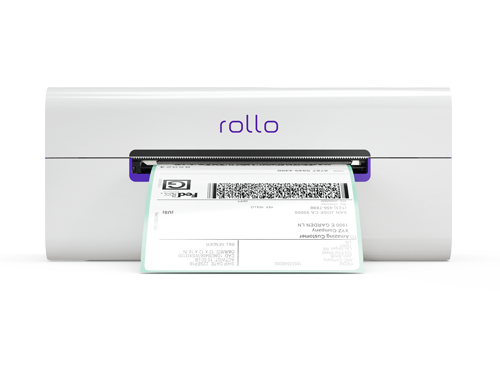
    wireless address label printer for Amazon by Rollo

    Features and benefits:

    • Direct Thermal Printing: Say goodbye to ink or toner. This printer uses heat to create high-quality labels.
    • High-Speed Printing: Capable of printing one label per second, keeping pace with your business needs.
    • Intelligent Label Detection: Eliminates the hassle of manual cropping, ensuring each label is perfectly sized.
    • Wide Compatibility: Works with various devices and platforms, making it a versatile choice for all your printing needs.
    • Compact Design: Its small footprint makes it ideal for tight spaces, and it’s portable enough to take on the go.

    Spotlight on Rollo USB Label Printer:
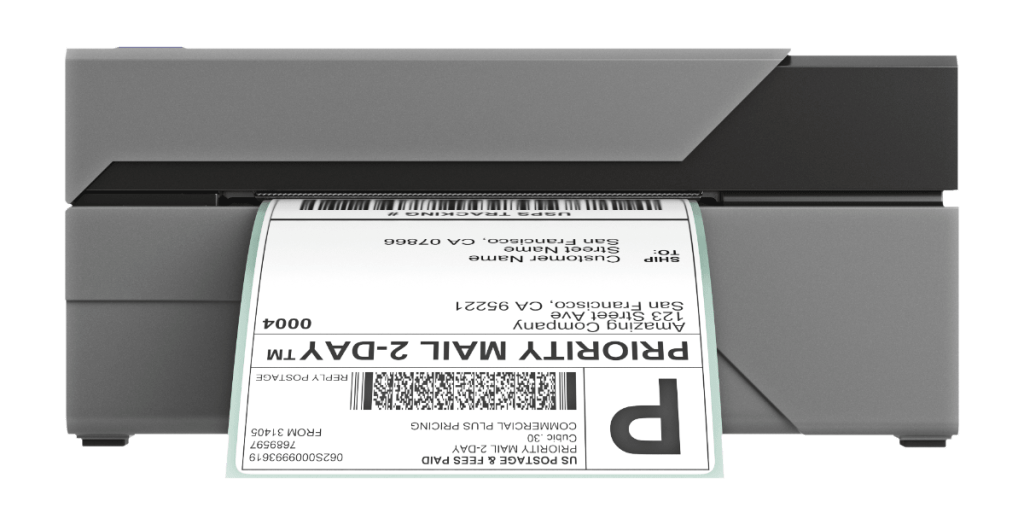
    USB address label printer from Rollo

    Features and benefits:

    • High-Speed Printing: Just like its wireless counterpart, it prints one label per second, streamlining your process.
    • 203 dpi Printing Resolution: Ensures each label is crisp and easy to read.
    • Wide Paper Width Support: This can accommodate various label sizes, offering flexibility for different types of shipments.
    • Simple Connectivity: USB connectivity makes it easy to set up and start printing quickly.

    Both Rollo printers are designed with your needs in mind, combining speed, efficiency, and quality to enhance your shipping process. As you continue to explore the world of address labels Amazon, remember that the right tools and knowledge are your best allies in ensuring every order is a step toward greater success.
    Address labels Amazon: The right printer for the job

    Why Rollo Printers Stand Out for Address Labels Amazon

    In a sea of options, Rollo printers shine like beacons, guiding Amazon sellers toward more efficient and professional shipping operations. Here’s why they stand out:

    • 🆗 Compatibility with Amazon: Rollo printers are designed with Amazon sellers in mind. They align perfectly with Amazon’s label formats, ensuring that your labels meet the marketplace’s stringent requirements every time.
    • 🆗 Efficiency and Speed: Time is money, especially in the fast-paced world of online selling. Rollo printers are renowned for their rapid printing capabilities, churning out one label per second, which means less waiting and more shipping.
    • 🆗 User-friendly Features: Rollo printers aren’t just powerful; they’re also incredibly user-friendly. With features like intelligent label detection and wide compatibility, they simplify the printing process, making it accessible to everyone, regardless of tech savviness.

    The Rollo address label printer is compatible not only with Amazon

    but with a variety of major marketplaces and carriers!

    Ease your shipping now!

    Maximizing Efficiency with Address Label Printers for Amazon

    To thrive on Amazon, you need more than just a good product; you need a shipping process that’s slick, swift, and reliable. Here’s how you can maximize efficiency with the right address label printer:

    Best practices for printing and handling address labels:

    • 👍 Regular Maintenance: Keep your printer in top condition with regular cleaning and maintenance. A well-maintained printer is less likely to encounter issues and will serve you faithfully for years.
    • 👍 Optimal Label Stock: Use high-quality labels designed for your specific printer. Poor-quality labels can lead to jams and smudging, which can slow you down and diminish the professionalism of your shipments.
    • 👍 Streamlined Workflow: Organize your shipping area for efficiency. Keep your printer, labels, and packages in an easily accessible, logical arrangement to speed up the packing and labeling process.

    Tips for speeding up the label printing process:

    • 🖨️ Batch Printing: If you have multiple orders, print all your labels at once rather than one at a time. Most label printing software, including those compatible with Rollo printers, offers this time-saving feature.
    • 💻 Direct Integration: Use software that integrates directly with your Amazon account. This allows you to automatically pull order information and print labels without manual data entry, reducing errors and saving time.
    • 📃 Pre-set Templates: Set up templates for your most common label sizes and types. This saves you from having to configure settings for each print job.
    Rollo printers and Rollo Ship for Your Amazon Orders

    Leveraging Rollo’s Technology for Address Labels Amazon

    Rollo printers aren’t just printers; they’re a technological advantage in the competitive world of Amazon selling. Here’s how they optimize your label printing process:

    • 🖨️ Direct Thermal Printing: This technology eliminates the need for ink or toner, which means you won’t have to deal with unexpected smudging or fading. It’s reliable, consistent, and cost-effective.
    • 🏷️ Intelligent Label Detection: Rollo Amazon address label printers automatically detect the size and characteristics of your label, adjusting settings accordingly. This means less wasted time and materials, and more confidence that each label will be perfect.
    • 🗂️ Wide Compatibility: Whether you’re printing from a PC, Mac, or even a mobile device, Rollo printers are ready to work with your preferred platform. This flexibility ensures that your printer can adapt to your workflow, not the other way around.

    By understanding and leveraging these aspects of Rollo’s technology, you can transform your shipping process into a streamlined, efficient operation that impresses customers and sets your Amazon business up for success. As you continue to explore the potential of Rollo printers, remember that the right technology is a powerful ally in your quest to dominate the marketplace.

    Integrating Amazon Address Labels with Your Business Workflow

    Incorporating a smooth label printing process into your existing workflow is like finding the perfect rhythm in a dance – it enhances performance and creates a more harmonious operation. Here’s how to seamlessly blend this critical task into your daily routine:

    How to seamlessly incorporate label printing into your shipping routine:

    • 🏢 Dedicate a Space: Set up a specific area for your Rollo printer and supplies. This dedicated space will keep you organized and ensure everything you need is within arm’s reach.
    • 👔 Establish a Routine: Incorporate label printing into your packing process as a step that’s as routine as sealing the box. A consistent approach reduces errors and speeds up the entire process.
    • 🧑‍🏫 Train Your Team: If you have staff, ensure they’re well-trained in using the Rollo printer and software. The more knowledgeable they are, the smoother your operation will run.

    The role of the Rollo Ship App in streamlining the process:

    The Rollo Ship App is not just an app; it’s your shipping command center. It integrates seamlessly with your Amazon merchant profile, syncing orders and facilitating easy label printing. Here’s how it enhances your workflow:

    • 🏪 Centralized Order Management: The app consolidates orders from various platforms, including Amazon, into a single interface, making it easier to manage and process shipments.
    • 🏷️ Automatic Label Creation: With direct integration with Amazon, the app can automatically generate address labels for your orders, saving you time and reducing the risk of errors.
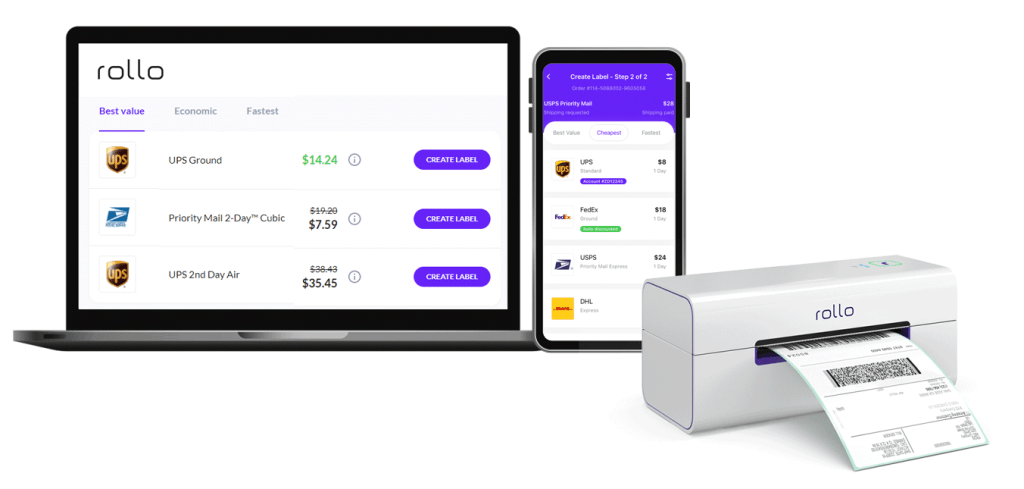
    • 📦 Discounted Shipping Rates: Access discounted rates from major carriers directly through the app, lowering your shipping costs and increasing your margins.

    Discover how they can streamline your operation,

    save you time, and delight your customers.

    Enhancing Your Shipping Strategy

    A streamlined label printing process isn’t just about saving time; it’s about elevating your entire business operation. Here’s how optimizing your label printing can benefit your Amazon business:

    The benefits of a streamlined label printing process:

    • 📨 Faster Order Turnaround: Quicker label printing means quicker shipping, leading to happier customers and more positive reviews.
    • 🏆 Reduced Errors: A streamlined, automated process reduces the chances of mistakes, ensuring your packages always reach the right destination.
    • 📚 Increased Capacity: With a more efficient process, you can handle more orders without additional stress or resources, allowing your business to grow.

    The Future of Printing Address Labels Amazon

    The horizon for address label printing is vibrant with emerging trends and technologies. Staying abreast of these developments can give you a competitive edge. Here’s what’s on the future roadmap:

    • ♻️ Sustainability: As environmental concerns grow, the demand for eco-friendly label materials and processes is rising. Expect to see more recyclable and biodegradable label options.
    • 🤖 Smart Labels: Technology like RFID and NFC tags are becoming more common, allowing for enhanced tracking and customer interaction.
    • ✍️ Customization and Personalization: Advances in printing technology mean small businesses can affordably customize labels, adding branding and personal touches to their packages.

    In the End: Embrace Efficiency with Rollo

    Throughout this guide, we’ve explored the critical role of address labels Amazon for your business and how optimizing this aspect of your shipping can lead to greater efficiency, professionalism, and customer satisfaction. Rollo’s printers and technology stand out as powerful allies in this quest, offering speed, quality, and ease of use that can transform your operation.

    Whether you’re a seasoned seller or just starting, investing in the right tools and knowledge is key to your success. Rollo’s commitment to innovation, quality, and customer support makes them an excellent choice for anyone looking to enhance their shipping process.

    Frequently Asked Questions about Address Labels Amazon:

    📌 Q: Where do I find Amazon return labels?

    💭 A: You can generate return labels directly through your Amazon seller account, simplifying the return process for both you and your customers.


    📌 Q: How do I make address labels for packages for Amazon?

    💭 A: With the right tools, like a dedicated address label printer for Amazon and software – an Amazon shipping integration, you can create professional-looking labels in no time. Give Rollo printers and Rollo ship a try.


    📌 Q: What’s the best way to print address labels Amazon?


    💭 A: The ideal printing solution offers a balance of speed, quality, and cost-effectiveness. Look for printers designed specifically for the task, like those offered by Rollo.


    📌 Q: Is there a program to print address labels Amazon?
    💭 A: Yes, several programs and apps are available to make label printing straightforward and efficient, many of which are compatible with Rollo printers. Rollo Ship especially integrates with your Amazon merchant profile for free so you can print address labels Amazon directly.
  • A Seller’s Handbook: Amazon Labels Explained

    A Seller’s Handbook: Amazon Labels Explained

    Navigating the vast landscape of selling on Amazon, one quickly realizes the paramount importance of Amazon labels. They are the vital connectors between your products and your customers, ensuring that each item reaches its rightful owner without a hitch. Whether it’s the standard Amazon shipping label attached to every package or the intricate Amazon barcode labels that help identify and track your products, understanding their significance is essential for every seller.

    Moreover, in the era of digital technology, manual methods of printing and managing labels are increasingly being deemed obsolete. Enter Rollo: a game-changer in the realm of label printing. With the Rollo shipping label printer and the Rollo Ship platform, sellers can streamline their Amazon label printing process, ensuring accuracy and efficiency every step of the way.

    So, if the labyrinth of Amazon labels leaves you bewildered or if you’re eager to harness the power of Rollo to simplify your selling on Amazon, you’ve landed on the right guide. Dive in as we unravel the intricacies of Amazon labels and showcase how Rollo can be your trusted ally in mastering them.

    What Are Amazon Labels?

    Amazon labels serve as the unique identifier for your product; think of it as an ID card that provides essential information for inventory management, shipping, and even customer returns. Neglecting this “ID card” or getting its details wrong could lead to logistical nightmares and unsatisfied customers, which no seller can afford.

    Each of these labels plays a unique yet interconnected role in the broader Amazon ecosystem. ASIN labels ensure your product can be uniquely identified; FBA labels assist in inventory management within Amazon’s vast warehouses, and Shipping Labels ensure that the product reaches the customer promptly and accurately.

    Label TypeDescriptionImportance
    ASIN LabelContains the Amazon Standard Identification NumberProduct identification
    FBA LabelUsed for Fulfilled by Amazon servicesSorting and shipping
    Shipping LabelContains shipping detailsPackage tracking

    Understanding these labels isn’t just Amazon policy; it’s good business practice that can streamline your operations and improve customer satisfaction.

    What Is An Amazon Shipping Label?

    At first glance, an Amazon shipping label might seem like a simple piece of paper slapped onto your package, but it’s much more than that. In essence, this label is the passport for your product’s journey from your warehouse—or Amazon’s—to the customer’s doorstep. Think of it as the “mission control” for each of your shipments. So what does it include, and why is it so essential?

    Key Components of Amazon Shipping Labels:

    📨 Sender’s Address: Your business or return address, ensuring the package can be sent back if there are delivery issues.

    📩 Recipient’s Address: Detailed information on where your product is headed.

    ⚖️ Package Weight: Helps carriers determine shipping costs and the best transport method.

    ️️️️️️📍 Tracking Number: A unique code that allows both the seller and the customer to monitor the package’s journey.

    Getting this label right is non-negotiable for efficient operations and happy customers. A mistake in the Amazon shipping label can result in delays, lost packages, and ultimately, unhappy customers. That's why it's vital to have a reliable method for generating and printing these Amazon labels, especially for brands sold in Amazon's store.

    Enter Rollo Thermal Label Printers: A Game Changer for Amazon Labels

    If you’re looking for an effortless, accurate, and efficient way to manage your Amazon labels, then look no further than Rollo thermal label printers. Specifically designed for high-volume sellers who need a dependable solution for their Amazon label printing, Rollo is a game-changer in several ways:

    Rollo Ship App

    This companion app makes the entire process seamless. With the ability to consolidate orders from various marketplaces including Amazon, it’s an all-in-one solution for your shipping needs. And the best part? The cost per Amazon shipping label is just 5 cents, waived for your first 200 labels!

    By making the task of creating Amazon labels, particularly Amazon shipping labels, a breeze, Rollo label printers empower sellers to focus more on growing their business and less on logistical challenges. So if you’re serious about selling on Amazon, investing in a Rollo thermal printer for your Amazon labels might just be the smartest move you make this year.

    What Size Are Amazon FBA Labels?

    When it comes to selling on Amazon through their Fulfilled by Amazon (FBA) program, even the seemingly minor details like the size of your Amazon FBA labels can make a significant difference. So, what size should your FBA labels be, and why does it matter so much?

    Standard Size for Amazon FBA Labels:

    The universally accepted standard size for Amazon FBA labels is 1 inch by 2 5/8 inches. This dimension is neither too large to crowd your package nor too small to risk being unscannable.

    Why The Size Matters:

    🔎 Scannability:

    The labels must be easily scannable. Amazon’s fulfillment centers use these labels to track and manage inventory. A label that is too small may not scan properly, leading to delays or errors in the handling of your product.

    🕵️ Product Identification:

    Amazon FBA labels are essential for differentiating your products from similar items in the Amazon fulfillment center. An incorrect label size could mean your product gets lost in the shuffle.

    👁️ Visibility:

    The label size must be big enough to be easily seen but not so big that it obstructs other vital information on the packaging.

    📖 Adherence to Amazon Guidelines:

    Failing to comply with Amazon’s label size guidelines can result in complications such as fines, or your inventory might be marked as unfulfillable.

    Standard FBA Label SizeAlternative Sizes
    1″ x 2 5/8″Custom sizes that are scannable

    Alternative Sizes:

    Though the standard size is most commonly used, Amazon allows for flexibility in the label size as long as they fit well on the product package and are easily scannable. Alternative dimensions should still comply with Amazon’s guidelines for label quality to ensure your products move smoothly through Amazon’s fulfillment network.

    How to Print Amazon Labels

    Printing Amazon labels is easy. If you’re using Amazon Seller Central, you simply go to your inventory, select the items you need labels for, and choose ‘Print Labels’. You can use regular printers for this, but a dedicated label printer like Rollo can make the process much more efficient.

    StepAction
    1Go to Amazon Seller Central and navigate to Inventory
    2Select items requiring labels
    3Use a dedicated label printer like Rollo for the best results
    4Use a dedicated label printer like Rollo for best results

    How to Connect Amazon to the Rollo Ship App

    If you’re looking to streamline your management of Amazon labels, Rollo can help. You can easily connect Amazon to Rollo Ship to print your labels directly and even get notified when new orders are in. Here’s how:

    On Rollo Ship Mobile App:

    🐾 Step 1: Launch the Rollo App and log in

    🐾 Step 2: Tap the Menu icon at the top left

    🐾 Step 3: Choose “Connections” > “Selling Channels”

    🐾 Step 4: Press “ADD NEW” and select Amazon

    🐾 Step 5: Define Amazon order sources

    🐾 Step 6: Select how Rollo should identify your products (e.g., SKU)

    🐾 Step 7: Click on Connect and enter your Amazon credentials

    How to connect Amazon to Rollo Ship and print Amazon labels

    On Rollo Ship Web:

    🐾 Step 1: Log in to Rollo Ship

    🐾 Step 2: Click “Connection” > “Selling Channels”

    🐾 Step 3: Find and click the Amazon logo

    🐾 Step 4: Define Amazon order sources

    🐾 Step 5: Select product identification method

    🐾 Step 6: Click on Connect and input your Amazon details

    Using Rollo Ship alongside Amazon streamlines your shipping process, saving time and reducing errors. By ensuring that your labels—be they ASIN, FBA, or shipping—are accurately printed and applied, you’ll enhance efficiency, improve customer satisfaction, and potentially boost your sales on the platform.

    The best part? As soon as you print a label, Amazon gets notified with the tracking number.

    NO MONTHLY SUBSCRIPTIONS.

    The first 200 shipping labels (Amazon labels) are on us.

    Every next label is just 5 cents.

    Schedule pickups, consolidate orders, and print bulk labels.

    Up to 90% off UPS, FedEx, and USPS shipping.

    What Are Amazon ASIN Labels?

    An Amazon Standard Identification Number (ASIN) is a 10-character unique identifier assigned by Amazon. ASIN labels specifically contain this number and are vital for tracking and inventory management on the platform.

    Importance of ASIN LabelsWhy Use Them
    Inventory ManagementMakes sorting easier and more accurate
    TrackingSimplifies locating items in Amazon’s vast warehouses

    How To Print Amazon ASIN Labels

    If you’re wondering how to get those ASIN labels onto your products, the process is relatively straightforward. Here are the steps to print ASIN labels from Amazon Seller Central:

    StepAction
    1Log into Amazon Seller Central
    2Go to the Inventory menu
    3Select the items that need ASIN labels
    4Choose ‘Print Item Labels’
    5Use a label printer like Rollo for quick and efficient printing

    How Do I Create an Amazon ASIN?

    Creating an ASIN is a part of the process when you list a new product on Amazon. You’ll go through a product listing procedure in your Seller Central account, where an ASIN will be automatically generated for your new item. Here’s how:

    StepAction
    1Log into Amazon Seller Central
    2Click ‘Add a Product’
    3Complete the product listing form
    4An ASIN is generated once the listing is complete

    What Labels Do You Need for Amazon?

    There is a variety of labels that you might need, depending on what you’re selling and how you’re fulfilling orders. These labels are essential for products sold in Amazon’s store, especially for small businesses partnering with Amazon. In general, you will require:

    • ASIN Labels for product identification
    • FBA Labels if you’re using Fulfilled By Amazon
    • Shipping Labels for sending out your products
    Label Type NeededWhen It’s Required
    ASIN LabelsAlways for product identification
    FBA LabelsWhen using Fulfilled By Amazon services
    Shipping LabelsFor all outgoing shipments

    What Size Are Amazon Shipping Labels?

    When you are in the business of selling on Amazon, understanding the ins and outs of Amazon labels can be a game-changer. One of the vital components that often raises questions is the size of Amazon shipping labels. Here’s what you need to know.

    Small businesses partnering with Amazon must ensure their shipping labels are the correct size to guarantee accurate delivery of their products.

    Standard Size of Amazon Shipping Labels:

    Amazon shipping labels typically adhere to a standard size of 4×6 inches. This dimension is universally accepted and compatible with most shipping carriers, ensuring a smooth delivery process.

    Why the Standard Size Matters

    📦 Compatibility with Shipping Carriers:

    The 4×6-inch Amazon shipping label is recognized and preferred by major shipping carriers. This means less hassle for you and faster processing of your shipments.

    👓 Legibility:
    At 4×6 inches, the label is large enough to clearly display all essential information, like the recipient’s and sender’s address, package weight, and tracking number, ensuring there are no delays in the shipping process.

    🖨️ Easy to Print:

    The 4×6-inch format fits most label printers, including thermal printers and inkjet printers, making it convenient for sellers to print labels.

    📏 Fits Various Packages:
    This size is versatile enough to fit on different types of packaging, from small boxes to large parcels, without overwhelming the look or crowding necessary information.

    label printer for Amazon labels

    Rollo Label Printer Makes it Easy:

    If you are looking for a reliable way to print your Amazon shipping labels, consider using a Rollo label printer. Its compact design is perfect for any workspace, and its intelligent label detection feature ensures that your Amazon labels come out perfectly every time. With Rollo, you can effortlessly print out your 4×6-inch Amazon shipping labels, streamlining your shipping process.

    Understanding the nuances of Amazon shipping label sizes can save you from a lot of potential headaches down the road. Stick to the standard, especially when you’re just starting, to ensure that your shipping process is as smooth as possible.

    PRINT AMAZON LABELS WIRELESSLY.

    From any device, any app, or any file.

    What Kind of Labels Do I Need for Amazon FBA?

    For FBA, you need both ASIN and FBA labels. The ASIN labels are for individual products, and FBA labels are used to identify boxes in Amazon’s fulfillment centers.

    FBA labels are essential for small business brands sold in Amazon’s store to ensure their products are managed efficiently.

    FBA Label RequirementDescription
    ASIN LabelsFor individual items
    FBA LabelsFor shipping and sorting in Amazon’s warehouses

    Do I Need a Printer to Sell on Amazon?

    While you don’t necessarily need a printer to sell on Amazon, having one becomes crucial when you consider the importance of labels for efficient selling and shipping. If you are selling products that require labeling or if you are shipping the products yourself, a printer will be invaluable. Additionally, having a printer allows small businesses partnering with Amazon to reach their customers more efficiently by ensuring accurate label printing.

    Why a Printer is HelpfulDescription
    Efficient LabelingQuickly print ASIN, FBA, and shipping labels
    Professional AppearanceClean and clear labels look more professional
    Streamlined ShippingSpeed up the shipping process with ready labels

    What is the Best Printer for Amazon Labels?

    For consistent and efficient label printing, Rollo is an excellent choice. Compatible with a range of devices, Rollo label printers are adept at printing various Amazon labels, ensuring they come out clear and precise every time.

    Using a reliable printer like Rollo ensures that small business brands sold in Amazon’s stores can hear from their customers about timely deliveries and accurate labeling.

    Printer FeaturesWhy It’s Useful
    Direct Thermal PrintingNo need for ink which saves on long-term costs
    Intelligent Label DetectionEfficiently identifies and prints without manual input
    Wireless ConnectivityPrint from multiple devices, anywhere in your workspace
    SpeedProduces one label per second, making it suitable for bulk orders

    How Do I Create a Shipping Label on Amazon?

    Creating a shipping label on Amazon is straightforward.
    Here’s a brief guide:

    🐾 Step 1: Log into your Amazon Seller Central account

    Shop products from small businesses

    in Amazon’s store by ensuring accurate shipping labels, which build customer confidence.

    🐾 Step 2: Navigate to the ‘Orders’ section

    🐾 Step 3: Choose the order for which you want to create a label

    🐾 Step 4: Click on ‘Buy Shipping’

    🐾 Step 5: Select your preferred carrier and shipping method

    🐾 Step 6: Confirm details and print the label

    Final Thoughts

    Understanding and efficiently managing Amazon labels is crucial for sellers. From identifying products with ASIN labels to ensuring shipments are accurately labeled, this knowledge will streamline your operations. Combining Amazon’s robust selling platform with Rollo’s efficient label printing capabilities can set you up for immense success.

    We hope this guide helps you in your Amazon selling journey. Remember, the right tools and knowledge are your stepping stones to success!

    Follow Rollo on:

    Frequently Asked Questions about Amazon Labels:

    📌 Q: Does Amazon Offer Shipping Labels?


    💭 A: Yes, Amazon offers shipping labels that you can print directly from your Seller Central account. These labels contain crucial information for shipping, including the carrier’s details and tracking number.


    📌 Q: Does Amazon Provide Shipping Labels for Returns?

    💭 A: Yes, Amazon provides return shipping labels for items that qualify for returns. When a customer initiates a return, they can print this label directly from their Amazon account to send the product back.